Laser Engraver Blogs

Mastering Precision: Essential Tips for Laser Cutting Success

Proper calibration and setup are critical to achieving high-quality results in laser cutting and engraving. Whether you are working with wood, acrylic, fabric, or metal, following correct operating practices ensures accuracy, efficiency, and consistency.

1. Proper Calibration

Accurate calibration is the foundation of successful laser cutting.

This includes:

  • Fine-tuning the cutting bed level
  • Ensuring precise laser beam alignment
  • Verifying correct focal distance and positioning

Consistent calibration throughout operation helps maintain stable cutting accuracy and prevents quality issues.

With LONGER laser machines, precise calibration ensures smooth material processing and clean, professional-grade results. The fixed-focus system also helps maintain consistent cutting depth, reducing the need for frequent manual adjustments.

2. Material Selection Matters

Different materials respond differently to laser energy, making material selection a key factor in performance.

Important factors include:

  • Thickness
  • Density
  • Surface reflectivity

For example:

  • Delicate materials like paper or fabric require lower power settings to avoid burning or scorching
  • Dense materials such as wood or acrylic require higher power and slower speeds for clean cuts

LONGER laser machines provide flexible settings that allow users to adapt easily to different material types.

3. Always Perform Test Cuts

Before starting complex or final projects, test cuts are essential.

Test cutting helps you:

  • Adjust power and speed settings
  • Verify focus accuracy
  • Avoid material waste or damage

For instance:

  • When engraving fine details on metal with the RAY5 20W, test cuts help prevent discoloration or overheating
  • When cutting thick materials like basswood or acrylic with the Laser B1 series, trial runs ensure clean edges and consistent performance

4. Ensure Proper Ventilation

Laser cutting produces smoke, dust, and fumes that may be harmful if not properly managed.

Always:

  • Work in a well-ventilated environment
  • Use an exhaust system or air filtration setup

This protects both the operator’s health and machine performance.

5. Secure Material Placement

To ensure accuracy during operation, materials must be firmly fixed in place.

Recommended methods include:

  • Clamps
  • Double-sided adhesive
  • Custom fixtures

Proper fixation prevents movement, vibration, or misalignment during cutting.

6. Optimize Cutting Parameters

Fine-tuning settings is essential for achieving optimal results.

Adjust:

  • Power
  • Speed
  • Frequency

Balancing these parameters helps reduce:

  • Burning
  • Melting
  • Edge charring

Experimentation is key to finding the best combination for each material.

7. Maintain the Laser Lens

Regular lens maintenance is critical for consistent performance.

Dust or residue buildup can:

  • Reduce cutting accuracy
  • Weaken laser power
  • Affect beam quality

Always clean the lens using manufacturer-recommended methods and replace it when necessary.

8. Use Assistive Technologies

Modern laser systems may include:

  • Camera alignment systems
  • Real-time monitoring tools
  • Smart positioning software

These features improve precision and efficiency, especially for complex or detailed designs.

Conclusion

By following proper calibration, material selection, testing, and maintenance practices, users can achieve highly precise and efficient laser cutting results.

With LONGER laser engraving machines—developed through years of innovation in laser technology—you are equipped with reliable tools designed to enhance creativity, accuracy, and productivity across a wide range of materials and applications.

By Laser Engraver Blogs | April 11, 2024
Troubleshooting Common Issues with Ray5 20W Laser Cutter

The LONGER Ray5 20W laser engraving machine is a powerful and versatile tool widely used for cutting and engraving a variety of materials. However, like any precision device, users may occasionally encounter technical issues that affect performance and workflow efficiency.

Understanding how to identify and resolve these common problems is essential for maintaining consistent output quality and ensuring long-term machine stability. This guide outlines the most frequently encountered issues with the Ray5 20W and provides practical troubleshooting solutions.

Poor Cutting Precision

One of the most common issues is inaccurate or inconsistent cutting results.

Possible causes:

  • Loose belts or mechanical components
  • Improper focus adjustment
  • Incorrect machine calibration
  • Unstable working surface

Solutions:

  • Tighten belts and check all mechanical connections
  • Recalibrate the laser module and ensure proper focusing
  • Level the working bed before operation
  • Secure the material firmly to prevent movement

Maintaining mechanical stability is key to achieving precise cutting results.

Insufficient Engraving Depth

If engraving appears too light or shallow, the issue is often related to energy output or settings.

Possible causes:

  • Low laser power setting
  • Incorrect speed configuration
  • Dirty or obstructed lens

Solutions:

  • Increase laser power gradually
  • Reduce engraving speed for deeper marking
  • Clean the laser lens regularly to ensure optimal beam transmission

Proper parameter adjustment is critical for achieving consistent engraving depth.

Software Connection Issues

Connectivity problems between the laser cutter and control software can interrupt workflow.

Possible causes:

  • Faulty USB cable or connection port
  • Driver installation errors
  • Incompatible software version

Solutions:

  • Replace or reconnect USB cables
  • Reinstall device drivers
  • Ensure software is updated and compatible with the Ray5 system

Stable communication between software and hardware is essential for reliable operation.

Burn Marks or Excessive Charring

Burnt edges or excessive charring can affect the quality of finished work.

Possible causes:

  • Excessive laser power
  • Slow engraving speed
  • Poor airflow or ventilation

Solutions:

  • Reduce power settings appropriately
  • Increase engraving speed
  • Improve ventilation or use an exhaust system

Balancing power and speed is key to clean engraving results.

Lens Contamination or Degradation

A dirty or damaged lens can significantly reduce laser performance.

Possible causes:

  • Dust buildup during operation
  • Smoke residue accumulation
  • Lack of regular maintenance

Solutions:

  • Clean the lens using recommended cleaning tools
  • Inspect regularly for damage or wear
  • Replace the lens if necessary

Routine maintenance ensures long-term performance stability.

Conclusion

While the LONGER Ray5 20W laser cutter is designed for reliability and precision, proper maintenance and correct operational settings are essential for optimal performance. Most common issues can be resolved through simple adjustments, regular cleaning, and proper calibration.

By understanding these troubleshooting methods, users can minimize downtime, improve engraving quality, and ensure smooth, efficient operation across a wide range of projects.


By Laser Engraver Blogs | April 9, 2024
Unleashing Creativity: The Evolution of Laser Engraving Technology

Laser engraving technology has rapidly evolved over the past decades, transforming from a specialized industrial process into an accessible creative tool for makers, designers, and small businesses. Today, laser engraving machines are widely used to turn everyday materials into personalized, detailed, and high-value creations.

From custom gifts to artistic works and functional products, this technology has opened new possibilities for creative expression with a level of precision that was previously difficult to achieve.

From Industrial Tool to Creative Platform

Originally, laser engraving systems were primarily used in industrial manufacturing for marking, cutting, and serial production. These machines required complex setups and were limited to professional environments.

However, advancements in laser diode technology, control systems, and software integration have significantly lowered the barrier to entry. Modern laser engravers are now more compact, user-friendly, and affordable, making them accessible to a much wider audience.

As a result, laser engraving has shifted from a purely industrial function to a creative platform for personalization and innovation.

Expanding Creative Possibilities

One of the most significant advantages of laser engraving technology is its ability to work with a wide range of materials, including:

  • Wood
  • Acrylic
  • Leather
  • Glass
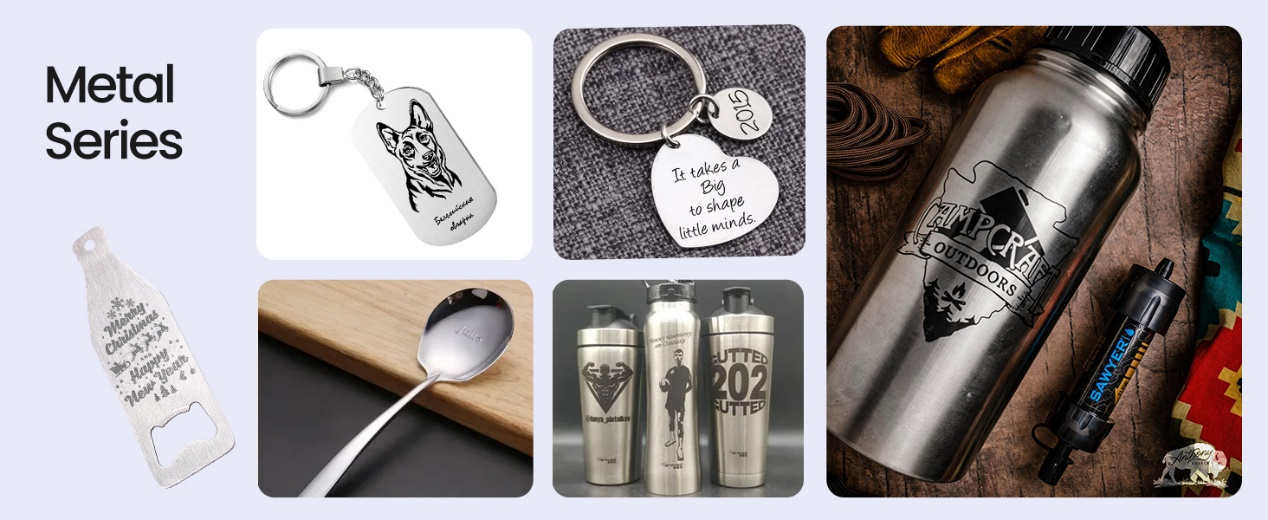
  • Metal surfaces
  • Paper and cardboard

This versatility allows users to create diverse projects such as:

  • Personalized gifts
  • Custom home décor
  • Jewelry and accessories
  • Branding and product labeling
  • Artistic installations

With precise control over depth, power, and speed, even highly detailed designs can be accurately reproduced.

Precision and Control in Modern Laser Systems

Modern laser engraving machines are designed to deliver high precision and repeatability. Fine control over laser parameters enables users to achieve consistent results across different materials and project types.

Key technological improvements include:

  • Higher resolution engraving capability
  • Improved motion control systems
  • More stable laser output
  • Advanced software integration

These developments allow creators to move seamlessly from digital design to physical product with minimal loss of detail.

Empowering Makers and Small Businesses

Laser engraving technology has also become an important tool for entrepreneurs and small businesses. It enables on-demand production, customization services, and low-volume manufacturing without the need for large-scale industrial equipment.

This shift has empowered individuals to:

  • Launch personalized product businesses
  • Offer custom engraving services
  • Prototype designs quickly and efficiently

As a result, creativity is no longer limited by manufacturing constraints.

The Future of Laser Creativity

As laser technology continues to advance, we can expect even greater accessibility, precision, and automation. Integration with smart software, AI-assisted design, and improved material compatibility will further expand creative possibilities.

Laser engraving is no longer just a tool—it is becoming a bridge between digital imagination and physical reality.

Conclusion

The evolution of laser engraving technology has fundamentally changed the way people create, design, and manufacture. By combining precision engineering with creative freedom, it enables users to transform simple materials into meaningful and personalized works of art.

As this technology continues to develop, its role in both creative industries and everyday life will only continue to grow.

By Laser Engraver Blogs | April 8, 2024
How to operate RAY5 Laser engraving machine

LaserBurn is a powerful mobile application designed specifically for LONGER laser engraving machine users, including the Nano and B1 series. It is developed to improve both convenience and control, allowing users—whether beginners or professionals—to operate their laser engraving machines directly from a smartphone.

With LaserBurn, users can streamline workflow, reduce setup complexity, and enjoy a more flexible engraving experience without relying entirely on desktop software.

What LaserBurn Can Do

The LaserBurn app enables users to:

  • Control LONGER laser machines directly via smartphone
  • Adjust engraving and cutting parameters remotely
  • Monitor machine status in real time
  • Improve workflow efficiency for both beginners and advanced users

This mobile-first approach makes laser engraving more accessible and flexible than ever before.


STEPS Calibrating Laser
a.Place the machine on a flat table and make sure that the machine is stable and will not shake.
b.Place the wood board to be engraved or cut under the laser
c.Loosen the two thumb screws on the front of laser head by hand. Then place the focusing column vertically on the bottom of the laser head form the rear side, and manually lift the laser head so that the bottom of the rear side of the laser is close to the upper surface of the calibration column.
d.Tihten the two laser thumbscrews, then remove the focusing column


Power Up
a.Find the adapter and power cable and connect them.
b.Connect the power cord to the power supply and connect the other end of the adapter to the power port of the motherboard.
c.Connect the computer and the engraving machine through a USB computer (or insert a Micro SD card).
d.To Turn ON your RAY5 by press the power switch (To Turn OFF your RAY5 by press the power switch once again.)
Touch Screen Operation
RAY5 has a full-color 3.5-inch touch screen with a user-friendly user interface. Engraving and cutting work can be operated with touch screen and SD card.


Alt image
Wi-Fi Control operation
Enter the IP address in the browser of mobile phone or computer, then the control interface will pop up
Alt image


LaserGRBL Software Operation and SetupLaserGRBL is an easy-to-use and fully free software for laser engraver only running on Windows.
a.Find LaserGRBL software in attached SD card(path:/software),Or download from the link: https://lasergrbl.com/download/
b.After installing laserGRBL, power up the RAY5, press the power switch button, and connect the laser engraver and computer via USB cable.
c.Open LaserGRBL, select correct port(depend on your PC), baud rate: 115200. Then click connect button.(If you cannot find correct port, please install CH340 driver manually by click Menu >> Tools >> Install CH340 Driver in LaserGRBL)
Usage1.Main Interface
Alt image


2.Open file and set parameters
Alt image


Alt image


3.Start to engrave
Place a board under the laser, then calibrate the laser.
Move the laser head to the place you want.
Click “Frame” button to check the work frame.
Click button to start engraving.
Alt image


Or you can save gcode file to SD card by click “File” >> “Quick Save” for offline workingMore help information about LaserGRBL, please refer to the link: https://lasergrbl.com/usage/
Alt image


LightBurn Software Operation and setupLightBurn is a professional software for engraver, a charging software running on Windows, macOS, and Linux. It provides a trial period. You could pay for it afterward if you like it.
a.Find Lightburn software in SD card(path: /software) came with the package. Or just download from the link:https://lightburnsoftware.com/download/
b.After installing Lightburn, power up the RAY5, press the Power Switch button, and connect the laser engraver and computer via USB cable.
c.For the first time launching LightBurn, it will prompt a “New Device Wizard” for help you setup machine.
d.Select GRBL form the list, then click “Next” button
Alt image


e.Select Serial/USB and press “Next” button.


Alt image


f.Fill your Device Name, X, Y axis, then click “Enter” button
Name: RAY5
X = 400
Y = 400
g.Select “Front Left” as your Origin X,Y and activate “Auto ‘Home’”, then click “Next” button.
Alt image


h.Select RAY5 and press Make Default. Your RAY5 is ready to be used in LightBurn software.
Main interface
Alt image


Select correct port(depends on your PC), then the RAY5 is connected to the computer.
Alt image


Click Menu “File” >> “Import image from disk.” Or just use draw tool on left column to design your own pattern
Alt image


Set the name, speed, maximum power, mode, and other parameters in the cutting/layer; (engraving function and cutting function are only different in speed, power. Normally, the cutting speed parameter is slower)
Alt image


After placing the board under the laser, click Frame to check the laser path whether is completely inside of the board.
Click “Start” to start to work.
Or you can save gcode file to SD card by click “Save GCode” button in Laser panel for offline working
Alt image


More help information about lightburn, please refer to the link: https://lightburnsoftware.com/pages/tutorials
APP Operation
RAY5 can be controlled or engraved through MKSLaser APP when the engraver and APP are connected to the same WIFI.
Please search for "MKSLaser" in Google play or app store or visit the address below to download Android system https://play.google.com/store/apps/details?id=makerbase.com.mks laser
Please search for "MKSLaser" in the app store or visit the address below to download https://apps.apple.com/us/app/mkslaser/id1542756280?uo=4&at= 11l6hc&app=itunes&ct=fnd for Apple system
Alt image

LaserBurn significantly improves the usability and accessibility of LONGER laser engraving machines by bringing core controls directly to mobile devices. Combined with traditional software options like LaserGRBL and LightBurn, users can choose the most suitable workflow for their skill level and project requirements.

Whether you are a beginner exploring laser engraving or a professional managing detailed production work, LaserBurn provides a more intuitive and efficient way to operate LONGER machines.

By Laser Engraver Blogs | April 7, 2024
Longer Ray5 20W Laser Engraver: Unveiling the Magnificence of Innovation

The Longer Ray 20W laser engraver stands as a testament to the relentless pursuit of innovation, born out of years of dedicated research and development. Longer spared no expense in exploring the frontiers of laser engraving technology, channeling substantial funds and countless hours into perfecting every aspect of the machine.


The Challenge of Longer Ray5 20W

The path to developing the Ray5 20W laser engraver was not without its challenges. LONGER's team of engineers and researchers encountered numerous obstacles along the way, from technical hurdles to logistical complexities. Yet, with unwavering determination and boundless creativity, they persevered, turning each setback into an opportunity for growth.


One such memorable moment occurred during the refinement of the engraving speed. As the team sought to push the boundaries of what was possible, they faced setbacks in achieving the desired level of precision without compromising on efficiency. However, through tireless experimentation and collaboration, they eventually achieved a breakthrough, culminating in the RAY5 20W laser engraver's exceptional engraving speed of up to 10,000mm per minute.


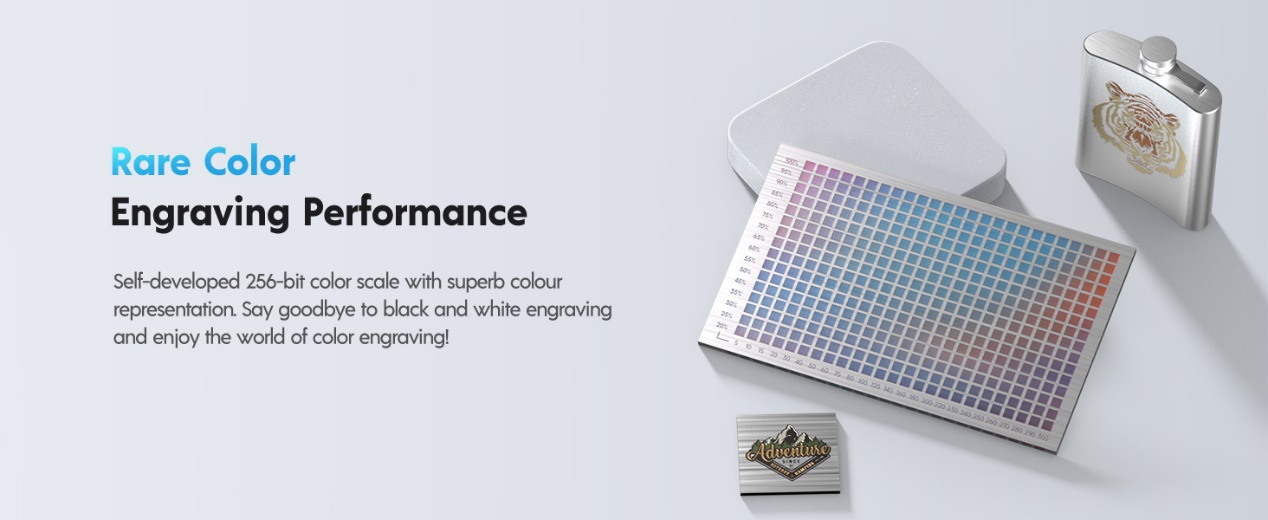
Another pivotal moment came in the development of the color engraving feature. LONGER's engineers embarked on a quest to unlock the potential of vibrant color engraving, seeking to transcend the limitations of traditional black and white engraving. Through meticulous calibration and innovation, they succeeded in creating a proprietary 256-bit color scale, ushering in a new era of expressive engraving possibilities.


Features of Longer Ray5 20W

Discover why the LONGER RAY5 20W laser engraver stands out as the top choice for both laser engraving enthusiasts and professionals alike. Here's why the RAY5 20W is the ultimate solution for your engraving needs:


  1. Unparalleled Color Engraving Performance: Experience the brilliance of color engraving with our self-developed 256-bit color scale. Bid farewell to monotonous black and white engraving and step into a vibrant world of color.


  1. Precision Redefined: With an engraving capability of 0.01mm, the RAY5 20W laser engraver delivers unmatched accuracy. Achieve intricate and precise engraving results like never before.


  1. Enhanced Eye Protection: Our laser head features professional shielding that filters out over 95% of laser light. Additionally, we provide anti-laser glasses to ensure your safety and well-being during operation.


  1. Lightning-Fast Engraving: Experience engraving speeds of up to 10,000mm per minute – nearly three times faster than conventional machines! Save valuable time and boost productivity with swift engraving capabilities.


  1. Ideal for Hobbyists and Startups: Whether you're a hobbyist exploring your creative passion or a budding entrepreneur launching a small-scale business, the LONGER RAY5 20W laser engraver is tailor-made for you. Versatile and efficient, it caters to a wide range of engraving needs.


Why Choose Longer Ray5 20W

In essence, the LONGER RAY5 20W laser engraver offers unparalleled performance, precision, safety, and efficiency, making it the ultimate tool for unleashing your creativity and enhancing your production capabilities. Choose the RAY5 20W Laser Engraver and elevate your engraving experience to new heights!


Join us on this journey of innovation and discovery with the LONGER RAY5 20W laser engraver, and unlock new realms of creativity and production. Choose the RAY5 20W Laser Engraver and embark on a journey of limitless possibilities!

By Laser Engraver Blogs | April 7, 2024
Exploring the Principle, Development, and Applications of Infrared Lasers

Infrared lasers are key optical devices in modern photonics, playing an essential role in communication, medicine, industry, military systems, and scientific research. As a core technology in laser processing, infrared lasers enable high-precision energy delivery and have become foundational tools in advanced manufacturing.

Leveraging deep expertise in laser systems, LONGER has been actively engaged in laser engraving technology research and development since 2016. Over the past 8 years, the company has continuously advanced optical design and system integration, delivering a diverse portfolio of high-precision laser engraving machines, ranging from desktop-level devices to industrial-grade solutions.

LONGER laser engravers, including the high-speed RAY5 series and the high-power B1 series, reflect years of engineering optimization and innovation. These systems are widely recognized for their stability, precision, and performance across various application scenarios.

1. Principle of Infrared Lasers

Stimulated Emission

Infrared laser operation is based on the principle of stimulated emission. In the active medium (solid, gas, or semiconductor), atoms or molecules are excited to higher energy states. When an incoming photon interacts with an excited particle, it triggers the release of a second photon with identical energy, phase, direction, and frequency. This process results in coherent light amplification, forming the basis of laser generation.

Optical Resonance

A laser cavity, composed of two mirrors (one fully reflective and one partially reflective), enables optical resonance. Light reflects back and forth within the cavity, repeatedly interacting with the gain medium. Only photons matching the resonant frequency are amplified, while others are suppressed. This selective feedback mechanism produces a highly coherent and directional laser beam.

2. Development of Infrared Lasers

Early Stage (1960s)

Initial infrared laser research focused on gas and solid-state lasers, such as CO₂ lasers. Although these systems demonstrated early success, they were limited by large size, high energy consumption, and high production costs.

Rise of Semiconductor Lasers (1970s–1980s)

Advances in semiconductor technology led to compact, efficient, and cost-effective infrared semiconductor lasers. These devices significantly expanded laser applications, especially in optical communication and medical systems.

Modern Development (1990s–Present)

Continuous technological improvements have greatly enhanced infrared laser performance. Today, they are widely used in:

  • High-speed fiber-optic communication systems
  • Medical laser surgery and diagnostics
  • Military targeting, guidance, and infrared imaging systems
  • Industrial precision processing

Infrared lasers have become a core enabling technology across multiple industries.

3. Applications of Infrared Lasers

Communication

Infrared lasers serve as key light sources in fiber-optic communication, enabling high-speed, long-distance data transmission. They are also used in optical modulation and wireless infrared communication systems.

Medicine

In healthcare, infrared lasers are widely used in surgical procedures, ophthalmic treatment, dermatology, and diagnostic imaging technologies such as OCT (Optical Coherence Tomography), providing high precision and minimally invasive solutions.

Military

Infrared laser systems are critical in target tracking, missile guidance, night vision, and infrared imaging technologies, significantly improving detection accuracy and operational efficiency.

Scientific Research

Infrared lasers are essential tools in spectroscopy, atomic physics, chemical analysis, and optical experimentation, enabling precise measurement and material characterization.

Industrial Processing

Infrared lasers are extensively used in cutting, welding, engraving, drilling, and surface treatment of materials such as metal, plastic, glass, and ceramics, significantly improving manufacturing efficiency and product quality.

4. Conclusion

Infrared laser technology plays a fundamental role in modern scientific and industrial development. Its principles of stimulated emission and optical resonance enable highly precise and controllable energy output, supporting a wide range of advanced applications.

With strong capabilities in optical system design and engineering, LONGER continues to advance infrared laser technology through continuous innovation and product development. The company’s laser engraving systems reflect a deep understanding of laser physics and real-world application needs, setting new standards in precision, reliability, and performance.

As laser technology continues to evolve, infrared lasers will remain a critical driver of innovation across industries. LONGER is committed to advancing this field through sustained research and development, empowering users with more efficient, precise, and intelligent laser solutions for the future.

By Laser Engraver Blogs | April 7, 2024
Tips for engraving glass using laser engraving machine

Laser engraving on glass using diode technology is a versatile craft that finds its place in contemporary artistry and manufacturing. In the realm of art creation, this technique empowers artists to intricately etch stunning patterns, text, and textures onto glass surfaces, crafting exquisite sculptures, decorative pieces, and more. Similarly, diode laser engraving is a staple in manufacturing, facilitating the production of ornaments, accessories, and personalized gifts with unparalleled precision and customization options, meeting the demand for top-quality craft products in the market.

Longer's diode laser engraving serves as an efficient solution for personalized engraving services, offering tailored options for souvenirs, trophies, and keepsakes from 2016. In architecture, Longer lends itself to the decoration and customization of glass elements in buildings, infusing spaces with unique artistic flair and bespoke designs. With its attributes including precision, automation, versatility in achieving various effects, and the ability to maintain glass surface smoothness, diode laser engraving emerges as a pivotal technology in glass processing and decoration, unlocking endless creative and manufacturing opportunities for creators and businesses alike.


Tip 1: Clean the Glass Surface Before Engraving

Cleaning the glass surface is a crucial first step before engraving. It not only helps ensure the accuracy and quality of the engraving but also prevents adverse effects during the process. Cleaning removes dirt, grease, and other impurities from the surface, ensuring that the laser can accurately irradiate the glass. Additionally, a clean glass surface aids in the uniform propagation of laser energy, avoiding excessive local heat that may cause glass breakage or uneven engraving effects. Therefore, it is essential to thoroughly clean the glass surface before engraving, using ethanol and a lint-free cloth to wipe it clean.

Tip 2: Apply Paint to the Engraved Glass Surface

Applying paint to the glass surface during engraving is a critical technique. By applying acrylic paint, the refraction of the laser is reduced, allowing the glass to absorb energy more fully and maintain stability during laser engraving. Additionally, spraying black paint or adhering colored paper is also a common method.

Tip 3: Clean the Engraved Glass Product

After waiting for the laser engraving to complete and cool down, use an appropriate solvent or cleaner (such as acetone, alcohol, or paint remover) to spray or apply it to the painted areas. These chemicals can typically dissolve the paint, making it softer and easier to remove. After spraying, gently wipe the painted areas with a soft cloth.

The above tips provide key techniques for achieving laser engraving on glass materials. LONGER is definitely a great helper for making glass decorations. Currently, the RAY5 and Laser B1 series machines have been released. The RAY5 series engraving machine is equipped with a 0.08*0.08mm compressed laser spot, which focuses energy more, perfectly combining simplicity with precision, making it an ideal choice for beginners entering the world of engraving and cutting. Meanwhile, the Laser B1 series machine boasts a engraving speed of up to 36000mm/min, standing out with its powerful functionality, meeting the needs of experienced creators proficient in engraving and cutting techniques.

Explore Ray5 20W at https://www.longer3d.com/products/ray5-20w-laser-engraver and Laser B1 30W https://www.longer3d.com/products/longer-laser-b1-30w-laser-engraver to learn more and elevate your glass engraving journey with Longer.

By Laser Engraver Blogs | April 7, 2024
Tips for Laser Engraving Wooden Materials with Precision

Wooden materials are indeed popular for laser engraving due to their versatility in processing and wide range of applications in various industries. Whether engraving intricate designs on wooden signs, engraving personalized messages on wooden gifts, or creating custom signage for business, wood is ideal for laser engraving projects. Its natural texture and warm texture add unique beauty to carved products and are favored by consumers. However, due to the immaturity of the user's engraving technology, there are often consequences such as excessive material consumption and unsatisfactory engraving effects. Therefore, achieving precise engraving on wooden materials requires some skills and precautions.

Tips for Engraving Wooden Materials with Laser Engraving Machine

Here are some practical tips to help creator achieve precise laser engraving of wood materials:

  • Wood selection: Different types of wood have different densities and textures, which directly affect the effect of laser engraving. Therefore, you need to consider its texture, color and grain when choosing wood to ensure the final carving is as intended. Typically, solid, clear-grained woods are better suited for laser engraving because they provide clearer, more precise engraving results. In addition to common woods such as oak, cherry, and maple, you can also try some special materials, such as birch, walnut, etc., to increase the diversity and personalization of your works.
  • Adjust laser parameters: Laser power, speed, frequency and other parameter settings have a vital impact on the engraving effect. Depending on the type and thickness of the wood material selected, these parameters must be adjusted appropriately to ensure accuracy and consistency in engraving. Generally speaking, for harder wood, higher power and speed are needed to ensure sufficient scoring depth and efficient scoring speed. The longer laser B1 series machine has a power of 20W-40W, uses an upgraded 32-bit motherboard, and has an engraving speed of up to 36000mm/min. It can engrave harder materials; for softer wood, lower parameters are required to avoid damage to the wood surface. Excessive charring or heat damage. Several models in the Longer Ray5 series range from 5-20W and are better suited for engraving and cutting softer woods.
  • Pre-treatment: Proper pre-treatment of the wood material before laser engraving can improve the engraving effect. This involves sanding the surface of the wood to remove any unevenness or wood fibers that may be present, ensuring a smooth surface. In addition, applying appropriate carving primer is also an effective way to improve the effect of engraving. It can enhance the smoothness and contrast of the wood, making the carving pattern clearer and details more prominent. Through these pre-processing steps, a more ideal foundation can be provided for subsequent laser engraving work, thereby ensuring that the final engraving effect is more satisfactory.
  • Carry out testing and calibration: Before officially engraving, it is recommended to engrave some test samples first. With these test samples, you can calibrate and adjust your machine to ensure engraving accuracy and consistency. When testing, be sure to pay attention to the engraving, including aspects such as clarity, depth, and detail. If any problems are found, make timely adjustments and corrections to the machine to ensure the quality and accuracy of the final engraving result. In addition, test samples can also be used to evaluate the engraving effects under different parameter settings so that the best parameter combination can be selected for formal engraving. This ensures you get a satisfactory engraving finished product and improves work efficiency.
  • Safety Precautions: Be sure to pay attention to safety when using the laser engraving machine. Especially when working with wooden materials, a number of precautions should be taken to ensure safety. First, be sure to wear standard protective glasses and gloves to avoid damage to the skin and eyes caused by laser radiation. Secondly, the work area should be kept well ventilated to reduce the health effects of harmful gases and dust generated during the laser engraving process. In addition, regular cleaning of the laser engraving machine and the surrounding environment to ensure that the equipment is in good working condition is also an important step to ensure safety. By strictly abiding by safe operating procedures, safety risks during the laser engraving process can be effectively reduced and the health and safety of operators can be protected.

The above provides key tips and considerations for achieving precise laser engraving of wood materials. Longer are definitely a good helper for making wooden decorations. So far, it has released two series of machines, the RAY5 and the Laser B1. The RAY5 series engraving machine is equipped with a 0.08*0.08mm compressed laser spot, which focuses more on energy and perfectly combines simplicity and accuracy, making it an ideal choice for beginners entering the world of engraving and cutting. At the same time, the Laser B1 series machines, with engraving speeds up to 36000mm/min, stand out with their powerful functions and cater to the needs of experienced creators who are proficient in engraving and cutting technologies.

Longer brand laser engravers adopt advanced technology and stable performance, which can meet a variety of different engraving needs and provide excellent engraving effects. In addition, the Longer brand provides users with a full range of after-sales service support with a professional attitude, including timely technical support and maintenance guarantees to ensure the smooth progress of the engraving work. Choosing a Longer brand laser engraving machine not only helps to present the creator's creativity, but also improves the user's craftsmanship and achieves better engraving achievements.

By Laser Engraver Blogs | March 19, 2024
Let’s Take a Look at the Flexibility of LONGER RAY 5 Laser Engravers

Laser cutting and engraving technology has become a game hanger in the world of modern design and manufacturing. Machines such as the LONGER RAY 5 series are taking the center stage in exemplifying power and flexibility in this sector. Our journey into this technology showcases how these machines are not just tools, but gateways to a world of creativity and precision. You can explore the LONGER RAY 5 series that offers models with power ranging from 5W to 20W. These lasers are not just machines; they're versatile companions ready to tackle various tasks. Whether you're into delicate crystal engraving or sturdy material cutting, there's a perfect match for you. Every model has unique power settings that suits the needs seasoned experts and hobbyists. This allows you to find the perfect machine for your project.

Overview of the LONGER RAY 5 Series

The LONGER RAY 5 series displays the evolution and advancements that have occurred in the laser engraving and cutting industry. The innovation, efficiency and user-friendliness of every model in this series makes the machines more accessible and helpful for seasoned users and beginners.

For instance, the 5W model is the best solution for users taking their baby steps in laser engraving. It is perfect for carrying out detailed and lighter tasks, like crystal laser engraving, where precision is critical. The 10W model comes with a perfect balance of finesse and power, which effectively works with a broad range of materials and is great for making intricate designs. The 20W model is perfect for users in need of more versatility and power as it can handle thicker and tougher materials, making it idea for industrial application.

Let’s Take a Look at the Flexibility of LONGER RAY 5 Laser Engravers

The most notable feature in every LONGER RAY 5 series model is their potential to deliver precise and exquisite results due to their perfect blend of versatility, precision, and power. Therefore, it remains a leader in its own class.

An Absolute Analysis of Longer Ray 5 Models

Due to out innate desire to cater to the needs of our diverse clients, the LONGER RAY 5 series provides 3 distinct models: 5W, 10W, and 20W. In this section will discuss in detail these variants in order to uncover their unique capabilities.

Meet our 5W model – the epitome of precision in the world of laser cutting and engraving. Tailored for the intricacies of detailed work, this machine is a maestro when it comes to tasks demanding meticulous attention, like bringing intricate designs to life on softer materials. It's a favorite among hobbyists and those who specialize in the art of delicate crafts, with a special knack for crystal laser engraving.

The 10W model, a step up in power, serves as a bridge between delicate precision and robust performance. For those seeking a bit more power to delve into deeper cuts while still valuing finesse for detailed work, our 10W model is the ideal choice. It's a perfect fit for small businesses or advanced hobbyists dealing with an array of materials, offering versatility that meets the demands of diverse creative endeavors.

Now, let's talk about the big player – our 20W model, a true powerhouse tailored for heavy-duty industrial applications. Packed with a high-power laser, this bad boy effortlessly slices through thicker materials, ensuring the muscle for robust tasks without compromising the finesse needed for top-notch engraving. It's the ultimate choice for professionals who crave speed, power, and pinpoint precision in every project they undertake.

Crystal Laser Engraving with LONGER RAY 5

Crystal laser engraving stands as a pinnacle of precision and artistry, and the LONGER RAY 5 series rises to this challenge with remarkable adeptness. Utilizing these machines for crystal engraving involves a delicate balance of power and finesse, ensuring each etching is both clear and detailed.

In our journey, we've found that the 5W model, with its delicate laser touch, is like a wizard when it comes to crystal work. It enables us to engrave complicated designs with spectacular depth and clarity that turns every piece into a masterpiece. The 5W model’s precision will ensure every complex pattern comes to life with sharp lines and subtle shading, unveiling the natural beauty of the crystal in all its glory.

If you're diving into the world of crystal engraving, we suggest kicking off with simpler designs before venturing into the intricate ones. Getting the hang of things involves tweaking the laser focus just right and doing a trial run on a sample piece to nail down the perfect settings. Remember, patience is your best friend here – the slower you go with the engraving speed, the more detailed and refined your work becomes. Armed with these tricks, the LONGER RAY 5 series turns ordinary crystal pieces into jaw-dropping works of art, merging the inherent elegance of the material with the unmatched precision of laser engraving.

Material Testing and Application Scenarios

When it comes to laser cutting and engraving, testing your materials is like the secret sauce, and the LONGER RAY 5 series totally gets it. Figuring out how each material dances with the laser isn't just about making a killer final product – it's also about keeping things safe and smooth. So, it's not just a step; it's the key to making sure your creations shine in quality while keeping the whole process a breeze. We typically test various materials by adjusting the laser's power and speed to find the perfect balance for each type.

For instance, while crystal laser engraving requires low power and high precision, materials like wood or acrylic might need higher power settings. Application scenarios vary widely: the 5W model is perfect for detailed work on delicate materials like paper or thin wood, whereas the 20W model can handle tougher materials like thick acrylic or soft metals, making it suitable for industrial applications.

Upgrading and Accessorizing LONGER RAY 5

The LONGER RAY 5 series is not only versatile in its current form but also offers numerous upgrade and accessory options. These enhancements range from different laser heads to additional modules that expand the machine’s capabilities. Ever thought about giving your machine a little boost? Upgrades are like magic for the LONGER RAY 5, making it zip through cuts or nail those intricate jobs like crystal laser engraving with insane precision. It's like customizing your ride – pick the right accessories, and suddenly, your LONGER RAY 5 becomes your very own powerhouse. It's not just about tweaking the machine; it's about turning your user experience up a notch and giving your projects that extra dash of quality.


Conclusion

As we've been checking out the LONGER RAY 5 series, we've been diving deep into the fascinating universe of laser cutting and engraving machines, giving a special shout-out to how awesome they are at crystal laser engraving. Each model in the series caters to different needs, from delicate artistry to robust industrial applications.

Once you grasp the significance of trying out different materials and unlocking the power of cool upgrades and accessories, you're all set to make the most of these machines. The LONGER RAY 5 series isn't just a set of machines; it's like a living proof of how versatile and innovative laser engraving and cutting can be.

By Laser Engraver Blogs | January 30, 2024
Longer Launches RAY5 5W Laser with Advanced Technology

Colorado Springs, CO, (November, 21st – 2023) – Longer is a well-established and pioneering company in the Laser engraver & 3D Printer industry. In the latest development, the company has launched a new product RAY5 5W Laser to innovate the landscape of digital fabrication. The company was founded in 2016 by Dr. Lao from the Georgia Institute of Technology and Dr. He from the Massachusetts Institute of Technology.

In the latest endeavor, the company introduces their products with cost performance, an easy-to-operate touch screen, exceptional performance, and a small light spot.  The RAY5 5W laser engraver boasts an impressive 5.5W output power, utilizing the latest laser FAC compressed technology.

This innovation results in an ultrafine laser spot size of 0.08*0.08mm, making engraving and cutting tasks exceptionally precise and robust. With an engraving speed reaching up to 10000 mm/min, the RAY5 5W ensures efficiency without compromising quality. With the new development, the company’s newly launched RAY5 5W Laser possesses the following features:

  • Ultrafine Laser Spot: The 5.5W output power and advanced laser technology produce a laser spot size of 0.08*0.08mm, enhancing the precision and strength of engraving or cutting tasks.
  • Touch Screen and Offline Engraving: The 3.5-inch smart color screen facilitates easy machine control. The built-in controller allows for offline engraving by saving files to a TF card, offering flexibility and convenience without the need for a computer connection.
  • 32-bit Chipset and WIFI Connectivity: The integration of a 32-bit chipset and WIFI connectivity enhances the user experience. The 3.5-inch smart color screen and built-in controller enable diverse DIY applications, and the machine can operate independently with file storage on a TF card.
  • Five Safety Protections: Safety is a top priority with the RAY5 5W, featuring thermal protection, move protection, motionless protection, emergency stop button, and eye protection, ensuring a secure working environment.
  • Upgradable Laser Head: The machine's versatility is further extended by the option to upgrade to a 10W to 20W laser head (sold separately), transforming it into a 10W engraving machine for higher-energy applications. The company possesses 10W and 20W laser heads that can be adapted to the 5W body.
  • Support for Multiple Software: C\ompatible with various carving software such as LaserGRBL and LightBurn, the RAY5 5W supports multiple operating systems and file formats, making it adaptable to different user preferences and project requirements.
  • Multiple Machines Control: With the capability to control multiple laser engravers from a single computer terminal, the RAY5 5W allows for parallel operation, optimizing production efficiency for large-scale projects.

Consequently, the RAY5 5W Laser Engraver by LONGER impresses with its combination of power, precision, and user-friendly features. Whether the client is a hobbyist or a professional seeking a versatile engraving solution, this machine offers a reliable and efficient platform to bring creative visions to life. LONGER's commitment to safety and upgradability further adds to the overall appeal of the RAY5 5W, making it a standout choice in the world of laser engraving technology.Top of Form

About the Company – Longer

Longer is a pioneering Laser engraver & 3D printer company witch with a mission to make things better. Longer is a recognized company in Laser engraver & 3D printer and maker tools, continually pushing the boundaries of innovation.  

By Laser Engraver Blogs | November 29, 2023