

Nano 6W / Basic
30W / Basic Set
10W / Basic Set
Basic Set
Store
CTRL + K CTRL + K
Language
EN
Country
USD
Account
Login
Cart ($0)
With Longer, Make It better
Handheld and portable, cut anytime, anywhere
Check coverage terms for your country or region
View Policy >
Get ready to use templates, designs
Create Now >
Find everything about Longer's Product software
Download>
Explore in-depth Services and tips in Longer
View Services >
Exclusive loyalty program designed to thank you our users
View Status >
Learn, Create, Succeed.Free tutorials, creative ideas
Learn Now >
Contains articles and guides for Longer's hardware and software
Product Manual
Quick Start Guide
Operation & Features
Software
Firmware
Troubleshooting
Longer Nano 6W Laser Engraver User Manual V1.0
Parameter Table for Longer Nano 6W Laser Engraver
FAQ of Nano series Laser Engraver
LightBurnDocs
Longer Nano 6W portable laser engraver LightBurn Operating Instructions
Laser GRBL Instructions for use with Longer Nano 6W portable laser engraver
How to Use LaserBurn APP with Longer Nano portable laser engraver Series in AP mode(No Internet)
How to Use LaserBurn APP with Longer Nano portable laser engraver Series in STA mode(With Internet)
Longer Nano MAC computer CH340 driver installation tutorial
Lightburn configuration file
LaserGRBL configuration file
Firmware upgrade tutorial
Longer Nano 6W Quick Start Guide V1.0
Longer Nano 6W Standard Set Quick Start Guide V1.0 0719
Longer Nano 6W portable Laser Engraving Machine Installation Video
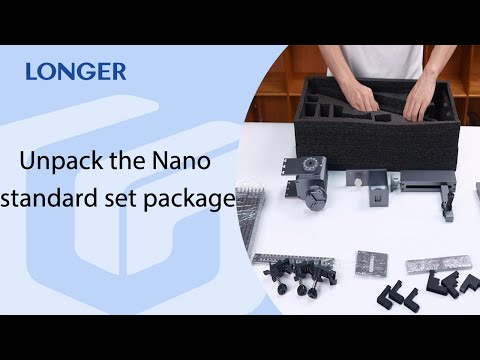
Unpack the Longer Nano 6W portable laser engraver standard set package
Longer Nano 6W portable laser engraver Series Rotary Extension Installation Tutorial
Rotary extension tutorial video
Slide extension tutorial video
How to adjust the focus of Nano series
How to Update the Firmware on Nano Series
How to import configuration files in LightBurn
How to understand the operating status of the Nano series machine through the indicator light
How to check the driver and install it
Nano & Nano Pro Laser Engravers: Introducing the Comprehensive Safety System
How to use LaserBurn to test material parameters
LightBurn Download Link&License Selection
How to connect the machine via USB in different software
How to switch engraving mode with Lightburn
How to set up multi-layer management in Lightburn
How to set the engraving and cutting order
How to Optimize Image Engraving for Optimal Engraving Results
How to use Lightburn for material parameter testing
Laser GRBL Import configuration file
Lightburn supports file formats and how to import files
How to switch engraving mode with LaserGRBL
How to Optimize Image Engraving in LaserGRBL for Best Results
LightBurn
LaserGRBL
LaserBurn
(macOS)LaserTool-V2.1.5
(Windows)LaserTool-V2.1.5-setup
(macOS)CH340 driver
(Windows)CH340 driver
Firmware download (1.7.6 version for MKS)
Firmware download (1.7.6 version for web)
Unable to connect to Lightburn or LaserGRBL for Nano
Nano Pro: LaserBurn cannot connect via IP
Nano Pro: Sudden Stop During Engraving
How to Solve Z-Axis Lifting Malfunction
How to Fix the Problem of No Laser Output During Framing
How to Resolve “Busy/Paused” Machine Prompt
Nano Pro:Set the engraving position of an image in LaserGRBL
Nano Pro: Engraving Stuttering
How to Solve Blurry Engraving Patterns
How to Transfer Images from Computer to the LaserBurn APP
How to Resolve the “Cut May Exceed Boundaries” Warning
How to Replace the Coupling
How to Lubricate and Maintain Moving Parts
How to Clean the Laser Window Lens and Galvo Mirror
CH340 Driver Installation Failure – Troubleshooting Guide
Longer Nano MAC computer CH340 driver installation tutorial.
Nano Portable laser engraver Series Comprehensive Tutorials.
Firmware upgrade tutorial: New Experience for Longer Nano
Nano slide Extension Tutorial Video
Longer Nano rotary extension tutorial video
Nano 6W portable Laser Engraving Machine Installation Video
Nano 6W portable laser engraver LightBurn Operating Instructions
Unpack the Nano 6W laser engraver standard set package
Nano & Nano Pro & Duo Laser Engravers
make an object positioning grid for Longer Nano series
“Busy/Paused” Machine Prompt — Nano Troubleshooting
Learn More
Making 10 Homes Design with Longer Nano
Batch Engraving Business Cards with Nano Series
Engrave black acrylic with Nano series engraving machine
LONGER Research: Engrave everywhere with Longer Nano
Nano 6W
Sign up for exclusive content, special prizes, and latest update
Products
UV Printers
Laser Engravers
3D Printers
Accessories
Materials
Company
About us
Contact Us
Blogs
Laserburn Download
Policy
Terms of Service
Privacy Policy
Payment Policy
Shipping Policy
Refund and Replacement
Visit
(+1) 888-575-9099
Customer Service: support@longer.net
Brand Cooperation: info@longer.net
Program
Affiliate
Trade Up
Maker Kits
Makers Club
B2B Portal
Projects
Maker Club
Project
© 2025, Longer Store | Laser Engraver & 3D Printers
!