Laser Engraver Blogs

Longer Camera Installation Guide

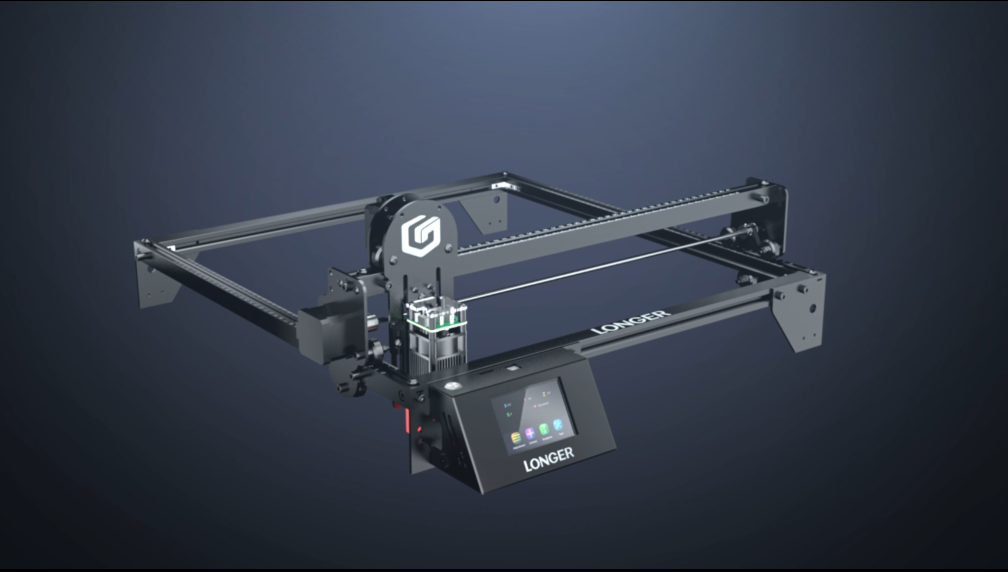
Installing a camera on your laser engraver can significantly improve positioning accuracy and workflow efficiency. This Longer camera installation guide walks through the installation process in a beginner-friendly format so you can properly set up and use your camera system without confusion.

Whether you are engraving wood, acrylic, leather, or custom projects, proper camera installation helps reduce alignment errors and saves setup time.


Table of Contents


Quick Answer

A properly installed laser engraver camera helps improve material positioning and job alignment. Follow the original Longer camera installation process exactly, including mounting location, connection methods, and software configuration steps.

Do not change settings or procedures from official instructions. Correct positioning and calibration directly affect engraving accuracy.


What This Guide Covers

This tutorial explains:

  • Required items before installation
  • Camera mounting preparation
  • Installation workflow
  • Important setup notes
  • Common issues and troubleshooting
  • Expert tips for better results
  • Frequently asked questions

Why Longer Camera Installation Matters

Many users manually align materials before engraving. This can be slow and may cause:

  • Material placement errors
  • Repeated positioning attempts
  • Wasted materials
  • Longer production times

Adding a camera system provides a live workspace view that can help with:

  • Faster material positioning
  • Improved engraving consistency
  • Reduced setup time
  • Better workflow for batch production

For users running small businesses, this becomes even more valuable because reducing setup time can improve productivity.


Before You Start

Requirements

Prepare the following before installation:

Hardware

  • Longer laser engraver
  • Longer camera kit
  • Included mounting accessories
  • Connection cables
  • Fasteners included in the package

Software

  • Longer software or required machine software
  • Camera setup files if provided

Workspace Requirements

  • Stable working surface
  • Adequate lighting
  • Sufficient installation space

If any required information is missing:

Follow official machine specifications or instructions.


Precautions

Before beginning installation:

⚠️ Turn off the machine before connecting hardware.

⚠️ Avoid placing cables where moving machine components can interfere.

⚠️ Do not force connectors into ports.

⚠️ Ensure the camera lens remains clean during installation.

⚠️ Avoid changing any original software settings not mentioned in official instructions.

⚠️ Keep installation hardware organized to avoid missing parts.


Step-by-Step Longer Camera Installation Guide

Step 1: Prepare Installation Components

Action:

Unpack the camera kit and verify all included components.

Check:

  • Camera module
  • Mounting hardware
  • Connection cables
  • Fasteners
  • Accessories

Expected Result:

All required items are present and undamaged.

Important Notes:

Missing components can interrupt installation later.


Step 2: Locate the Camera Mounting Position

Action:

Identify the specified mounting location according to the original installation instructions.

Expected Result:

The camera location provides a clear view of the engraving workspace.

Important Notes:

Camera placement directly affects:

  • Workspace visibility
  • Positioning precision
  • Calibration quality

Do not modify mounting locations unless instructed.


Step 3: Install the Camera Bracket

Action:

Attach the camera bracket according to official instructions.

Secure all fasteners properly.

Expected Result:

The bracket remains stable without movement.

Important Notes:

Avoid over-tightening screws because this may damage components.


Step 4: Mount the Camera

Action:

Attach the camera to the installed bracket.

Ensure the camera orientation matches official instructions.

Expected Result:

The camera sits securely and faces the working area correctly.

Important Notes:

Incorrect orientation may affect later calibration.


Step 5: Connect Cables

Action:

Connect the supplied cables according to the installation guide.

Route wires neatly.

Expected Result:

All cables are securely connected.

Important Notes:

Avoid:

  • Tight cable bends
  • Loose connectors
  • Cable contact with moving machine parts

Step 6: Power On and Verify Camera Detection

Action:

Power on the machine and launch the required software.

Verify that the software recognizes the camera.

Expected Result:

The camera feed becomes available.

Important Notes:

If the camera is not detected:

  • Check cable connections
  • Restart software
  • Follow official machine specifications or instructions

Step 7: Perform Camera Configuration

Action:

Complete required software configuration according to official procedures.

Expected Result:

Camera functionality becomes available for workspace viewing.

Important Notes:

Do not alter menu names, settings values, or configuration procedures.


Helpful Resources

You may also find these related guides useful:

For machine setup and workflow improvement:


Common Problems and Solutions

Problem Requirements Solution
Camera not detected Check hardware connection Reconnect cables and restart software
Camera image appears blurry Clean lens Remove dust and debris carefully
Camera view misaligned Verify mounting position Recheck installation position
Camera image unstable Check bracket installation Tighten hardware correctly
Software does not recognize camera Verify compatibility Follow official machine specifications or instructions

Tips for Better Results

1. Keep the Camera Lens Clean

Dust buildup can reduce image quality and affect alignment precision.

2. Use Consistent Lighting

Changing light conditions may affect workspace visibility.

3. Check Hardware Regularly

Machine vibration during long use can loosen fasteners.

4. Keep Cables Organized

Neat cable routing reduces accidental disconnection risks.

5. Test Before Starting Large Projects

Run a small test job before beginning important engraving work.


Frequently Asked Questions

Q: How to install a laser engraver camera for beginners?

A: Follow the original installation process step by step. Do not change mounting positions, settings, or procedures.


Q: Why is my laser camera image blurry?

A: Common causes include dust on the lens, incorrect focus, or improper installation positioning.


Q: Can I change the camera mounting location?

A: Only use the mounting location specified in official instructions.


Q: Why is my software not detecting the camera?

A: Check cable connections and verify that all hardware is installed correctly.


Q: Does camera installation improve engraving accuracy?

A: A properly configured camera can improve positioning efficiency and reduce alignment errors.


Q: Is a camera necessary for laser engraving?

A: A camera is optional but can improve workflow speed and positioning convenience.


Q: What is the best laser camera setup for engraving accuracy?

A: The best results come from correct mounting, stable hardware installation, and following official setup instructions.


Final Thoughts

Completing the Longer camera installation guide correctly helps create a smoother and more efficient engraving workflow. Proper mounting, secure connections, and following the official setup sequence are critical for achieving reliable results.

After installation, test the camera with small engraving projects and verify that positioning behaves as expected.

For more laser tutorials, troubleshooting resources, and machine guides, explore additional resources from Longer support and training materials.

By Laser Engraver Blogs | March 4, 2025
LONGER Safety Precautions and cutting
Laser engraving and cutting offer powerful capabilities for creating customized products, but proper operation and safety procedures are essential. This guide outlines key safety precautions and the complete workflow for using LONGER laser engraving equipment effectively.


Safety Precautions:

Safety is the most important aspect of laser operation.

Always wear appropriate laser safety goggles that match the wavelength and optical density of your machine to protect your eyes from laser exposure.

Ensure your workspace is:

  • Well-ventilated to prevent smoke and harmful fumes from accumulating
  • Free from unnecessary clutter to reduce operational hazards

Operators should strictly follow all safety instructions provided by LONGER. Key safety practices include:

  • Carefully following every step of the operating procedure
  • Handling the machine with caution at all times
  • Conducting regular equipment inspections and maintenance

Laser safety rules are critical and must never be ignored.

Laser Cutting:

Once safety checks and setup are complete, you can begin the laser cutting process.

Steps include:

  1. Import your design file into the machine software or controller
  2. Carefully review all cutting parameters such as power, speed, and intensity
  3. Begin the engraving or cutting process
  4. Continuously monitor the machine during operation

Choosing the correct material is essential for both performance and safety. Always evaluate potential risks before processing any material.

Design File Preparation:

Proper file preparation ensures accuracy and efficiency.

  • Create or import design files in .dwg or .dxf format
  • Ensure all shapes, dimensions, and paths are correct
  • Organize elements using layers or color coding for easier processing
  • Load the file into the machine software and verify compatibility
  • Complete calibration and focusing before starting work

Whether working on large projects or detailed engraving tasks, precise file setup is critical for achieving high-quality results.

Test and Adjust:

Before full production, always perform a test engraving or cut.

This step helps:

  • Fine-tune machine settings
  • Prevent material damage
  • Ensure design accuracy

Procedure:

  • Secure a sample piece of material
  • Run a small test section
  • Observe results and adjust parameters if needed

Testing is especially important when working with new materials such as wood, acrylic, or stone.

Post-Cutting Finishing:

After engraving or cutting is complete, carefully remove the finished pieces from the machine bed.

Depending on the project, additional finishing steps may include:

  • Sanding edges
  • Painting or surface treatment
  • Polishing for smoothness
  • Applying protective coatings
  • Assembling components
  • Performing final quality inspection

For detailed applications such as jewelry engraving or precision crafts, post-processing plays a key role in achieving a professional finish.

Conclusion

Laser engraving and cutting with LONGER machines can deliver precise, professional-quality results when proper procedures are followed. From careful safety preparation and accurate design file setup to testing, adjustment, and final finishing, every step plays an important role in achieving consistent performance and high-quality output.

Always refer to the official LONGER user manual and follow the recommended operating procedures. Proper handling not only ensures safe operation, but also extends machine lifespan and guarantees stable, high-quality engraving results over time.


By Laser Engraver Blogs | May 22, 2024
LONGER Research: Mastering Laser B1 30W for Leather Crafting

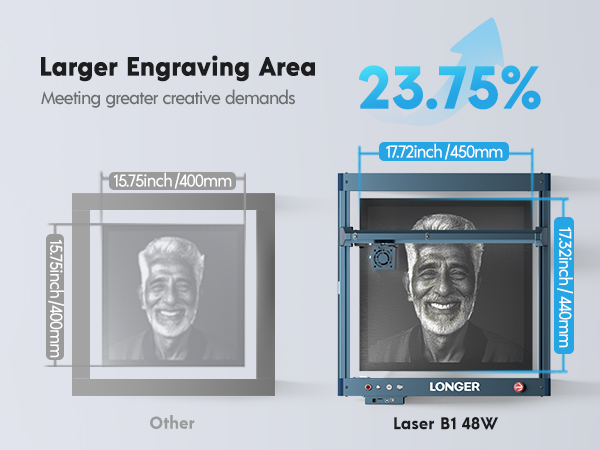
The LONGER Laser B1 30W utilizes cutting-edge Diode Laser Technology to provide precise and intricate engravings on leather. With a working area of 450x440mm (17.72x17.32 inches) and a laser wavelength of 450nm, this machine is perfectly suited for detailed work on large leather surfaces. The fixed focus of 50mm and a laser spot size of 0.08x0.15mm ensure high precision, allowing for detailed and accurate engravings.

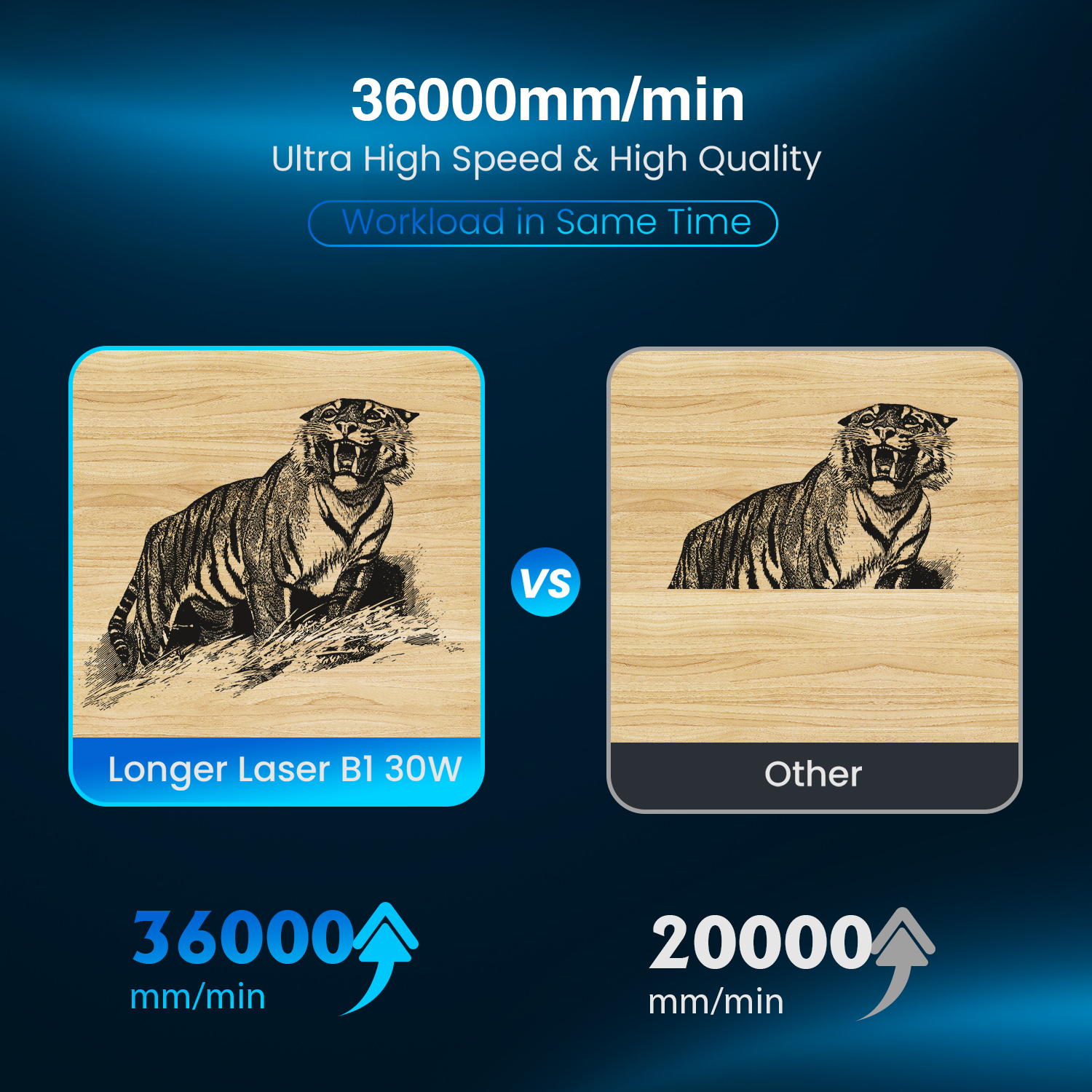
With an optical output power of 30W and a rated power of 145W, the Laser B1 30W is powerful enough to handle various engraving tasks with ease. It boasts a fastest working speed of 36000mm/min, making it highly efficient for large-scale projects. The engraver's robust design includes a laser head life of over 10,000 hours, ensuring long-term reliability and performance.

Versatile Engraving Capabilities

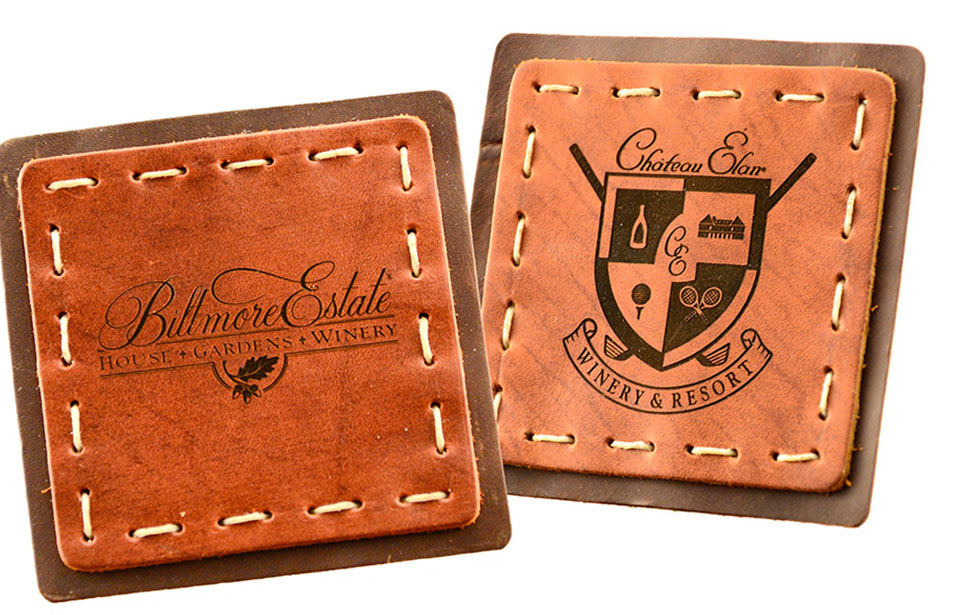
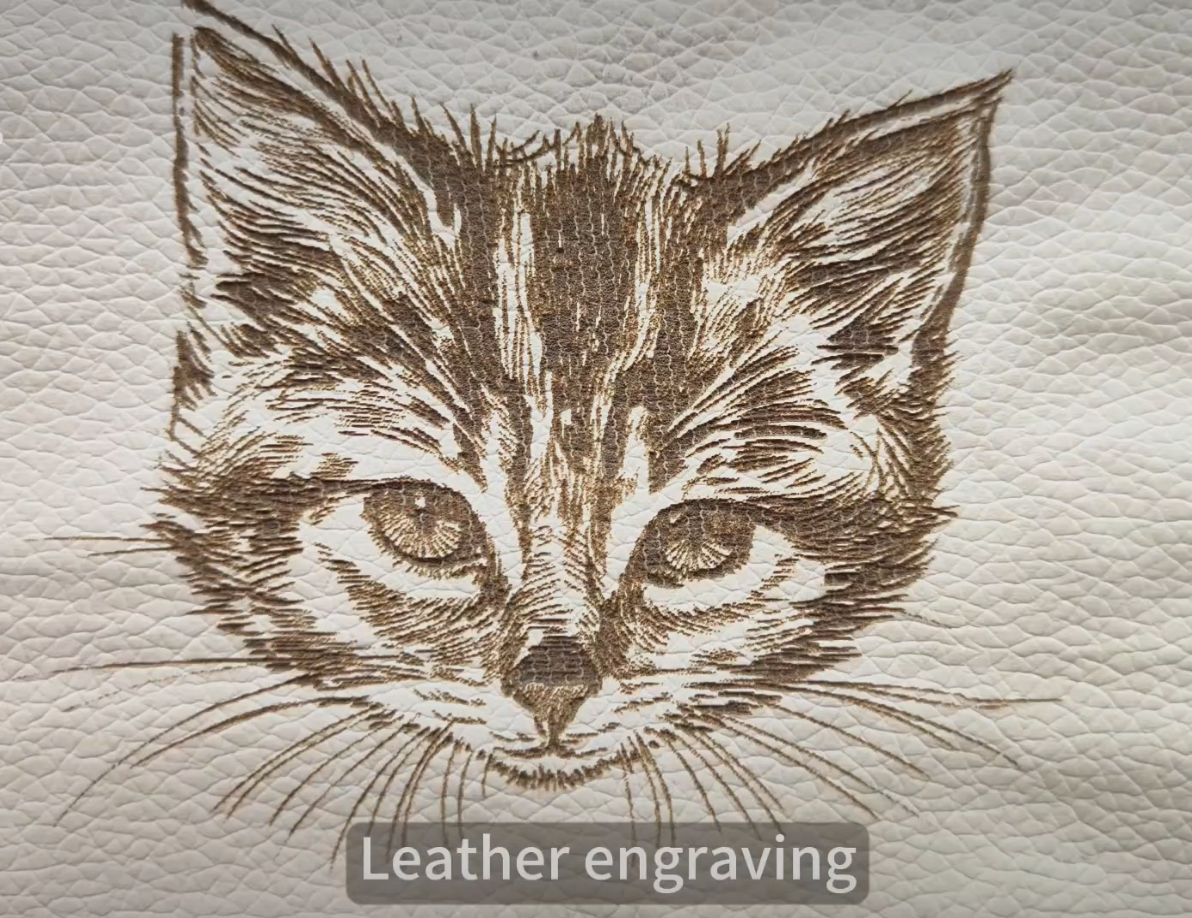
The Laser B1 30W can perform various types of leather engravings, each suited for different aesthetic and functional needs: Surface Engraving: This process lightly scratches the surface of the leather, giving a delicate and elegant impression. It's perfect for embossing names or small graphics on leather accessories. Deep Engraving: For a more pronounced design, deep engraving cuts into the leather, resulting in a bold and textured appearance. Burnishing: This method lightens specific areas of the leather to create contrast and depth, ideal for intricate patterns. Tone-on-Tone: By adjusting the laser power, you can achieve a tone-on-tone effect, engraving a lighter design on darker leather or vice versa, enhancing visual interest.

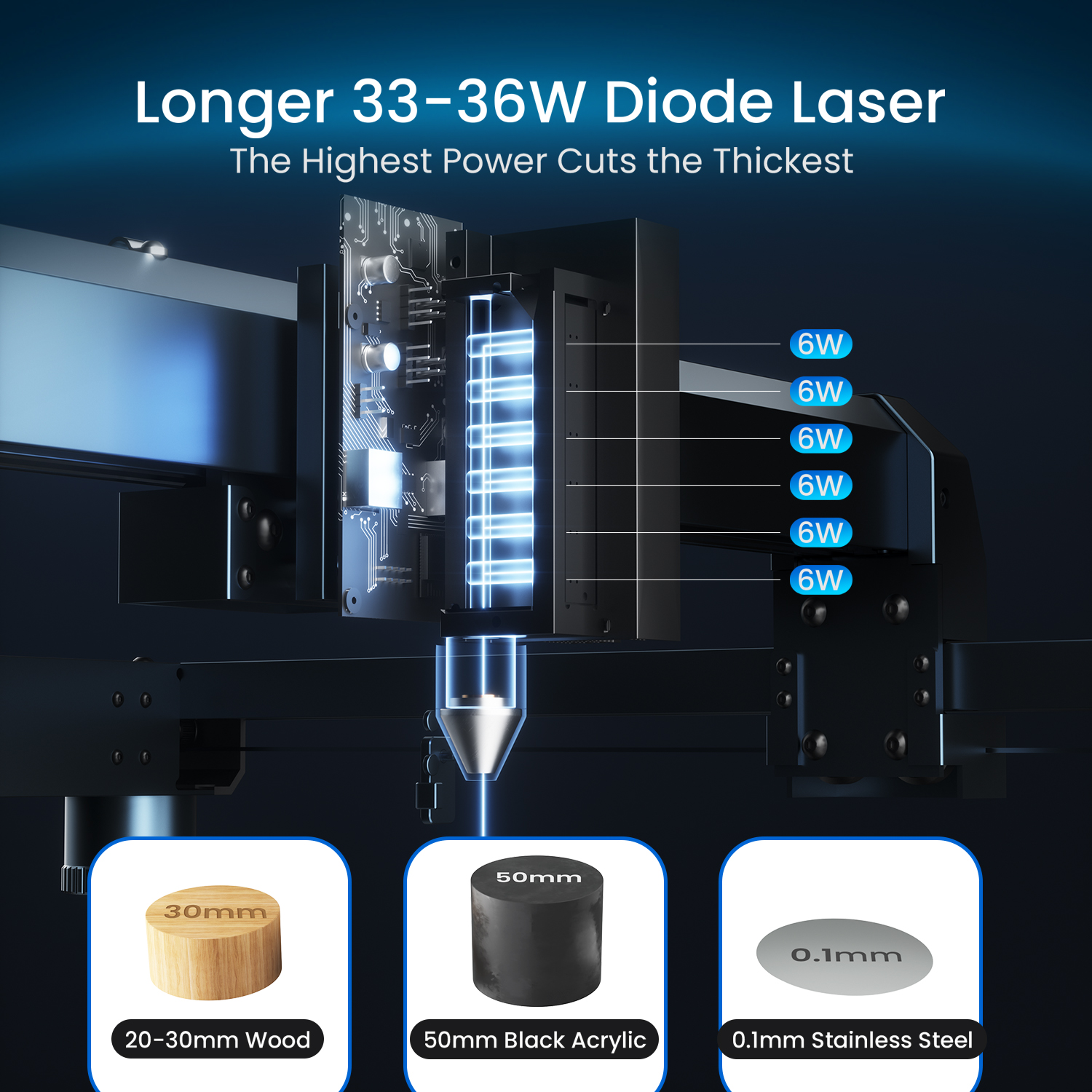
The Laser B1 30W is not limited to leather. It can also cut through 20mm plywood and 10mm acrylic in one pass, and can handle up to 25mm plywood, 50mm acrylic, and 0.1mm stainless steel. This versatility makes it a valuable tool for a wide range of crafting needs.

User-friendly

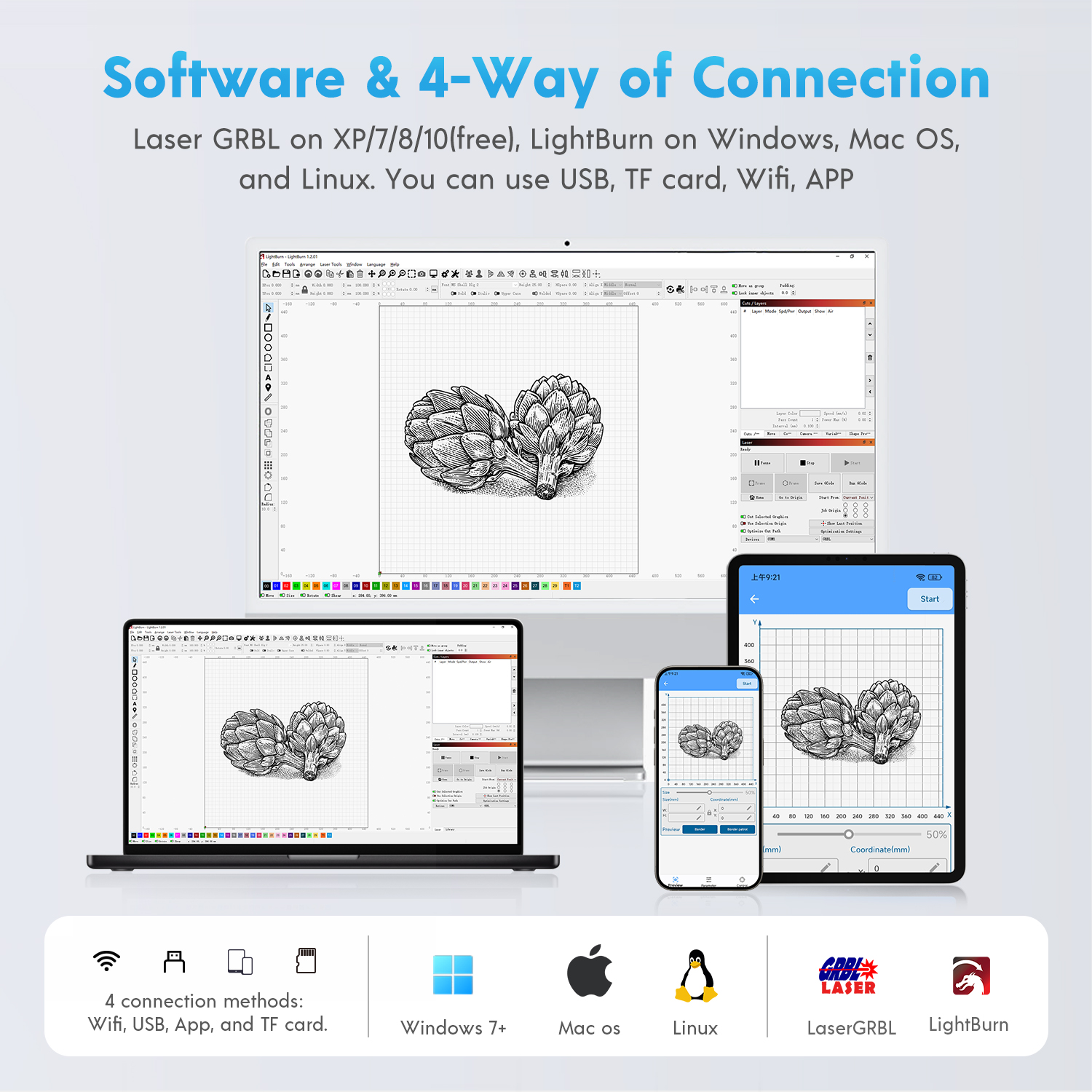
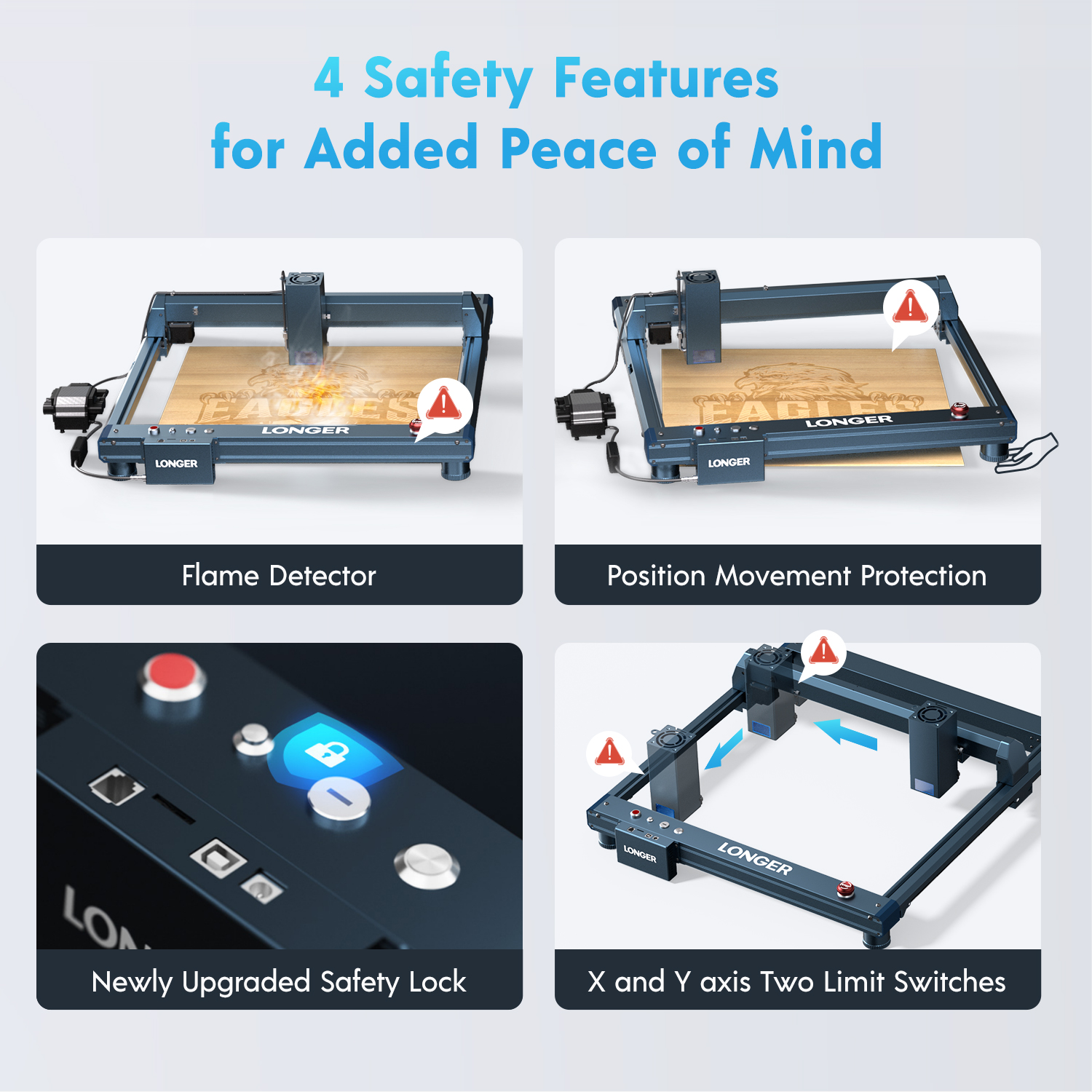
The Laser B1 30W is designed for ease of use, featuring a user-friendly interface and compatibility with various software, including LaserGRBL (free), LightBurn (paid), and the LaserBurn APP. It supports Windows, macOS, Linux, Android, and iOS operating systems, providing flexibility for different users. The machine includes X and Y-axis limit switches for precise movement, contributing to consistent and accurate results.

Safety Features

Safety is paramount with the Laser B1 30W, which includes flame detection, movement detection, motionless protection, an emergency stop button, and built-in eye protection. These features ensure operator safety and compliance with regulatory standards.

To excel in laser engraving leather, consider the following factors: Design Knowledge: Learning design fundamentals, including composition and balance, will enable you to craft effective and beautifully structured engravings. Settings and Control: Adjusting the laser strength, speed, and frequency is essential for achieving the best effect and quality. Material Understanding: Different types of leather require different laser settings. Understanding the characteristics of the leather you're working with is crucial. Hand-eye Coordination: Stabilizing hand movements and precisely locating the engraving area are integral parts of mastering the art of engraving.

Tips for Enhancing Your Technique

To enhance your technique and improve your results, consider the following tips: Experiment with Settings: Take time to test different laser power, motion, and frequency settings on various materials before engraving your final piece. Master Design Software: Learn how to use design software effectively. Practice drawing, using text-to-path conversion, and utilizing special features offered by the engraving mechanisms. Take Safety Precautions: Always wear safety goggles and gloves during operation. Follow all safety measures outlined by the manufacturer. Optimize Material Placement: Ensure the item is firmly anchored throughout the engraving process. Use clamps or adhesives to secure the material. Clean and Prepare Leather: Ensure the leather surface is clean and dust-free. Use a cleaning solution and cloth, and gently wipe the surface. Use masking tape to protect areas you don't want to engrave.

LONGER's laser engraving machines enable customization and personalization of leather items by engraving names, logos, and detailed images. This capability meets the growing demand for unique and personalized leather products. The Laser B1 30W can be used to create decorative patterns on leather goods, adding a unique touch to accessories, apparel, and home decor items. For businesses, the Laser B1 30W offers the ability to engrave company logos and branding elements on leather products, enhancing brand recognition and product appeal. The Laser B1 30W can be used to create custom leather accents for furniture and interior design projects, adding a luxurious and personalized touch to any space.

Conclusion

LONGER's Laser B1 30W laser engraver represents a significant advancement in leather crafting technology. Its precision, versatility, and efficiency make it an invaluable tool for leather crafters seeking to elevate their craft. By continuously innovating and adhering to the highest quality and safety standards, LONGER remains a leader in the industry, providing the best solutions for modern leather crafting needs. Join us in our pursuit of excellence and creativity with LONGER, and transform your leather crafting projects into masterpieces.

By Laser Engraver Blogs | May 21, 2024
LONGER Research: Exploring the Impact of Laser Engraving on Sustainable Fashion

The adoption of LONGER Laser engraver technology in sustainable fashion highlights a significant shift towards global environmental conservation and sustainable development. This advanced technology offers numerous benefits that enhance sustainability compared to traditional cutting and engraving methods previously used in the fashion industry. The LONGER Laser B1 40W cnc laser engraver, with its cutting-edge features, exemplifies how laser technology can revolutionize sustainable fashion.

Efficient Material Utilization
The utilization of materials in laser engraving is significantly more efficient than traditional methods. The LONGER Laser B1 40W, with its working area of 450x440mm (17.72x17.32 inches) and laser spot size of 0.1x0.15mm, ensures precise and efficient cutting, thereby reducing waste. The fixed focus of 50mm and optical output power of 40W allow for detailed and accurate engravings, minimizing material wastage and maximizing the use of raw materials.

Flexibility with Sustainable Materials

The LONGER Laser B1 40W's versatility makes it an invaluable tool for working with a variety of biodegradable and recycled materials, such as bamboo and recycled wood and can be jewelry engraving machine. This flexibility ensures that a wide range of environmentally-friendly materials can be used, supporting the fashion industry's shift towards sustainable resources. The machine's fastest working speed of 36000mm/min and rated power of 175W enable efficient processing of these materials, making sustainable production more feasible.

Precision and Accuracy

Similar to other advanced models, the LONGER Laser B1 40W offers high precision and accuracy, essential for complex designs. Its eight diode lasers with FAC technology ensure precise and intricate engravings and cuts and can be metal laser engraver. The machine's ability to cut 20mm plywood, 25mm Paulownia wood, this precision enables the creation of highly complex designs while minimizing material wastage, aligning with sustainable manufacturing practices.

Design Versatility

Laser engraving serves as a substitute for chemical processes like dyeing and printing commonly used in conventional clothing production. By eliminating the need for chemicals, laser engraving reduces environmental burdens associated with chemical usage and disposal, promoting sustainability in fashion manufacturing. LONGER laser engraving technology offers designers and manufacturers greater flexibility in creating intricate and customizable designs. It enables the production of detailed patterns, textures, and motifs that are challenging to achieve through other methods, fostering creativity and innovation in sustainable fashion.

Waste Reduction

Laser engraving minimizes material waste through precise and localized material removal, reducing the need for additional embellishments such as printing, dyeing, or embroidering. This waste reduction contributes to a more sustainable fashion industry by conserving resources and minimizing environmental impact. Unlike processes like printing and dyeing, laser engraving does not require water to operate. LONGER laser engraving technology helps lower the fashion industry's water usage by eliminating the need for water-intensive textile dyeing and finishing processes. By saving water, brands can achieve sustainability goals and reduce their environmental footprint.

Conclusion

By incorporating LONGER Laser B1 40W technology into sustainable fashion practices, brands can enhance efficiency, reduce waste, and promote environmental conservation. This innovative approach to fashion manufacturing aligns with global sustainability efforts and paves the way for a more eco-friendly fashion industry. Join LONGER in revolutionizing sustainable fashion with advanced laser engraving technology.

By Laser Engraver Blogs | May 21, 2024
Design File, Calibration and Focus to LONGER Laser engraver

LONGER laser engravers are equipped with advanced technology that enables precise cutting using focused laser beams. This process is essential in both development and production phases. To achieve effective laser cutting, it's imperative to understand key principles, select suitable materials, design appropriately, operate the machine correctly, and adhere to safety protocols. The LaserB1 and Ray5 series are highly regarded for their exceptional performance in laser cutting. Operating a LONGER laser cutting machine involves a series of important steps:


Design File Preparation:


Theming relies on the accuracy and replicability of the design. Whether designing in software like Illustrator or CorelDRAW, vector formats like AI or DXF are crucial for preserving geometry and dimensions. Determine cutting speed and power levels, considering material details simultaneously.


  • Use compatible design software such as Adobe Illustrator, CorelDRAW, or Inkscape.
  • Save files in SVG or DXF formats.
  • Develop a comprehensive design concept from sketches or design software.
  • Maintain design style and line detail integrity.
  • Utilize laser processing for color or layer applications.
  • Organize layers or groups for easy navigation.
  • Ensure fonts are in vector format for versatility.
  • Follow technical documentation for dimensions and scale.
  • Avoid confusing file structures.
  • Double-check design files for accuracy before laser processing.


Machine Calibration and Focus

Machine calibration and focus are critical aspects of ensuring optimal performance from your LONGER laser cutting machine. Before beginning any cutting operation, it's essential to calibrate the machine properly. This involves adjusting the laser beam focus and aligning the mirrors according to the LONGER's guidelines or user manual instructions. Using a focus tool to determine the focal plane and adjusting the focal point based on material type, thickness, and processing goals can help optimize cutting performance.


In addition to calibration, beam alignment is another crucial step in the setup process. Properly directing the laser beam along the intended path is essential for achieving accurate cuts. Utilizing alignment tools provided by the LONGER’s and regularly inspecting and adjusting the laser beam alignment can help maintain cutting precision over time.


Furthermore, conducting test cuts or sample runs on scraps and test materials allows you to fine-tune the focus settings and ensure the quality of the cuts. By recording the best focus setting based on the results of these test cuts, you can streamline future cutting operations and minimize material waste.


Regular maintenance and monitoring are essential for preserving the performance and longevity of your LONGER laser cutting machine. Cleaning and inspecting optical components regularly, monitoring machine performance and consistency, and following manufacturer-recommended maintenance and calibration procedures are essential practices for ensuring continued cutting precision and efficiency.

By Laser Engraver Blogs | April 26, 2024
Exploring Seven Key Features for Choosing the Ideal Laser Engraver

The laser engraving machine is a powerful tool capable of turning designers' ideas into reality and offers a vast range of possibilities for manufacturers and artists.However, when choosing a laser engraver that suits your needs, there are several key features that need to be carefully considered.Below we will delve into these seven key features to help you find the ideal laser engraving machine.

  1. Laser power

Laser power plays a crucial role in the engraving and cutting ability of laser engraving machines. In general, the higher the power of the laser engraving machine can handle thicker, harder materials. When choosing laser power, you need to consider the type and thickness of the material you often use. For example, our Laser B1 30W and Laser B1 40W series offer high power and excellent cutting capability for experienced users looking for a better experience. Beginners can choose the lower power RAY5 5W and RAY5 10W, suitable for engraving operations.

Laser power
  1. Size of the work area

The size of the work area determines the maximum size of the object you can work with. Ensure that the working area of the selected laser engraving machine is large enough to accommodate common items and does not affect engraving quality and accuracy. If you need to make larger objects, we recommend the Laser B1 series products, because the operating space can be up to 450*440㎟. For smaller objects, you can consider the RAY5 series, which operates in 400*400㎟.

  1. Engraving speed

Engraving speed affects work efficiency. Faster engraving speeds can improve productivity, but may sacrifice certain details. Find the right balance between speed and quality to meet the demands of the job. If you want a higher power device, you can choose our B1 series products, engraving speed of 36000mm/min. If you want more detailed carving and don't go for speed, you can choose our RAY5 series, which has a carving speed of 10000mm/min.

  1. Resolution and accuracy

Resolution determines the level of detail that can be achieved. Higher resolution lasers produce finer details and smoother edges. Accuracy is crucial for precision engraving, especially when dealing with complex designs or small objects. Taking the RAY5 series as an example, its engraving accuracy under the three powers of 5W, 10W and 20W is 0.08*0.08mm, 0.06*0.06mm and 0.01mm respectively. For the B1 series, its engraving accuracy is 0.08*0.1mm, 0.08*0.1mm and 0.1*0.15mm under the three powers of 20W, 30W and 40W, you can choose according to your needs.

Resolution and accuracy


  1. Compatibility and software

Ensure that the selected laser engraving machine equipment is compatible with commonly used design software and provides an easy-to-operate interface. User-friendly software with an intuitive interface simplifies the design and operation process and increases productivity, even for beginners. Our laser engraving machines support a wide range of computer system operations and have extensive software compatibility, including compatibility with LaserGRBL and LightBurn. Whether you're using Windows 7+, macOS or Linux, you can easily work with our laser engraving machines. In addition, we offer auxiliary extensions that make it easier for you to operate and optimize with LightBurn software.

  1. Security features

Since laser engraving machines involve high energy lasers, safety features are very important. Choosing a laser engraving machine equipped with safety devices such as emergency stop buttons and shields can ensure safety during operation. Our equipment is equipped with corresponding safety devices to ensure your safety during operation, and you can purchase with confidence.

  1. Maintenance and support

Finally, consider the maintenance and technical support of the equipment. Choose a manufacturer that provides excellent after-sales service and technical support to ensure timely resolution of problems and reduce downtime during use. Longer has a comprehensive after-sales service policy, and we are ready to support you to ensure that your equipment is always in the best condition.In general, you can adjust the balance between these aspects to best meet your needs and achieve the optimal design and manufacturing objectives of the laser engraving machine equipment.

 In general, you can adjust the balance between these aspects to best meet your needs and achieve the optimal design and manufacturing objectives of the laser engraving machine equipment.If you're considering entering the laser engraving industry but are unsure which device to choose, you're welcome to explore Longer. We're confident that you'll discover a device within Longer's offerings that perfectly suits your needs and ensures a satisfying experience.

By Laser Engraver Blogs | March 19, 2024
10 Easter Home Decor DIY Ideas Worth Exploring

As the Easter season approaches, it's time to transform our living spaces into a haven of celebration with creative Easter decor ideas. Imagine a living room decorated with whimsical bunny prints and cheerful Easter eggs, delicate strings of colorful eggshells hanging in the windows, and a festive feel throughout every corner of the house. This season is not only a time to celebrate but also a time to reunite with loved ones and share warmth.

A family laser engraver stands out as an excellent aid for crafting Easter house decorations. It wields impressive cutting capabilities across various materials such as wood, felt, and acrylic. Leveraging this tool, you can swiftly and effortlessly fashion shapes like Easter eggs, bunnies, and carrots, enabling you to craft personalized decorations for your home with ease.

10 Creative Easter Home Decor Projects

Okay, here’s the detailed production process for each Easter decor ideas suggestion:

  1. Easter Egg Decoration

To make a simple Easter wooden egg craft, start by gathering wooden eggs and engraving tools. Select your favorite design and transfer it to the engraving machine. Adjust the settings and carve your design onto the wooden egg. Spread Easter cheer to friends with these holiday decorations or gifts.

  1. Easter Theme Card Making

Making Easter cards is easy with an engraving machine. First you need to design an Easter themed pattern and greeting. Next, these designs can be engraved onto the card using an engraving machine. Finally, you can make the card more visually appealing by adding extra embellishments or bright colors.

  1. Bunny and Chick Decoration

Rabbits and chicks are the symbols of Easter. First find pictures of rabbits and chicks that you like. The image is then transferred to a laser engraving machine and engraved. After the pattern is carved, you can cut out the rabbits and chicks, and add colors or other decorations as needed.


  1. Easter Cookies

First you need to import the Easter theme pattern into engraver. After the biscuits are ready, you can use an engraving machine to carve exquisite patterns with an Easter atmosphere on the biscuits.

5.Easter hanging decorations

An engraving machine can be used to engrave your favorite Easter designs on wood. Then string them together with ribbon. Once made, hang them in your windows and doorways throughout your home to instantly lift your mood and spread holiday cheer.

  1. Easter headdress

To create a charming Easter headpiece, start by designing a pattern that resonates with your style and engraving it on the hair accessory's material using engraver. Once the shapes are created, infuse them with bright colors and decorative elements to bring them to life. Finally secure these embellishments to a headband or hair clip.

  1. Easter Dinnerware Labels

Easter-themed tableware labels add a sense of ritual to celebrating the holiday. Engraver can be used to engrave patterns on your favorite label paper. You can customize these labels with different patterns or text as needed. Place these tags next to corresponding dinnerware to add a whimsical feel to your Easter dining experience.

  1. Easter Lanterns

It is also suitable to use an engraving machine to make lanterns with Easter elements. First, use an engraving machine to carve Easter themed decorations on cardboard. Then make the cardboard into a lantern, put in a small electronic light bulb, and a unique Easter lantern is completed.

  1. Easter Window Decorations

To create stunning Easter window decorations, start by carving an Easter-themed pattern using an engraving machine. Once made, arrange them into a beautiful window decoration that captures the essence of Easter.

  1. Easter bracelets

Making decorative Easter bracelets is a delightful way to spread holiday cheer. First you need to prepare some beads and carving materials. Next, use an engraving machine to carve a charming Easter-themed pattern onto the beads. Finally, connect them in series and the bracelet is ready.

How to Make Easter Decor Projects at Home

Making Easter supplies, gifts, and art at home has never been easier. The revolutionary Longer range of engraving machines, comprising series of Longer Nano, Longer B1, and Longer RAY5, is designed for DIY enthusiasts, hobbyists, artists, and professionals. With endless possibilities, these Longer laser engraving machines offer unparalleled versatility.

This innovative machine can engrave and cut a wide range of materials, from wood and ceramics to paper, acrylic, leather, and steel. With such versatility, you have ample options to bring your indoor Easter decorations to life and create personalized items with ease.

The precision of the machine ensures flawless engraving, allowing you to even imprint your photos onto wood or other materials for a stunning effect. Your Easter patterns will come out looking perfect and captivating every time.

Unleash your creativity and craft unlimited Easter items and decorations using the Longer Nano. Moreover, if selling your creations through online stores, you would earn some extra income during the Easter season. It's a fantastic opportunity to showcase your talent and make the most of the holiday spirit.

Utilizing the Longer Nano is a breeze. Let's explore how this machine can bring your Easter decoration concepts to life:

Step 1: Initiate the process by locating your design file. Graphic designers can craft their own designs, while others may explore online resources for inspiration.

Step 2: Position your chosen material, ranging from plywood and acrylic to steel or ceramic, meticulously on designated work surface.

Step 3: Transfer your design to advanced software platforms such as LightBurn, LaserGrbl, or LongerBurn, meticulously developed by Longer. Fine-tune settings such as speed and power to achieve optimal results. Execute the process by clicking the "Start" button to commence engraving or cutting.

Step 4: Upon completion of the engraving or cutting process, your decorative pieces stand ready for display. Elevate their aesthetic appeal by embellishing them with paint or applying decorative stickers as desired.

Creating customized items can add an extra layer of joy to Easter celebrations. Harnessing the power of a Longer Nano, you can unleash your creativity by crafting personalized gifts and indoor Easter decorations. Creating everything at home proves to be highly economical, and venturing into online sales of Easter items and decorations could potentially transition into a profitable business endeavor.

By Laser Engraver Blogs | March 8, 2024
Discovering the World of Laser Engraving Machines

Laser engraving is famous in the art and industry. These versatile tools have revolutionized in the woodworking and mark making on the various materials. The laser engraving technology has changed crafts due to versatility and efficiency of its operations. These gadgets come from power 5W to 40W for varied purpose. The detailing purpose is served by the 20W laser engraver, where the 40W laser cutter breezily cuts through materials. Laser enclosures are involved in working with safety measures. From crafts to markings and personalized gifts, laser engraving equipment is versatile. RAY5 in 10W and 5W are longer versions of bringing power and accuracy to RAY5. With improving technology, with time, laser engraving equipment will advance expressiveness and operations. This article talked about the technology that defines engraving using a laser, its intricated uses, and hints of future possibilities.

How Does a Laser Engraving Machine Work?

The light is employed to cut or alternatively each other materials. Various applications for these machines are involved with woodworking, sign manufacturing, and product customizing among others. The best laser cutting machine is made by components. The light for laser engraving could be provided either by CO2 lasers or fiber lasering. When such focussed laser hits the material, it would either burn or undergo the process of controlled ablation. Machines for engraving and cutting employ laser beams guided by computers. Engraving depth and complexity depend on laser intensity, speed, as well as focus. Laser engraving equipment can imprint various patterns on wood, metal, plastics, and textiles, thus being applicable in crafts and manufacturing.

Key Components of a Laser Engraving Machine

Laser Source

For the wavelength of CO2 lasers, it is absorbed by wood and acrylic and therefore they are the most preferred for engraving. In the case of engraving metal and plastics, fiber lasers are the best since they give high accuracy.

Laser Head

Flexibility of laser head is key to precise focus and depth of engraving. Function ensures that laser performance is optimized in view of material parameters to refine precision and well detailed results.

Controller

The controller does the control of motions of a laser head, analysis of complex computer design data. The data is translated into particular instructions of the lasers that are precise to permit the machine to exactly do a recreation of complicated patterns.

Motion System

The motion system has precise motors and mechanical elements. The belts, pulleys, and gears of the X, Y, and Z axes are designed to allow smooth and accurate motions that significantly affect engraving quality.

Work Bed/Table

The material bed adjusts according to the thickness of materials engraved. Rotary attachments enhance the laser's engraving of round or cylindrical items like bottles and trophies.

Cooling System

Laser sources produce a considerable amount of heat when in operation. Effective dissipating of this heat happens with an efficient cooling system, whether air-based or water-based, lest the laser source overheats and improves on performance and lifetime as well.

Exhaust System

Exhaust system prevents fumes and particles from the workpiece from settling during the process of engraving. This is in order to attain consistent results by ensuring that there are clean laser optics, and it also minimizes worker interaction with the hazardous contaminants, thus facilitating proper safety in a workplace.

Ventilation

In this, proper ventilation takes away fumes and smokes thereby avoiding pollution into the workplace. It is dependent on operator safety and also avoids residues on etched material.

Power Supply

Basically, power supplies are made to provide steady reliable power. The laser source together with other components demands a constant supply of power for better performance and free from power fluctuations which would thereafter have an impact on the engraving quality.

Control Software

Control Software acts as a user interface allowing operators to import, edit then optimize designs. Flexibility with common design programs along with machine manufacturer-specific software increases control and customization.

Exploring Different Power Capacities: 5W, 10W, 20W, and 40W Laser Engravers

5W Laser Engraver

Beginners should start with a 5W laser engraver like the Longer RAY5. This entry-level laser engraving machine is perfect for beginners due of its accuracy and price. Users may confidently create using the RAY5 5W's application-focused design.

10W Laser Engraver

Upgrading to a 10W laser engraver makes sense as your abilities and projects grow. The RAY5 10W boosts power and versatility for engraving operations. This update permits finer engraving and thicker material cutting, expanding your creative possibilities.

20W Laser Engraver

A 20W laser engraver offers even more flexibility and speed. A 20W machine can deal with a range of materials, making it a popular option for companies and amateurs that value efficiency and speed.

40W Laser Cutter

A 40W laser cutter is best for demanding tasks. These powerful machines are ideal for engraving and cutting wood. A 40W laser cutter is used in bulk production and complicated crafts for accuracy and efficiency.

Applications of Laser Engraving Machines

Wood Engraving and Cutting

Laser engraving devices make woodworking more adaptable and accurate at decorating wooden surfaces. These machines create elaborate patterns, enabling artists and producers to give furniture detailed designs. Laser cutting also allows precision wood contouring, allowing intricate and bespoke wooden items. Laser engraving enhances woodworking creativity and workmanship, whether decorating furniture or making unique presents.

Metal Engraving and Marking

Beyond carpentry, laser engraving is essential in metals. Lasers mark metal surfaces precisely. Businesses that need accurate and permanent marks on metal components for identification and traceability benefit from this capability. Laser engraving on metal allows detailed patterns and branding and fulfills industrial requirements.

Personalization and Customization

Laser engraving equipment provides tremendous customization and personalization across materials. These devices let people and organizations to personalize their goods by engraving names and trademarks on personal items or producing intricate patterns on various surfaces. Laser engraving can customize promotional materials, awards, and unusual presents to meet the rising need for customized and distinctive things.

Signage and Branding

Laser engraving machines are essential for high-quality signs and branding. Lasers reproduce logos, text, and images precisely, giving firms a polished and professional look. Laser-engraved signs on acrylic, wood, metal, or other materials boosts visibility and brand identification. This technology helps create eye-catching displays, promotional materials, and durable outdoor signs, enhancing a business's branding strategy.

Laser Marking Machines

Laser engraving involves laser marking equipment, which mark different materials. These robots help companies comply with industry requirements by identifying and tracking products. Laser marking permanently and precisely labels objects with serial numbers, barcodes, and other important information. Laser marking equipment help manufacturers, electronics, and healthcare companies enhance product quality and inventory management.

Choosing the Right Laser Engraving Machine for You

Consider Your Needs

Before buying a laser engraving equipment, evaluate your needs. Consider whether you like engraving or cutting and the tools and resources you will need. Understanding your needs will help you choose a machine.

Power Requirements

Consider laser power. A 5W or 10W machine may be enough for hobbyists or engravers. Commercial and material-handling businesses may profit from a 20W or 40W equipment with higher power output.

Budget Considerations

Laser engraving machines vary in price. Start with a needs-based budget and investigate choices within it. Think about accessories and upkeep, not just the initial cost.

Brand and Model

Prioritize reliable and high-performing brands and models. RAY5 series 5W and 10W models are worth considering. This series balances quality and price.

Ease of Use and Software Compatibility

Laser engraving machines should be easy to operate and compatible with design software, especially for beginners. Make the machine compatible with your design tools for convenience.

Material Compatibility

Choose a laser engraving equipment that works with your materials. Different machines can engrave or cut wood, acrylic, leather, glass, or metal. Check if the equipment can handle your project materials.

Workspace Size

Consider the machine's engraving or workspace size. Working space may increase for larger projects. Make sure your materials fit in the machine's area.

Speed and accuracy

Examine laser engraving equipment speed and accuracy. Machine speed affects productivity, particularly for commercial use. Engraving delicate details requires precision. Find the ideal balance.

The Future of Laser Engraving Technology

Laser engraving equipment evolve with technology. Future developments include artificial intelligence for precision, automation for efficiency, and eco-friendly laser technology. The crystal ball of technological progress shows various trends and innovations that foretell the future.

Integration of Artificial (AI) Intelligence

Laser engraving will benefit greatly from artificial intelligence. The accuracy and efficiency of laser engraving equipment are improving with AI algorithms. These clever technologies assess designs, optimize engraving paths, and adjust to material qualities in real time for unmatched accuracy.

Increased Automation for Efficiency

Laser engraving will require automation in the future. Automation technologies like self-calibrating equipment and automated material management will simplify engraving and reduce human participation. This boosts productivity and frees up operators' time for harder tasks, balancing machine accuracy and human innovation.

Environmental Considerations

As industries prioritize sustainability, laser engraving technology should follow suit. Future machines may use greener laser sources and energy-efficient parts. Manufacturers may reduce waste and optimize energy use to follow the worldwide eco-conscious trend.

Multi-Material Capabilities

Laser engraving equipment will likely handle more materials in the future. Current machines are good at engraving wood, metal, and plastics, but future models may engrave ceramics, glass, and composites. This adaptability expands inventiveness and applications.

Miniaturization and Portability

Technological advances reduce design size. Future laser engraving equipment may shrink to make them more portable. This could make laser engraving technology more accessible to individuals and small businesses, removing the need for large, specialized spaces.

Enhanced Connectivity and Remote Operation

IoT technology could increase laser engraving equipment connectivity and remote control. Workers might remotely monitor and handle equipment for a more flexible and responsive workflow. Laser engraving may also use cloud-based design-sharing and collaboration systems.

Holographic and 3D Engraving

More advanced holographic and 3D engraving methods may replace 2D engraving. This could enable rich, three-dimensional designs with texture and depth. Such advances would be used in industrial prototypes, jewelry, and art.

Conclusion

The exciting realm of laser engraving machines combines creativity and accuracy. From 5W engravers to 40W laser cutters, these technologies have transformed industrial branding, carpentry, and customization. As laser engraving equipment technology evolves, companies and inventors have more options. Whether you're a company seeking cost-effective production solutions or a hobbyist learning engraving, laser engraving equipment can unleash your creativity.

By Laser Engraver Blogs | December 29, 2023
6 Must Have Laser Engraver Accessories

Desktop laser engravers are popular among craft enthusiasts and small businesses alike. Most laser engraving machines only require simple assembly to complete fine cutting and engraving work.

Nowadays, everyone pays more attention to the upgrade of accessories. 6 essential laser engraving machine accessories can expand the possibilities of using the laser engraving machine and better turn every user's creativity into reality.

1. Rotary Roller Upgrade Kits

Have you ever thought about engraving a unique pattern on your cup? All it takes is a roller stand kit. This accessory is now loved by many people.

360° automatic rotating roller, suitable for cylindrical objects, including irregular cylindrical objects. Wine glasses, glasses, mugs, etc. can all be made into works of art.

Rotary Roller Upgrade Kits

2. Extension Kits

The normal working area of a laser engraving machine is 400*400MM. But we can have larger areas of items to make. At this time, the extension rod can be used.

With just a simple installation, you can quickly gain more than 4.5 times the huge engraving area. High stability, expanded working range but still high safety factor, no need to worry about safety issues.

Extension Kits

3. Honeycomb Working Table


Honeycomb panels come in many sizes and different types. Using honeycomb panels during laser engraving work can ensure that the ground or other places will not be damaged. In addition, using honeycomb panels with clamps also ensures better cutting and does not allow the object to move while working.
Honeycomb Working Table

4. Enclosure


Today's hoods are equipped with exhaust fans and ducts to speed up air circulation, allowing the laser to work more fully while eliminating smoke and odors.

The outer shell of flame-retardant fiberglass cloth, coupled with the thermal insulation silicone coating, has a higher fire resistance temperature and can achieve dust-proof and noise reduction effects.

It is easy to assemble and can be installed in about ten minutes. It provides a safer working environment and is loved by many carpenters.
Laser Engraver Enclosure

5. Camera Kits

Maybe you have trouble with inaccurate positioning when using a laser engraving machine? At this time, a camera kit is needed to achieve high-definition video recording and real-time monitoring.

The laser engraving machine camera can observe the work progress, material changes or machine operating status. You only need to align the desired pattern to the corresponding position on the operation page. The laser engraving machine camera will help you work without deviation. Greatly improve work efficiency and accuracy.
Camera Kits

6. Air Assist Kits


The air-assisted pump kit quickly reduces heat around the laser head and clears debris around the contact points, and you'll get better results with smooth lines, complete patterns, and a clean material surface.

The laser air auxiliary kit can effectively remove smoke and dust generated during the laser engraving process, prevent laser energy from attenuating, ensure the stability of the laser energy, and help the engraving machine cut faster and deeper.


This air pump protects your laser from residue buildup and overheating, increasing the life of your laser module.

The noise of the air assist device when working is 60 decibels, which is lower than the working sound of the fan. The air assist device can provide you with a quiet laser engraving environment.
option air assits

Conclusion

Laser engraving machines can only meet some basic engraving and cutting needs. If you want to expand the use of your laser engraving machine, you need to equip it with a variety of different accessories.

As mentioned above, laser engraving machine accessories can not only expand the functions of the laser engraving machine, but also enhance the safety of use. I look forward to your use of laser engraving machine accessories to achieve richer imagination!


By Laser Engraver Blogs | December 22, 2023
Easily Remove Engraving Residue from Wood

If you've ever run your laser at low speed and high power, you've probably noticed sticky sap, smoke residue, and varnish buildup left behind on the engraved surface. This residue can make an otherwise detailed engraving appear dirty or uneven.

In this guide, you'll learn how to quickly and easily remove wood residue after laser engraving using a common hand cleaner and a soft-bristle brush. This beginner-friendly method helps leave your engraving looking clean, crisp, and professional without using harsh chemicals.

Table of Contents

  • What This Guide Covers
  • Quick Answer
  • Why Removing Engraving Residue Matters
  • Before You Start
    • Requirements
    • Precautions
  • Step-by-Step Tutorial
  • Common Problems and Solutions
  • Tips for Better Results
  • Frequently Asked Questions
  • Final Thoughts

What This Guide Covers

This tutorial explains:

  • How to remove sticky wood residue after laser engraving
  • How to clean soot, sap, and varnish buildup
  • Which cleaning materials to use
  • Safe cleaning techniques for engraved wood
  • Beginner-friendly post-processing tips

The original cleaning process and sequence are preserved exactly.

Quick Answer

To remove wood residue after laser engraving:

  1. Apply a small amount of Permatex Fast Orange Hand Cleaner to a soft-bristle brush.
  2. Gently scrub the engraved area until the residue is removed.
  3. Wipe away remaining dirt and cleaner using a slightly damp paper towel.

This method provides a quick and effective way to clean laser engraved wood surfaces.

Why Removing Engraving Residue Matters

During laser engraving, especially at low speed and high power, wood materials can release sap, smoke residue, and burned varnish. These materials settle on the surface and inside engraved areas.

Cleaning the residue helps:

  • Improve engraving clarity
  • Increase contrast and detail visibility
  • Prevent sticky buildup
  • Create a cleaner finished appearance
  • Improve the overall presentation of laser projects

Proper post-processing is especially important for display pieces, gifts, signs, and products intended for sale.

Before You Start

Requirements

You'll need:

  • Permatex Fast Orange Hand Cleaner
  • Soft-bristle brush
  • Paper towels or cloth

The product used in this tutorial is described as:

  • Biodegradable
  • Waterless
  • Petroleum solvent-free
  • Free from harsh chemicals
  • Free from mineral oils
  • Free from ammonia

Follow official machine specifications or instructions if additional cleaning recommendations are provided.

Precautions

Before cleaning your laser engraved wood project:

  • Make sure the material has cooled completely
  • Avoid aggressive scrubbing
  • Use a soft-bristle brush only
  • Do not soak the wood surface
  • Test on scrap material if needed

Gentle cleaning helps protect engraving details and prevents damage to softer wood materials.

Step-by-Step Tutorial

Step 1: Apply Cleaner to the Brush

Action

Begin by placing a small amount of Permatex Fast Orange Hand Cleaner on the soft-bristle brush.

Expected Result

The brush becomes lightly coated with cleaner and ready for residue removal.

Important Notes

Only a small amount of cleaner is needed.

Using excessive cleaner may make the surface harder to wipe clean afterward.


Step 2: Gently Scrub the Engraved Area

Action

Gently scrub the engraved area until it is free of residue.

Expected Result

Sticky sap, smoke residue, and varnish buildup begin lifting from the engraved surface.

Important Notes

Use gentle pressure while scrubbing.

Aggressive cleaning may:

  • Damage wood fibers
  • Blur engraving edges
  • Scratch softer materials

Continue cleaning carefully until the surface appears clean.


Step 3: Wipe Away Remaining Dirt and Debris

Action

When your project is residue free, wipe away any excess dirt and debris with a slightly damp paper towel.

Expected Result

The engraved wood surface appears cleaner, sharper, and more defined.

Important Notes

The paper towel should only be slightly damp.

Excess moisture may affect unfinished wood surfaces.

Allow the material to dry naturally after cleaning.


Common Problems and Solutions

Problem Possible Cause Solution
Sticky residue remains Not enough cleaning time Continue gentle scrubbing
Engraving still looks smoky Residue trapped in engraved grooves Use the soft-bristle brush carefully in detailed areas
Surface becomes fuzzy Excessive scrubbing pressure Reduce cleaning force
Cleaner leaves streaks Too much cleaner applied Wipe thoroughly with a slightly damp paper towel
Wood absorbs moisture Paper towel too wet Use only a slightly damp towel
Fine engraving details appear faded Cleaning too aggressively Use lighter pressure during scrubbing

Tips for Better Results

Clean Soon After Engraving

Residue is often easier to remove shortly after the project cools down.

Use Proper Laser Settings

Low speed and high power settings can create heavier residue buildup. Optimizing settings may help reduce cleanup time.

Keep Your Workspace Ventilated

Good airflow helps reduce smoke accumulation during engraving.

Use Soft Cleaning Tools Only

Soft-bristle brushes help protect delicate engraving details while removing residue effectively.

Avoid Harsh Chemicals

The cleaner used in this process is biodegradable and free from petroleum solvents, mineral oils, ammonia, and harsh chemicals.

Frequently Asked Questions

Why does laser engraving create sticky residue?

Low speed and high power settings can produce excess sap, smoke residue, and varnish buildup on wood surfaces.


Can I use regular household cleaners?

This tutorial specifically uses Permatex Fast Orange Hand Cleaner. Follow official machine specifications or instructions before using alternative products.


Is this cleaning method safe for engraved wood?

Yes, when performed gently using a soft-bristle brush and a slightly damp paper towel.


Can aggressive scrubbing damage engravings?

Yes. Excessive force may damage fine details or roughen the wood surface.


Why use a soft-bristle brush?

Soft bristles help remove residue without scratching or damaging the engraved material.


Should the paper towel be wet or damp?

The paper towel should be slightly damp only.

Avoid excessive moisture on wood surfaces.


Does this method work for laser cutting residue too?

Yes. This cleaning process can also help remove residue left behind from laser cutting projects.

Final Thoughts

Removing wood residue after laser engraving is an important finishing step that can dramatically improve the appearance of your project. Using Permatex Fast Orange Hand Cleaner together with a soft-bristle brush provides a quick, effective, and environmentally friendly way to clean soot, sap, and varnish buildup from engraved wood surfaces.

With gentle cleaning and proper handling, you can achieve cleaner engravings, sharper details, and more professional-looking laser projects every time.


By Laser Engraver Blogs | December 6, 2023