

Academy

TCHC TR6 Anti Leakage Hotend - LONGER
TCHC TR6 Anti Leakage Hotend

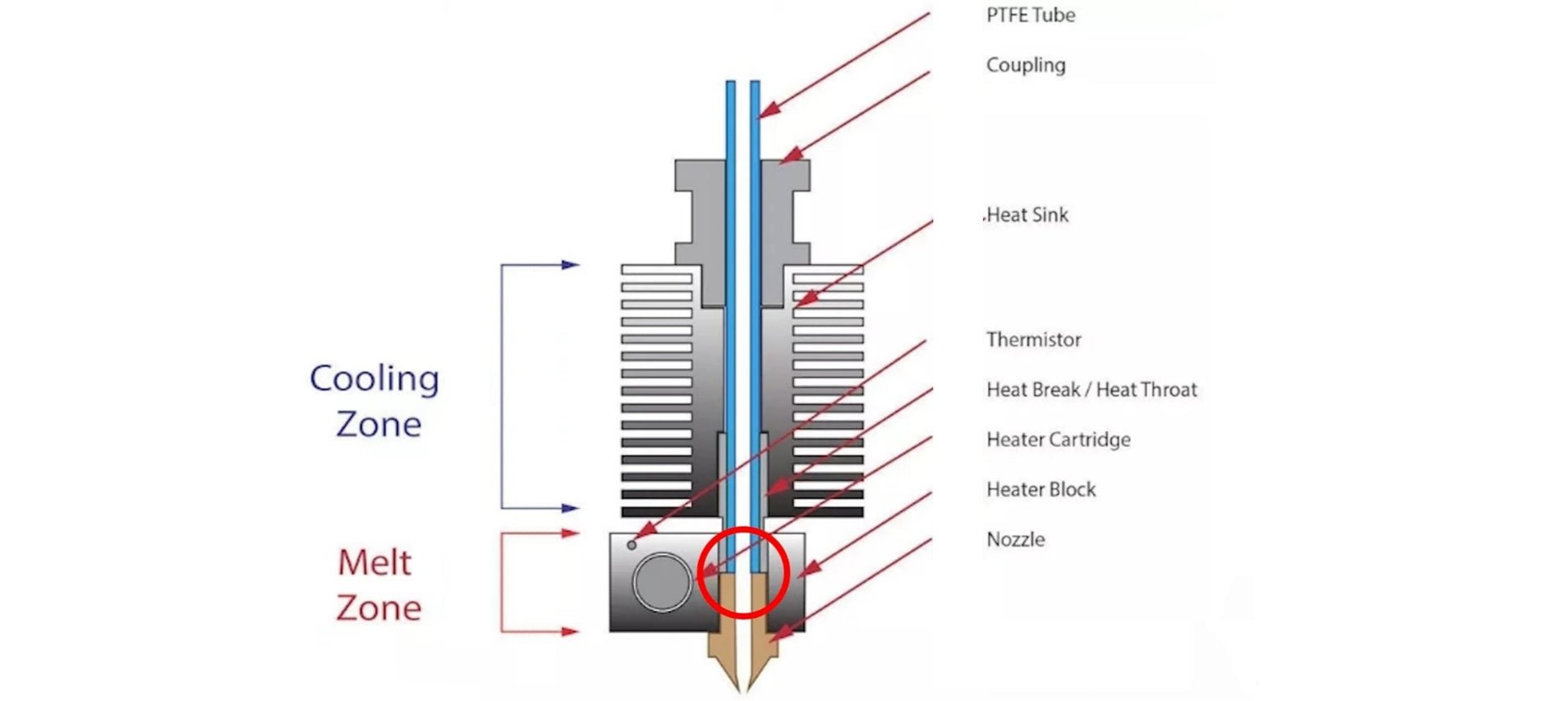
The Hotend is the part of an FDM 3D printer that deals with the melting and deposition of molten plastic material. A Hotend consists of a Nozzle that deals with depositing the molten material, a Heatblock that deals with the melting of the material and a Heatbreak that keeps the hot zone separate from the cold zone of the Hotend. The Heatbreak can be equipped with a heat sink, which in turn is equipped with a fan.

When assembling a Hotend, care must be taken to ensure that the PTFE tube is in beating with the Nozzle. This implies that the PTFE tube is inserted inside the Heatbreak, then the filament flows inside the PTFE tube and reaches the Nozzle directly, without intermediate zones; therefore, it is essential that the PTFE is tightly tightened and joined to the Nozzle, so that the filament flows forcibly through the exit hole of the Nozzle. In the event that there is even a slight gap between PTFE and Nozzle, then leakages of molten filament from the top edge of the Heatblock can occur, causing fillings and damage to both the print and the printer.

TCHC TR6 Anti Leakage Hotend

In addition, the PTFE tube, in the part in contact with Nozzle and Heatblock, tends to reach the same melting temperature set for the filament, however this is not a problem as PTFE supports temperatures up to 300C very well before melting, well beyond the normal printing temperatures of PLA, PETG and ABS. On the other hand, the higher the printing temperature, the greater the amount of heat that the Heatbreak must dissipate; in fact, when the heat is not dissipated properly, it tends to rise inside the PTFE causing the filament to melt in areas far from the nozzle, resulting in obstructions that prevent the filament from passing. In addition, the PTFE tube inside the Heatbreak also begins to lose its characteristics, thus causing obstructions. For this reason, it is necessary to accompany the Heatbreak with a heatsink with fan, in this way the passage of heat is quickly interrupted.

TCHC TR6 Anti Leakage Hotend 1

To solve these two problems, you can switch to a Hotend like the Hotend Trianglelab TCHC TR6 Model B, which is a Hotend with Bi-Metal thin wall Heatbreak; in this way the PTFE tube is not in contact with the hot Nozzle, but stops high in the Heatsink, where the temperature is cold. Therefore, the filament passes from PTFE to Bi-Metal thin wall Heatbreak when it is still solid, and so leakages of molten material cannot occur. In addition, the Bi-Metal thin wall Heatbreak is welded inside the Nozzle already factory, and therefore it is not possible for losses of molten material between the Bi-Metal thin wall Heatbreak and the Nozzle.

TCHC TR6 Anti Leakage Hotend 2

With this type of Hotend it is therefore possible to definitively solve two problems that afflict users of a 3D printer, namely the leakage of molten material between PTFE and Nozzle, and the deformation of the PTFE tube due to the high temperatures reached during the printing of materials such as PETG / ABS / NYLON.

TCHC TR6 Anti Leakage Hotend 3

The Hotend Trianglelab TCHC TR6 Model B is the same size as the Hotend MK8 of the Longer FDM 3D printers, so the installation is very user friendly and plug & play. The new Hotend fits both the Longer Classic Printhead and the new Longer Dual Blower, although the Longer Dual Blower is recommended as it provides greater heat dissipation of the Heatsink, as it has a much larger fan than normal. For installation, simply remove the print head cover and the fans, then just unscrew the old Hotend MK8 and screw the new Hotend TCHC TR6 Model B. Instead, as regards the connection of the cables, simply connect the two white cables of the heating resistor to the HEATER port on the mainboard, instead or two black cables of the temperature sensor must be connected to the TH port of the mainboard. The most skilled and experienced users can simply cut the cables of the old Hotend and solder them to the cables of the new Hotend.

TCHC TR6 Anti Leakage Hotend 4

Once the assembly and calibration procedures have been completed, you can immediately proceed with printing. You may need to reduce the retraction values inside the slicer and adjust small settings, however 3D printing will be much easier and more enjoyable thanks to this anti-leakage and PTFE-free Hotend in the hot zone.
By Academy | October 8, 2023
Mesh Bed Levelling for LK4PRO & LK5PRO - LONGER
Mesh Bed Levelling for LK4PRO & LK5PRO

LO 

Some users of Longer FDM printers prefer to use a BL-TOUCH automatic leveling system in order to obtain more precise and higher quality prints, as well as making the printing bed leveling process easier and more immediate.

However, the standard automatic leveling procedure is for the BL-TOUCH sensor to remeasure the plane points before each new print. This procedure takes time, and is often useless, especially in the case of making daily prints, the print bed maintains calibration and the printer is never moved. If these conditions are met, then you can simply recall a previous plan mesh before starting a new print, without the need to create a new one.

If you want to print using the last saved mesh, simply change the START GCODE for BL-TOUCH to the following START GCODE:


-- BL-TOUCH START GCODE --
G21 ; metric values
G90 ; absolute positioning
M82 ; set extruder to absolute mode
M107 ; start with the fan off
; confirm BL-touch safety
M280 P0 S160 ; BL-Touch Alarm release
G4 P100 ; Delay for BL-Touch homing
G28 X0 Y0 ; move X/Y to min endstops
G28 Z0 ; move Z to min endstops
; reconfirm BL-touch safety
M280 P0 S160 ; BL-Touch Alarm realease
G4 P100 ; Delay for BL-Touch
; bed leveling
M420 S1 Z5 ; enable bed leveling
; prepare hot-end
G92 E0 ; Reset Extruder
G1 Z2.0 F3000 ; Move Z Axis up little to prevent scratching of Heat Bed
G1 X0.1 Y20 Z0.3 F5000.0 ; Move to start position

G1 X0.1 Y150.0 Z0.3 F1500.0 E15 ; Draw the first line

G1 X0.4 Y150.0 Z0.3 F5000.0 ; Move to side a little

G1 X0.4 Y20 Z0.3 F1500.0 E30 ; Draw the second line

G92 E0 ; Reset Extruder

G1 Z2.0 F3000 ; Move Z Axis up little to prevent scratching of Heat Bed

G1 X5 Y20 Z0.3 F5000.0 ; Move over to prevent blob squish
; -- end of BL-TOUCH START GCODE -- 


In this way, printing will start immediately, without mesh the print bed, using the last calibration made. However, sometimes you will need to create a new mesh, especially if the print plate has been moved or if the printer has been moved; in this case, simply create open "Notepad" on your laptop and paste the following GCODE:

; bed leveling
G28 X0 Y0 ; move X/Y to min endstops
G28 Z0 ; move Z to min endstops
G29; Auto leveling
M500 ; save data of G29 and M420
M420 S1 ; enable bed leveling

For last, save the file as levelling.gcode (be careful, do not save as .txt) and copy the GCODE you just created into the microSD of your printer. Whenever it will be necessary to calibrate the printing plate, simply start the GCODE from the printer display, like any other print file, and wait for the measurement to complete.


By Academy | August 23, 2023
BL-Touch Installing Guide for LK4PRO & LK5PRO - LONGER
BL-Touch Installing Guide for LK4PRO & LK5PRO

Longer LK4PRO & LK5PRO are two FDM printers capable of producing high-quality 3D prints. However, you can increase the ease and quality of printing by installing a BL-TOUCH or 3D-TOUCH compatible automatic leveling sensor.


Preparation

Wiring

  1. Switch-off the printer
  2. Find the position of motherboard, then screw down the mainboard cover
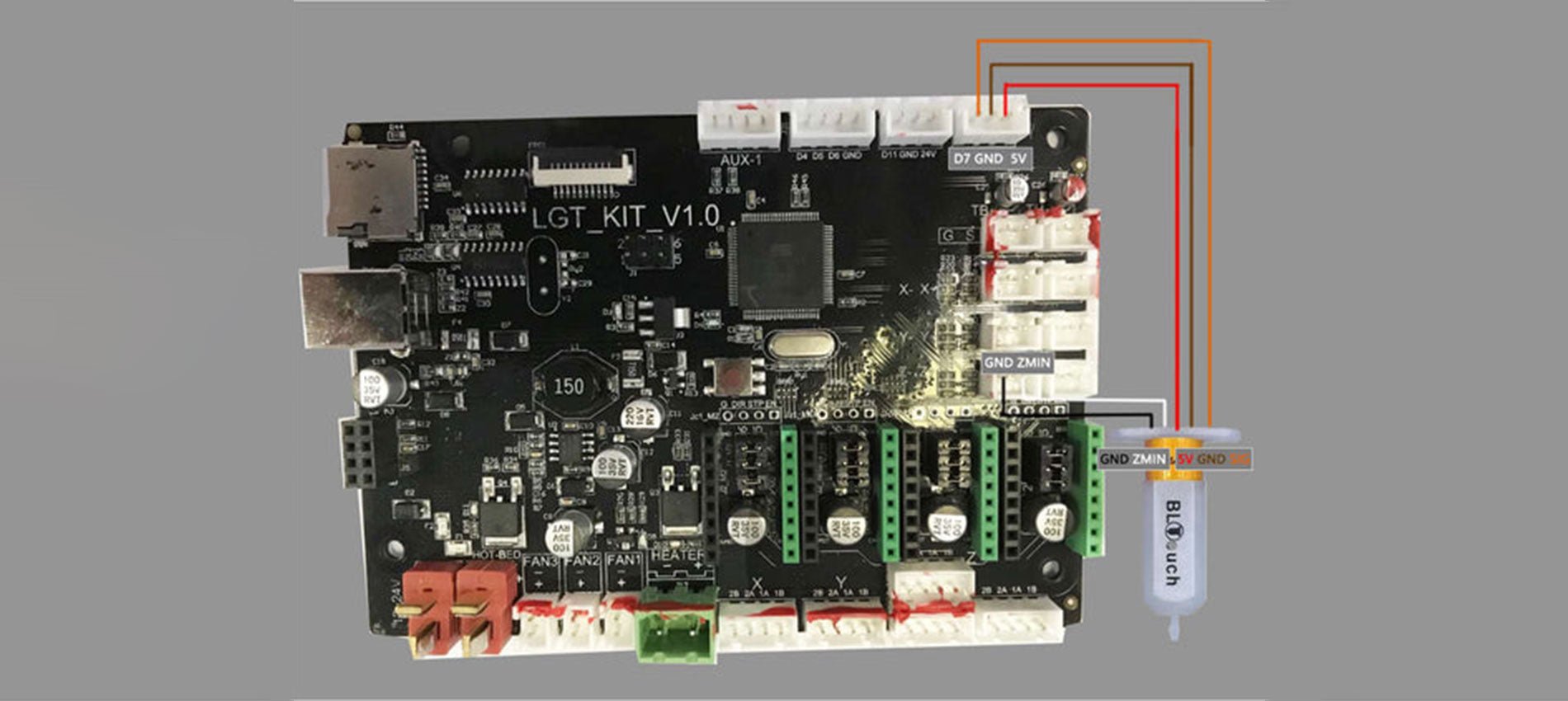
  3. Unplug the Z-MIN wire (2-pin) from the mainboard
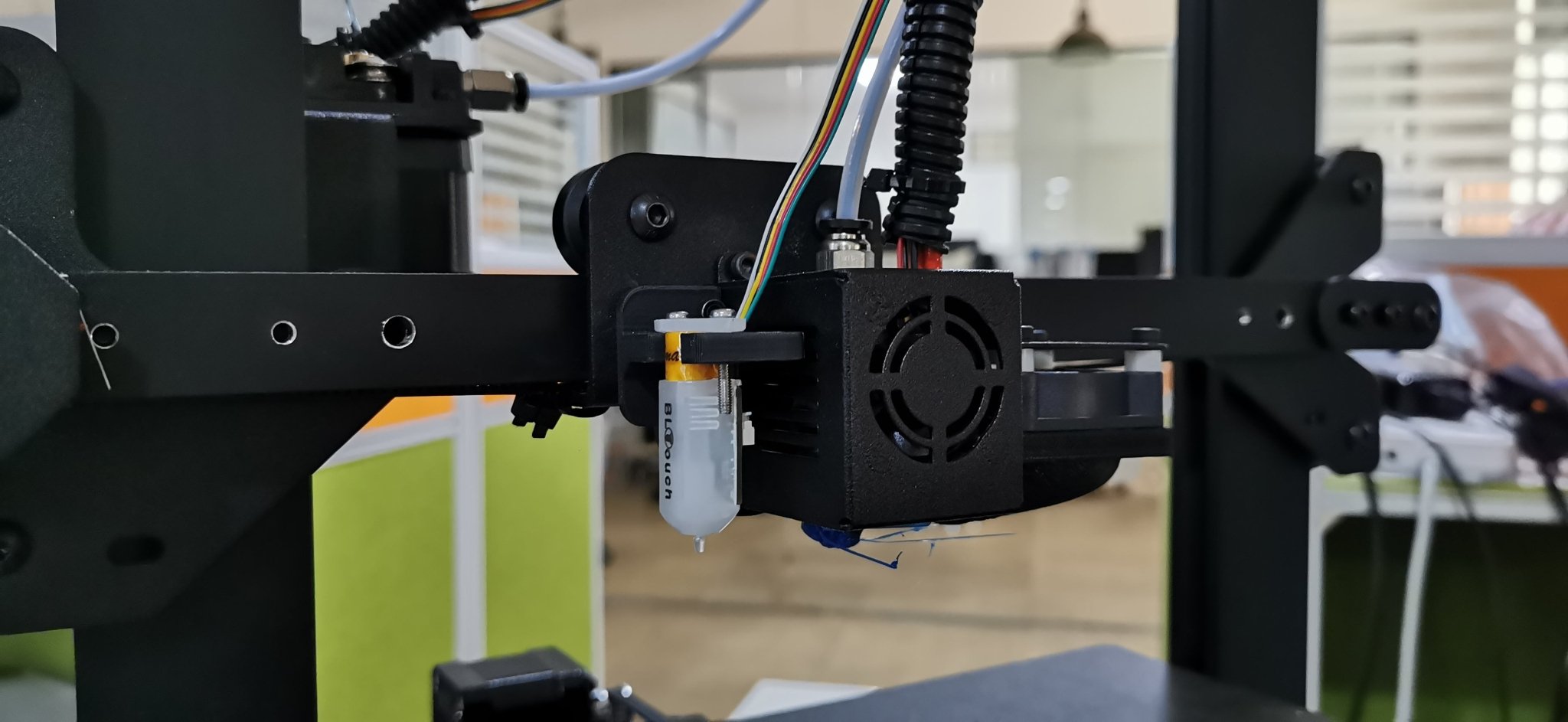
  4. Connect the sensor's cables to the motherboard, as the picture below shows.
    Connect the sensor's cables to the motherboard
  5. Screw up the mainboard cover
  6. Remove the Z endstop switch, as picture showing below
    Remove the Z endstop switch
  7. Screw down the left 2 screws of the printhead module and mount the BL-TOUCH as picture showing below (follow the same step if you have DualBlower)
    Screwdown left 2 screws of PrintHead module and mount the BL-TOUCH

Configuration

  • Confirm BL-TOUCH wiring and mounting is complete
  • Power ON the printer
  • Connect PC and printer with the modified USB cable.
  • Open Pronterface software, select serial port (115200 baudrate) and connect it to the printer

Adjusting Z-Offset

  1. Clean up bed and nozzle, and ensure no materials stick on 
  2. Send M851 Z0 to reset Z offset value.
  3. Send G28 to home XYZ axis
  4. Send G1 F60 Z0 to lower Z axis to the software origin. 
  5. Send M211 S0 to inactivate software endstop function
  6. Place a sheet of paper (0.10 mm approximately) on the bed and use Pronterface to lower the nozzle 0.1 mm by 0.1 mm until you feel friction between the nozzle and the sheet of paper (the paper is not to be jammed but not too free either). Then remove the sheet
  7. Send M114 to get the current Z height value (usually negative) and take note of it. This is the z-offset value we need
  8. Send M851 Z-x.x to set z-offset. (x.x is the value of previous value; for example, if previous value is -1.2, then send M851 Z-1.2.)
  9. Send M500 to save current settings
  10. Send M211 S1 to reactivate software endstop function. 
  11. Send G28 to home XYZ axis
  12. Send G1 F60 Z0 to test if the Z axis could go back to the actual Z origin by checking the clearance between the bed and the nozzle if it is about 0.1 mm (the thickness of a sheet of paper). If not, please repeat steps from 1 to 11.

START GCODE replacement

Inside the Slicer software (Cura, Slic3r, Simplify3D), replace the original START GCODE with the following START GCODE for BL-TOUCH.

-- BL-TOUCH START GCODE --
G21; metric values
G90: absolute positioning
M82: Set extruder to absolute mode
M107: start with the fan off
; confirm BL-touch safety
M280 P0 S160 ; BL-Touch Alarm release
G4 P100 ; Delay for BL-Touch homing
G28 X0 Y0 ; move X/Y to min endstops
G28 Z0 ; move Z to min endstops
; reconfirm BL-touch safety
M280 P0 S160 ; BL-Touch Alarm Release
G4 P100 ; Delay for BL-Touch
; bed leveling
G29: Auto leveling
M420 Z5 ; set LEVELING_FADE_HEIGHT
M500: save data of G29 and M420
M420 S1 ; enable bed leveling
; prepare hot-end
G92 E0 ; Reset Extruder
G1 Z2.0 F3000 ; move the Z Axis up little to prevent scratching of the heat bed.
G1 X0.1 Y20 Z0.3 F5000.0 ; Move to start position

G1 X0.1 Y150.0 Z0.3 F1500.0 E15 ; Draw the first line

G1 X0.4 Y150.0 Z0.3 F5000.0 ; Move to side a little

G1 X0.4 Y20 Z0.3 F1500.0 E30 ; Draw the second line

G92 E0 ; Reset Extruder

G1 Z2.0 F3000 ; move the Z Axis up little to prevent scratching of the heat bed.

G1 X5 Y20 Z0.3 F5000.0 ; Move over to prevent blob squish
; -- end of BL-TOUCH START GCODE -- 

By Academy | August 23, 2023
Differences between PETG and PLA in FDM 3D Printing - LONGER
Differences between PETG and PLA in FDM 3D Printing

In general, the choice between PETG and PLA depends on the specific needs of the 3D printing you intend to do. If you want greater impact resistance, flexibility, and chemical resistance, PETG may be your best choice. Instead, if you want a cheap, easy-to-print, and biodegradable material, PLA may be the best choice. In particular, PETG is a very resistant and flexible filament, ideal for printing large-volume objects and resistant to the effects of chemicals such as acids and alkalis; moreover, compared to PLA, PETG is more resistant to heat and less fragile, so it is great for making prints that will be placed outside and exposed to sunlight.

PETG is a copolymer that combines the properties of PET and glycol. The addition of the latter reduces the problems of overheating of PET and, consequently, increases its resistance. For these reasons, PETG is one of the most commonly used filaments and is an excellent choice for printing parts subjected to mechanical stress and heat; moreover, PETG has an almost absent odor during printing, even if it is a material derived from petroleum and therefore not biodegradable.

PLA is a lactic acid polymer and was the second bioplastic marketed and sold on a large scale. It derives from the milling of corn and is to be considered biodegradable, even if it requires precise conditions to trigger the decomposition process. PLA has some advantages over PETG, such as greater ease of printing, greater rigidity, better surface quality, and lower cost, although it fears heat and weathering.

Therefore, summarizing the advantages of PETG over PLA, here is a list of technical characteristics:

  • Impact resistance: PETG is more impact resistant than PLA. This means that PETG is less likely to break during use.
  • Flexibility: PETG is more flexible than PLA, which makes it better for printing parts that require a certain amount of flexibility or need to resist warping.
  • Chemical resistance: PETG has higher chemical resistance than PLA, which makes it more suitable for printing parts that come into contact with chemicals or solvents.
  • Ease of printing: PETG is easier to print than other materials such as ABS and nylon but offers very similar characteristics to these. However, compared to PLA, PETG is more difficult to print.
  • Temperature resistance: PETG has greater temperature resistance than PLA and can withstand higher temperatures without deforming or losing its shape.
  • Weather resistance: PETG is more weather resistant than PLA, which makes it more suitable for printing parts for outdoor use.
  • UV light resistance: PETG has greater resistance to UV light than PLA. This means that PETG is less susceptible to yellowing or degradation caused by exposure to UV light.
  • Dimensional tolerance: PETG has a higher dimensional tolerance than PLA. This means that PETG molded parts can have higher dimensional accuracy than PLA.

In general, PETG is a versatile and durable material that can be used for a wide range of applications. However, like any material, it also has some disadvantages, such as the need to use higher printing temperatures than PLA and a greater propensity to create stringing filaments. In addition, PETG may require more attention in the preparation of the print bed and in the calibration of the printer than PLA; however, if you choose PETG and take all the precautions seen in a previous article, the printing result can be of high quality.

In conclusion, both materials have their advantages and disadvantages, and the choice depends on the specific needs of the project. When choosing between PETG and PLA, it is important to consider the strength, flexibility, chemical resistance, ease of printing, heat resistance, weather resistance, durability, availability, cost, sustainability, color, appearance, and specific applications of the project you want to achieve.

https://www.longer3d.com/products/lk5-pro-fdm-3d-printer

By Academy | March 28, 2023
PETG 3D Printing in FDM - LONGER
PETG 3D Printing in FDM

Longer FDM 3D printers are capable of printing PETG with high quality. This type of material offers many advantages, as it can be printed as easily as PLA but is as durable as ABS.

To 3D print the PETG, you need to make sure that the 3D printer is set up correctly to print the PETG. This includes material selection, nozzle and hotbed temperature, extrusion speed, and other settings related to print quality. In addition, when printing PETG, it is recommended to always keep an eye on the press to make sure that everything goes according to plan and that there are no problems.

The recommended parameters for printing with PETG in 3D may vary depending on the 3D printer, the type of PETG purchased, and the project you want to carry out. However, here are some common printing parameters for PETG:

  • Extrusion temperature: 220°C – 250°C
  • Bed temperature: 70°C – 90°C
  • Print speed: 40 mm/s – 80 mm/s
  • Fan speed: 0% - 30%
  • Retraction distance: 4 mm–8mm
  • Retraction speed: 30 mm/s – 40 mm/s
  • Layer height: 0.2 mm

Keep in mind that these are only basic values, and small adjustments may be necessary to achieve the best results based on your specific needs. In fact, there are a few other factors that could affect printing with PETG:

  • Adhesion to the bed: it may be useful to use an adhesive solution to be affixed to the glass or a latex/PEI top to increase the adhesion of the material to the printing bed.
  • Fan cooling: it is important to keep the fan off or at a minimum to cool the newly extracted material, as cooling too fast can cause warping and weakening of the structure.
  • Extrusion: It is important that the extruder is able to extrude a constant amount of material during printing, so the temperature must be set high enough.
  • Bed leveling: A well-leveled bed can ensure that the model has an even base and that there are no detached parts during printing.
  • Speed: Printing speeds that are too fast can cause warping or adhesion effects. Adjust the print speed to achieve a balance between quality and print time.
  • Temperature: Extrusion temperature can affect material properties, such as flexibility and strength. Make sure the temperature is high enough to ensure good extrusion but not too high to cause other problems.
  • Print bed cleaning: Make sure the print bed is clean and free of dust or other things that could affect material adhesion.

These are just some of the factors that can affect printing with PETG. It is advisable to do some tests to understand which combination of parameters works best for your 3D printer and for your specific project. In addition, it is important to use a quality material and store it correctly, since PETG can be sensitive to changes in temperature and humidity; therefore, it is necessary to store the filament in an airtight container along with a silica bag to maintain the quality of the material. In general, the key to successful printing with PETG is to experiment and optimize printing parameters according to the specific needs of the project. However, once you have learned how to 3D print PETG, this is a material that allows you to create resistant, flexible, and quality objects. For best results, it's important to follow recommendations on printing parameters, such as temperature, speed, and media usage, and pay attention to design and post-processing details.

https://www.longer3d.com/products/lk5-pro-fdm-3d-printer

By Academy | March 28, 2023
FDM 3D Printers – 24V vs 12V - LONGER
FDM 3D Printers – 24V vs 12V

FDM 3D printers on the market usually work at 12V or 24V. The choice is made based on the characteristics of the product, the type of user to whom it is intended, and also the production costs; however, even if the operation of a printer is identical, regardless of the working voltage, there are clear differences depending on whether the operation is based on 12V or 24V.

In physics, it is shown that the electric power (Watt) is the multiplication between the voltage (Volt) and the intensity of electric current (Ampere), i.e. P = V * I ; therefore, with the same power, as the voltage increases, the current decreases (and vice versa). In addition, the charge carriers that make up the electric current generate heat by moving inside the conductors, so the higher the current intensity, the greater the charge carriers, the greater the heat that develops. In fact, for this reason the power lines that transport electricity from one part of the various continents and nations to another operate at high voltage, as this allows the use of cables of lesser thickness (less passage of current) with the same power supplied; then, only locally the transport takes place at domestic voltage (110V / 230V), so as to be compatible with domestic electrical equipment.


Based on these premises, it becomes much easier to understand that an FDM 3D printer operating at 24V can have the following advantages:

  • to heat a Hotend with a resistor of 40W are sufficient only 1.67A (against the 3.33A needed at 12V)
  • to heat a Hotbed with a resistor of 180W are sufficient only 7.5A (against the 15A needed at 12V)

This means less heating of the cables and connectors on the mainboard, minimizing the risk of connector fire and overheating of the mainboard's smd components, resulting in irreversible damage.


For these reasons, Longer FDM 3D printers operate at 24V so that we can offer all customers the best possible product.

 https://www.longer3d.com/products/lk5-pro-fdm-3d-printer

By Academy | March 28, 2023
Hotends comparison - MK8 vs V6 - LONGER
Hotends comparison - MK8 vs V6

The Hotend is the part of an FDM 3D printer that deals with the melting and deposition of molten plastic material. Therefore a Hotend is composed of a Nozzle that deals with depositing the molten material, a Heatblock that deals with the melting of the material, and a Heatbreak that keeps the hot zone separate from the cold area of the Hotend. The Heatbreak can be equipped with a Heatsink, equipped in turn with a fan.

Hotends come in various shapes and sizes, however common and popular types are the Hotend MK8 and Hotend e3d V6.


Hotend MK8

The Hotend MK8 are composed of Nozzle, Heatblock, Heatbreak and Heatsink, and provide for the insertion of the PTFE tube in beat with the nozzle. This implies that the PTFE tube is inserted inside the Heatbreak, then the filament flows inside the PTFE tube and reaches the nozzle directly, without intermediate zones.


The PTFE tube, in the part in contact with Nozzle and Heatblock, tends to reach the same melting temperature set for the filament, however this is not a problem as PTFE supports temperatures up to 300 C very well, well beyond the normal printing temperatures of PLA, PETG and ABS. On the other hand, the higher the printing temperature, the greater the amount of heat that the Heatbreak must dissipate; in fact, when the heat is not dissipated properly, it tends to rise inside the PTFE causing the filament to melt in areas far from the Nozzle, resulting in obstructions that prevent the filament from passing. For this reason, it is necessary to accompany the Heatbreak with a heatsink heatsink with fan, in this way the heat passage is quickly interrupted.

The Hotend MK8 is ideal for printing most filaments, however for printing more technical materials it may be unsuitable. In fact, printing filaments that require a high temperature, such as polyamide (nylon), also require a large dissipation capacity; however, the structure of the MK8 Heatsink is not able to dissipate much heat, moreover the PTFE tube present inside the Heatbreak also begins to lose its characteristics, thus causing obstructions.


Hotend e3d V6

The Hotend e3d V6 are composed of Nozzle, Heatblock, Heatbreak and Heatsink, and provide both the insertion of the PTFE tube in batting with the nozzle and the PTFE tube in batting with the Heatbreak. This implies that the PTFE tube is inserted inside the Heatbreak, then the filament flows inside the PTFE tube and reaches the nozzle directly, without intermediate zones, or the PTFE is beaten at the entrance of the Heatbreak and the filament passes through an all-metal area before reaching the nozzle. Therefore, the Hotend e3d V6 provides two different configurations of Heatbreak, or the classic Heatbreak with PTFE or a Fullmetal Heatbreak.


The Hotend e3d V6 has an improved heatsink, with a larger dissipative surface, so it is ideal for printing most filaments, including printing more technical materials. In fact, even the printing of filaments that require a high temperature, such as polyamide (nylon), can be performed thanks to the great dissipation capacity; moreover, if the temperature is excessive for the PTFE tube present inside the Heatbreak, then it is possible to use a Fullmetal Heatbreak that does not suffer from temperature problems.


Unfortunately, due to its large size, it is often very difficult to install a Hotend e3d V6 on smaller printers, for this reason the default installation of a Hotend MK8 is often preferred, which is able to perform almost any printing option for common users with a small footprint.

 https://www.longer3d.com/products/lk5-pro-fdm-3d-printer


By Academy | March 28, 2023
The Truth about FDM 3D Printer in Real-World Business - LONGER
The Truth about FDM 3D Printer in Real-World Business

When we talk about FDM 3D Printing as a whole, the question that troubles most people is whether these printers are practical enough to be used for real-world operations. To tackle these concerns, we'll be looking at what FDM 3D printing is and whether or not it's suitable for your business, in particular.

What is FDM 3D Printing?

Fused Deposition Modeling is a process that involves heating up the filament and depositing it in layers on a build platform. This process allows for the creation of complex shapes and structures with high accuracy and detail. FDM 3D printing can be used for a variety of applications ranging from prototyping to product manufacturing.

FDM 3D printing can be used to create parts for prototypes, end-use products, or even customized items such as jewelry or toys. With the help of this technology, businesses are able to reduce their production costs while creating high-quality products with greater efficiency.

What are the Differences between FDM Printing and SLA Printing?

3D printing technology has revolutionized the way products are designed and manufactured. Two of the most popular 3D printing technologies used today are FDM printing and SLA printing. While both technologies have their advantages and disadvantages, it is not easy to determine which one is better for a particular application.

Fused Deposition Modeling (FDM 3D Printing) involves melting a plastic filament material through a heated nozzle and then depositing it in layers to build up an object. This type of 3D printing is fast, cost-effective, and can be used to produce complex shapes with high accuracy.

It is being used in a wide range of industries, such as automotive, aerospace, medical, consumer goods, and many more. With its increasing popularity, FDM 3D printing is becoming one of the most popular ways to create customized parts or objects quickly and efficiently.

On the contrary, SLA 3D printing is a revolutionary technology that has changed the way we produce products. It is a type of 3D printing process that uses a laser to cure liquid resin layer by layer, creating complex and detailed objects with high accuracy and surface finish.

Although both printing technologies are efficient in working, deciding which one will work best for you depends entirely on what outcome you are expecting.

Is FDM Printing Practical for Real-World Operations?

3D printing technology has completely changed the way we create and manufacture products. It has allowed us to print complex shapes and structures with precision and accuracy, making it a perfect choice for a variety of applications. FDM printing, in particular, is being used more and more in real-world operations due to its cost-effectiveness, speed, and scalability.

This technology has a lot of advantages over other 3D printing methods, such as its low cost and ease of use. However, there are some drawbacks to consider when deciding if FDM printing is right for your operations. The upsides and downsides have been discussed ahead.

The Perks of Utilizing FDM 3D Printing

FDM 3D printing offers a range of benefits for businesses of all sizes, from medium-scale startups to large corporations. The most significant perks of utilizing FDM 3D printing include faster production times, improved product quality, and cost savings. With FDM 3D printing, businesses can quickly create complex designs with intricate detail and accuracy while still keeping costs low.

Additionally, the technology can be used to produce highly customized products that meet specific customer requirements. By leveraging FDM 3D printing, businesses can take advantage of its many benefits and gain a competitive edge in their respective markets.

From cost savings to faster production times, FDM 3D printing can help you streamline your manufacturing process and produce quality products in less time.

The Downsides of Utilizing FDM 3D Printing

FDM 3D printing has become an increasingly popular technology for a variety of uses, from prototyping to end-use parts. While it offers many advantages, there are some downsides that should be taken into consideration when utilizing this technology. These include the high cost of materials, the slow printing speed, and the limited accuracy of parts produced.

But, all these drawbacks are concerned with the expertise of practitioners. If you are a pro in handling the printer, you can do wonders with it. Even beginners can also come up with excellent results, if they go through the detailed how-to guide for using it. Another factor contributing to these drawbacks is the quality of your FDM 3D printer. If you are using one sourced from inexpensive and unreliable manufacturer, you should expect to face these cons.

The Truth about Getting an FDM 3D Printer: Is it Worth It?

With the rise of 3D printing technology, more and more people are turning to FDM 3D printers to create custom objects. But is it actually worth getting one? FDM 3D printers offer a lot of advantages over traditional manufacturing methods, including cost savings, speed, and convenience. FDM 3D printers are now more accessible than ever.

Getting an FDM 3D printer also depends on your individual needs and goals. For example, if you need to make small-scale prototypes or models for your business, then an FDM 3D printer can be a great investment.

Worried About Getting an Effective 3D Printer: Longer May Have Just What You Need

If you're looking for an effective 3D printer that can do the job right, then you need not worry anymore. Longer has just what you need to get your 3D printing projects done quickly and efficiently.

From powerful desktop models to large-scale industrial machines, including FDM 3D Printers and Resin Printers, Longer offers a variety of options that will help bring your ideas to life. Therefore, if you're on the lookout for a dependable FDM 3D printer that won't break the bank, then Longer is the perfect choice for you.

Some of our top picks from their top-notch collection include the FDM 3D Printers, LK5 PRO, LK4 PRO, LK1, etc., and Resin Printers, Orange 4K, Orange 30, and Orange 10.

Conclusion

Ultimately, the decision of whether or not it's worth getting an FDM 3D printer will depend on what kind of projects you plan on using it for. FDM 3D printers offer many advantages over other types of 3D printing technology.

They are affordable, easy to use, and can produce high-quality prints with a variety of materials. They also have a wide range of uses, from prototyping to production parts and even home decor items.

https://www.longer3d.com/products/lk5-pro-fdm-3d-printer

By Academy | February 10, 2023
Is FDM 3D Printer the Best Gadget for Beginners? - LONGER
Is FDM 3D Printer the Best Gadget for Beginners?

Technology is constantly evolving and thus is reflected in the improvement of printing. As of now, 3D printing has been the talk of the town. The majority of individuals today rely on the advanced technology of this 3D Printing approach.

3D printers have ushered in a new era in the industrial business. They have practically limitless options for the goods they generate. Out of several 3D printing techniques, FDM has taken over the 3D printing industry by storm. What better time to start learning more about FDM than now?

This article will take you through why and how novice users can efficiently operate FDM, put it to use, and enhance their marketing tactics.

What is FDM 3D Printer?

In 1980, FDM (Fused Deposition Modelling) was introduced. As you are aware, a typical printer creates images one line at a time. FDM printers are identical, except that they generate images in three dimensions rather than simply two. One layer of your substance is laid on top of another until you have achieved the masterpiece.

The sector, primarily mass media, portrays 3D printing as a pristine and modern tech capable of replicating complicated products. However, because of this, defining 3D printing is incredibly difficult. In truth, there are different 3D printing technologies, but FDM (fused deposition modeling), the subject of this article, is the most popular.

FDM is a method of additive manufacturing that heats and melts a plastic filament coiled over a spindle roll into liquid. This liquid is then stretched across a surface known as the build platform.

You may have encountered the term FFF (Fused Filament Fabrication). FDM and FFF employ the same technique but depict it in two different ways, often confusing those new to the 3D printing sector. The proprietor of FFF later trademarked the name FDM.

What to Know about the Working of FDM 3D Printers?

What material is utilized to execute FDM? All you need is thermoplastic, renowned for being pliable when heated. This feature allows each layer to adhere to the others during the creation process. With so many different types of thermoplastic available, you may choose one that meets your preferences.

To keep the material from spilling over, you must add stability, which is entirely dependent upon the size and shape of the piece. The fascinating part is that FDM can also generate these supports. You may also lift your game by adding water-soluble support materials to hold your design intact.

Reasons FDM 3D Printer Is the Best for Beginners

Although FDM is the most prevalent type of 3D printing, you should grasp why it is the ultimate for newbie users or whether it is the perfect method for your purposes. Here's everything you need to know!

1. Accessibility

Overall, what is the most well-known feature of each item for the industry depart? It's all about accessibility! Today, there is a 3D printer for all, and FDM printers are marketed in all sectors.

Having all of this stated, it is evident that accessibility has been a critical component in the evolution of 3D printing, as well as one of its primary benefits generally. It gives the upper hand to beginners to easily purchase the equipment and set up their business.

2. Easy to Use

They are simple to use whether you buy or create your own desktop 3D printer FDM setup. Compared to other digital fabrication platforms, the workflow necessitates a relatively simple way to process and print an object. You can easily set up your FDM 3D printing setup and utilize it without causing any damage to your goods.

3. Give Your Creation a Geometric Freedom

When creating your masterpiece, think outside the box. One of the most significant benefits of FDM 3D printing is the capacity to create unique 3D shapes that would be challenging to produce with standard printing technologies.

The precise layering of the manufacturing stage allows a geometric shape to encompass all three axes. The previous approach to designing goods was guided by limited ways such as sculpting and forging. To harness this exceptional range of innovation, industry rookies should consider getting FDM 3D printer.

4. Personalization and Customization

One of the most obvious benefits of 3D printing is the ability to customize products. This versatility also enables large-scale manufacturing, in which customized items may be created while keeping the minimal costs related to mass creation.

This can be a crucial differentiator for many sectors and deliver good items for clients to enter the trade.

5. Financial Feasibility

3D printing is broadening the spectrum of systems and applications. The cost of production with 3D FDM printing gives you financial flexibility and allows you to spend less on generating a quality product. You can easily rank in business if you spend on this approach.

6. Endless Possibilities

The possibilities and applications of an FDM 3D Printer are limitless. This printing is popular among amateurs and may be used in various fields, such as dentistry and aeronautics.

Where Can I Get this High-Quality FDM 3D Printer?

As FDM 3D printers become a more innovative technology in the printing industry, you may be asking where you should get yours. Let us reveal the top-tier company group that operates in the 3D printing market, LONGER 3D. It is a well-known brand with years of experience in the filed. The Longer 3D team is dedicated to providing its customers with high-quality items and the most outstanding service in town.

LONGER LK5

For beginner, their LK5 PRO, LK4 X, and LK4 PRO are the best choices. These come with easy-to-handle controls and are much convenient to use. Read the manual once and you are all set to make your own 3D models.

Final Thoughts

These 3D printing novel ways exist in a fast-paced world where new technology, equipment, and systems are being developed daily. The FDM 3D printer's efficiency, limitless applicability, accessibility, and geometric flexibility are the key features that make it ideal for beginners. Because of these characteristics, FDM 3D printing technology is widely used in industries ranging from medicine to aircraft manufacturing.

If you want to get yours right away, the ideal brand is Longer 3D, which will meet all your requirements. Check out their website to know more about it!

https://www.longer3d.com/products/lk5-pro-fdm-3d-printer

By Academy | February 10, 2023
How to Make Perfect 3D Objects Using FDM 3D Printer - LONGER
How to Make Perfect 3D Objects Using FDM 3D Printer

3D printing has become quite popular in the last few years to make complex shapes allowing new possibilities in many industries. Significant impacts are seen in industry, medicine, agriculture, and many other fields. According to results from research, up to 98.81% accuracy is achieved with commercial FDM printers. Is it easy to achieve an outstanding quality such as this?

Many factors can help you achieve high quality and an accuracy of almost 99% through the tips and tricks mentioned in this article. Without further delays, let’s hope on!

Choosing the Right Material

The suitable material is a defining quality and expense for the model you need. You can choose any material, but assessing the design’s purpose will save you time and money. Explore all possible options and experiment a little to enhance your capability.

PLA – Polylactic Acid is one of the most common materials for FDM 3D printing because of its rigidity and brittleness. Use it for ornamental models or if you want to learn more about 3D printing as a starter, as it is easier to build.

ABS – Acrylonitrile Butadiene Styrene, stronger but challenging to build, ideal for functional parts. So, choose it as such because it is inflexible.

PETG – Polyethylene Terephthalate is stronger than PLA and more flexible than ABS. Perfect for outdoor models as it has good chemical resistance.

Nylon – Strongest and most flexible, suitable for tools and functional parts because it is durable.

Take Care of Filaments

Store your filament spools properly and keep them wound at all times. Any careless knots or breaks can cause clogging in the extruder and damage in printing.

Consider storage space if you keep a few spools for backup and free of humidity. You don’t want your feed to go stale so keep absorbents or air jar containers. We also recommend using Filament Filters to keep your spools clean and oiled.

Split Your Models

The best complexity is the simplest. You can save tons of time and cost if you work on that. Splitting your model into two or more parts can save much material on supports and be made individually. After you are done with parts, you can join them together quickly afterward.

 How to Make Perfect 3D Objects Using LONGER FDM 3D Printer - LONGER 3D

Paying Attention to Detailing is Paramount

Depending on the size of your FDM printer and the material used, your design will always have limitations. You should not reduce the thickness of the model’s walls to less than 1mm, making it safer for FDM printed designs. The more complex the shape, the more safety cushion you require. Furthermore, you need more space between interlocking parts. Anything higher than 0.4mm is considered safe.

Strong Models Require Stress Distribution and Analysis

Take a look at the image below. The one on the left is more prone to failure if force is applied to either end. The model on the right has a brace to support both legs of the angle, supporting it. Most slicer and 3D designers in the market allow you to analyze your model based on different preferences. Learn to use them and fix errors in your 3D models as they come along.

 How to Make Perfect 3D Objects Using FDM 3D Printer - LONGER 3D 2

Orientations of Holes in Your Models

As we discussed above regarding splitting the model and allowing bracing, managing holes orientation is also essential. The model on the left requires support as the top arm can bend under the weight. Your printer can easily print the hole on the right with a vertical axis orientation. A simple rotation does the trick.

 How to Make Perfect 3D Objects Using FDM 3D Printer - LONGER 3D 3

Now, if you have multiple holes in different directions and orientations, here is what you should do. Prioritize the blind holes first. When they are covered, you can prioritize smaller holes, so they don't get smothered under the wait. Lastly, you must consider which hole is more critical to the model design and work from there.

Managing The File’s Polycount

Make it easier for your printer when it comes to the polycount of your design. You don’t want a processing nightmare for an intricately designed model. Keep the polycount as low as possible, or split the model to keep the polycount in check.

Following Guidelines for Working Temperature

Each filament type and manufacturers have different recommendations for extrusion temperatures. Please follow those suggested temperatures with a buffer of 10 degrees higher or lower. Significant changes can cause lower-quality FDM outputs. You don’t want your model to have wrinkles, spilling, or sticking where not needed.

 How to Make Perfect 3D Objects Using FDM 3D Printer - LONGER 3D 4

The platform should be heated adequately to allow the print to stick with it and give the printing parts above sturdiness.

Choosing the Best Printer and Manufacturer

This is the most critical part. Your tools are what makes or break your design. You should not spend on an expensive machine which isn’t up to the mark. If you are new to 3D printing, why not consider optimal-priced 3D FDM printers?  

The LK5 Pro FDM printer from Longer has sufficient spacing to allow for larger designs, as it also has an upgraded dual blower kit. You can also choose the LK4 X FDM printer with a direct dual-gear extruder.

LONGER LK5 Pro

Talking to the manufacturers or getting recommendations from your friends and others in the field is always the best choice.

Epoxy Resin Coating for Strength

The strength of your 3D print is crucial, especially for functional tools. Epoxy resin coating after you are done printing can enhance the strength of your product. The coating adds a hard layer outside your print. It will also help hide all the layers and extrusions left on your surface due to supports and joints.

Best Practices for FDM 3D Printing

  • Don't let the bridge exceed 5mm as sagging may occur, or your supports can leave a mark in the end
  • You can drill into your vertical hole diameters if you want greater accuracy
  • Add supports if you consider making models with an angle higher than 45 degrees.
  • Include chamfers that are at 45 degrees angle for all the edges of your model that are touching the base/build plate of your FDM printer
  • Considering practices such as splitting model, the orientation of holes, and build direction can significantly influence the final build time and costs
  • https://www.longer3d.com/products/lk5-pro-fdm-3d-printer
By Academy | February 10, 2023