

Academy

TCHC TR6 Anti Leakage Hotend - LONGER
TCHC TR6 Anti Leakage Hotend

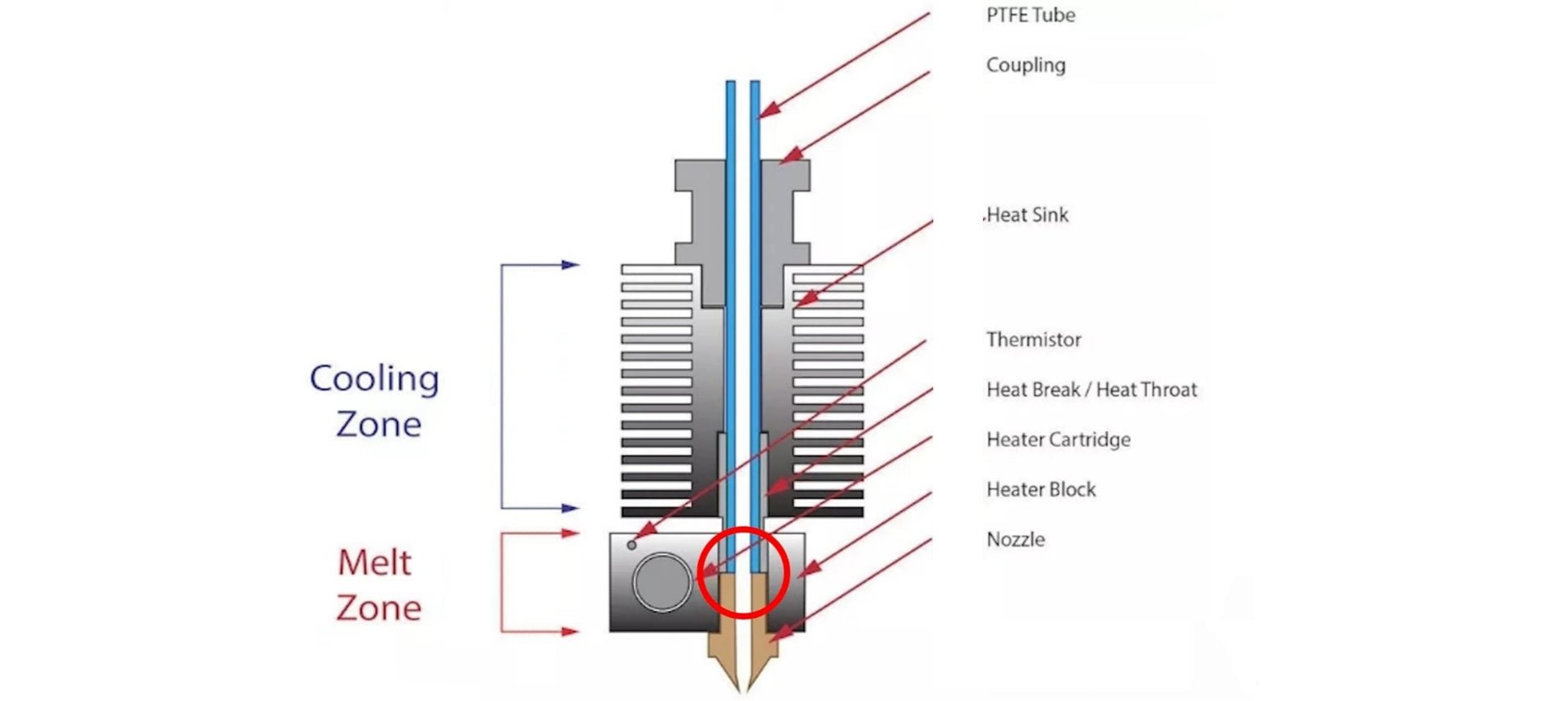
The Hotend is the part of an FDM 3D printer that deals with the melting and deposition of molten plastic material. A Hotend consists of a Nozzle that deals with depositing the molten material, a Heatblock that deals with the melting of the material and a Heatbreak that keeps the hot zone separate from the cold zone of the Hotend. The Heatbreak can be equipped with a heat sink, which in turn is equipped with a fan.

When assembling a Hotend, care must be taken to ensure that the PTFE tube is in beating with the Nozzle. This implies that the PTFE tube is inserted inside the Heatbreak, then the filament flows inside the PTFE tube and reaches the Nozzle directly, without intermediate zones; therefore, it is essential that the PTFE is tightly tightened and joined to the Nozzle, so that the filament flows forcibly through the exit hole of the Nozzle. In the event that there is even a slight gap between PTFE and Nozzle, then leakages of molten filament from the top edge of the Heatblock can occur, causing fillings and damage to both the print and the printer.

TCHC TR6 Anti Leakage Hotend

In addition, the PTFE tube, in the part in contact with Nozzle and Heatblock, tends to reach the same melting temperature set for the filament, however this is not a problem as PTFE supports temperatures up to 300C very well before melting, well beyond the normal printing temperatures of PLA, PETG and ABS. On the other hand, the higher the printing temperature, the greater the amount of heat that the Heatbreak must dissipate; in fact, when the heat is not dissipated properly, it tends to rise inside the PTFE causing the filament to melt in areas far from the nozzle, resulting in obstructions that prevent the filament from passing. In addition, the PTFE tube inside the Heatbreak also begins to lose its characteristics, thus causing obstructions. For this reason, it is necessary to accompany the Heatbreak with a heatsink with fan, in this way the passage of heat is quickly interrupted.

TCHC TR6 Anti Leakage Hotend 1

To solve these two problems, you can switch to a Hotend like the Hotend Trianglelab TCHC TR6 Model B, which is a Hotend with Bi-Metal thin wall Heatbreak; in this way the PTFE tube is not in contact with the hot Nozzle, but stops high in the Heatsink, where the temperature is cold. Therefore, the filament passes from PTFE to Bi-Metal thin wall Heatbreak when it is still solid, and so leakages of molten material cannot occur. In addition, the Bi-Metal thin wall Heatbreak is welded inside the Nozzle already factory, and therefore it is not possible for losses of molten material between the Bi-Metal thin wall Heatbreak and the Nozzle.

TCHC TR6 Anti Leakage Hotend 2

With this type of Hotend it is therefore possible to definitively solve two problems that afflict users of a 3D printer, namely the leakage of molten material between PTFE and Nozzle, and the deformation of the PTFE tube due to the high temperatures reached during the printing of materials such as PETG / ABS / NYLON.

TCHC TR6 Anti Leakage Hotend 3

The Hotend Trianglelab TCHC TR6 Model B is the same size as the Hotend MK8 of the Longer FDM 3D printers, so the installation is very user friendly and plug & play. The new Hotend fits both the Longer Classic Printhead and the new Longer Dual Blower, although the Longer Dual Blower is recommended as it provides greater heat dissipation of the Heatsink, as it has a much larger fan than normal. For installation, simply remove the print head cover and the fans, then just unscrew the old Hotend MK8 and screw the new Hotend TCHC TR6 Model B. Instead, as regards the connection of the cables, simply connect the two white cables of the heating resistor to the HEATER port on the mainboard, instead or two black cables of the temperature sensor must be connected to the TH port of the mainboard. The most skilled and experienced users can simply cut the cables of the old Hotend and solder them to the cables of the new Hotend.

TCHC TR6 Anti Leakage Hotend 4

Once the assembly and calibration procedures have been completed, you can immediately proceed with printing. You may need to reduce the retraction values inside the slicer and adjust small settings, however 3D printing will be much easier and more enjoyable thanks to this anti-leakage and PTFE-free Hotend in the hot zone.
By Academy | October 8, 2023
Mesh Bed Levelling for LK4PRO & LK5PRO - LONGER
Mesh Bed Levelling for LK4PRO & LK5PRO

LO 

Some users of Longer FDM printers prefer to use a BL-TOUCH automatic leveling system in order to obtain more precise and higher quality prints, as well as making the printing bed leveling process easier and more immediate.

However, the standard automatic leveling procedure is for the BL-TOUCH sensor to remeasure the plane points before each new print. This procedure takes time, and is often useless, especially in the case of making daily prints, the print bed maintains calibration and the printer is never moved. If these conditions are met, then you can simply recall a previous plan mesh before starting a new print, without the need to create a new one.

If you want to print using the last saved mesh, simply change the START GCODE for BL-TOUCH to the following START GCODE:


-- BL-TOUCH START GCODE --
G21 ; metric values
G90 ; absolute positioning
M82 ; set extruder to absolute mode
M107 ; start with the fan off
; confirm BL-touch safety
M280 P0 S160 ; BL-Touch Alarm release
G4 P100 ; Delay for BL-Touch homing
G28 X0 Y0 ; move X/Y to min endstops
G28 Z0 ; move Z to min endstops
; reconfirm BL-touch safety
M280 P0 S160 ; BL-Touch Alarm realease
G4 P100 ; Delay for BL-Touch
; bed leveling
M420 S1 Z5 ; enable bed leveling
; prepare hot-end
G92 E0 ; Reset Extruder
G1 Z2.0 F3000 ; Move Z Axis up little to prevent scratching of Heat Bed
G1 X0.1 Y20 Z0.3 F5000.0 ; Move to start position

G1 X0.1 Y150.0 Z0.3 F1500.0 E15 ; Draw the first line

G1 X0.4 Y150.0 Z0.3 F5000.0 ; Move to side a little

G1 X0.4 Y20 Z0.3 F1500.0 E30 ; Draw the second line

G92 E0 ; Reset Extruder

G1 Z2.0 F3000 ; Move Z Axis up little to prevent scratching of Heat Bed

G1 X5 Y20 Z0.3 F5000.0 ; Move over to prevent blob squish
; -- end of BL-TOUCH START GCODE -- 


In this way, printing will start immediately, without mesh the print bed, using the last calibration made. However, sometimes you will need to create a new mesh, especially if the print plate has been moved or if the printer has been moved; in this case, simply create open "Notepad" on your laptop and paste the following GCODE:

; bed leveling
G28 X0 Y0 ; move X/Y to min endstops
G28 Z0 ; move Z to min endstops
G29; Auto leveling
M500 ; save data of G29 and M420
M420 S1 ; enable bed leveling

For last, save the file as levelling.gcode (be careful, do not save as .txt) and copy the GCODE you just created into the microSD of your printer. Whenever it will be necessary to calibrate the printing plate, simply start the GCODE from the printer display, like any other print file, and wait for the measurement to complete.


By Academy | August 23, 2023
BL-Touch Installing Guide for LK4PRO & LK5PRO - LONGER
BL-Touch Installing Guide for LK4PRO & LK5PRO

Longer LK4PRO & LK5PRO are two FDM printers capable of producing high-quality 3D prints. However, you can increase the ease and quality of printing by installing a BL-TOUCH or 3D-TOUCH compatible automatic leveling sensor.


Preparation

Wiring

  1. Switch-off the printer
  2. Find the position of motherboard, then screw down the mainboard cover
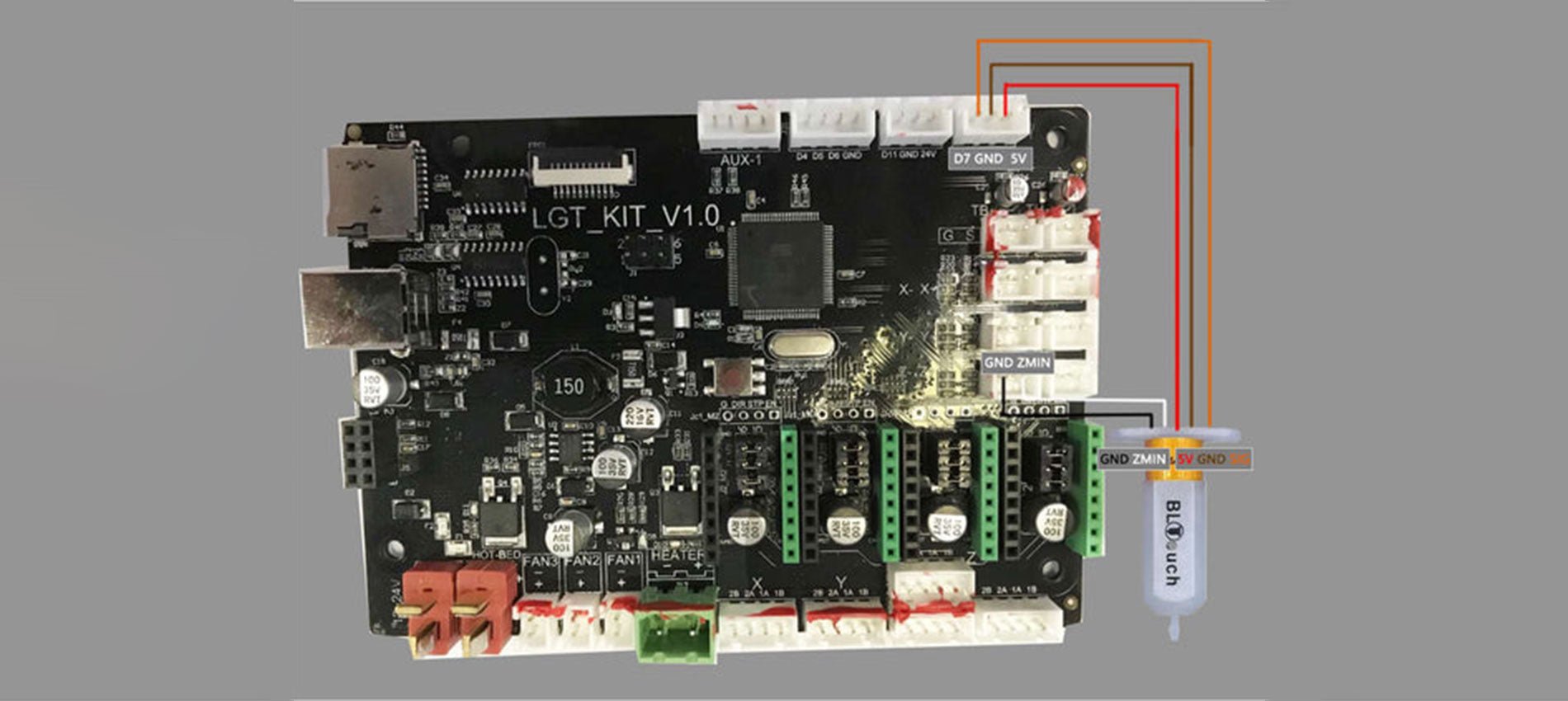
  3. Unplug the Z-MIN wire (2-pin) from the mainboard
  4. Connect the sensor's cables to the motherboard, as the picture below shows.
    Connect the sensor's cables to the motherboard
  5. Screw up the mainboard cover
  6. Remove the Z endstop switch, as picture showing below
    Remove the Z endstop switch
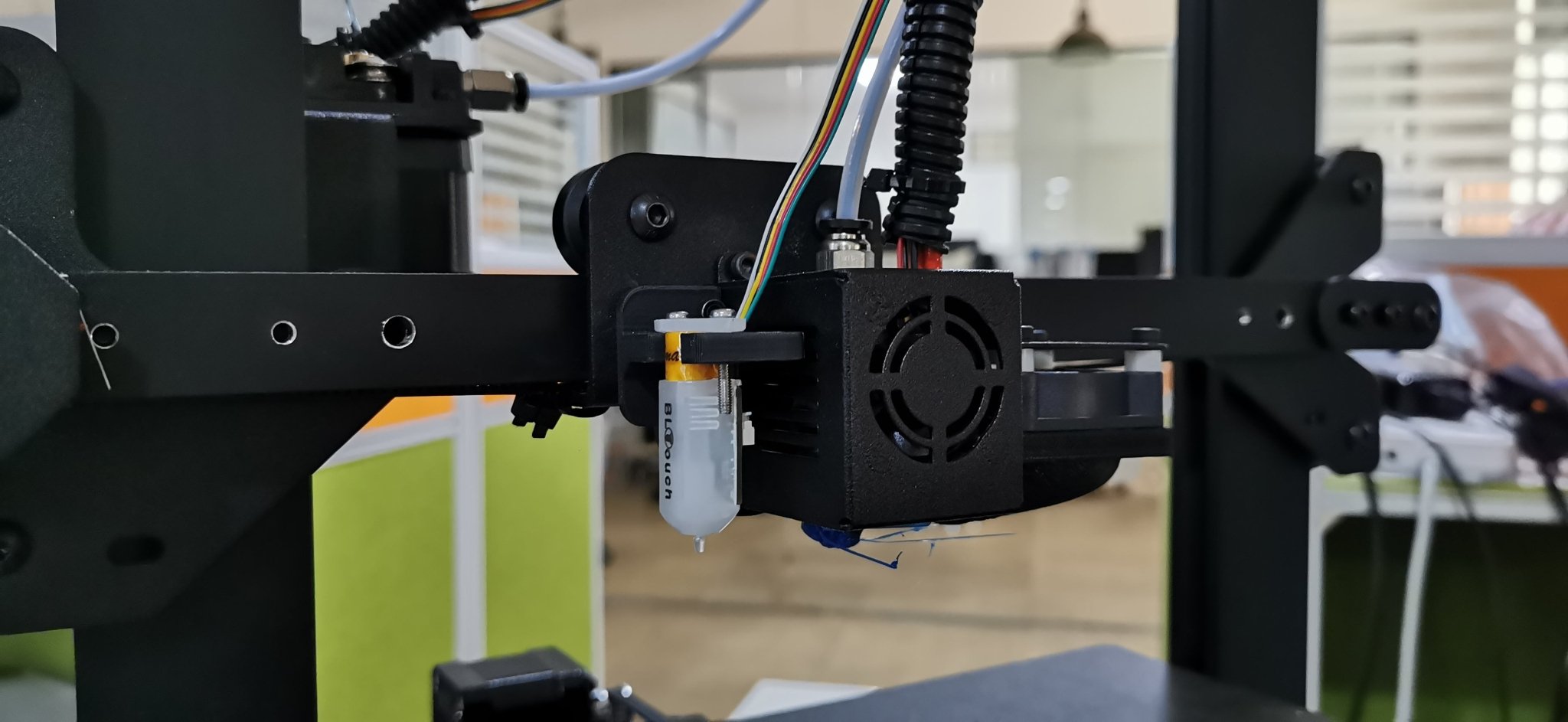
  7. Screw down the left 2 screws of the printhead module and mount the BL-TOUCH as picture showing below (follow the same step if you have DualBlower)
    Screwdown left 2 screws of PrintHead module and mount the BL-TOUCH

Configuration

  • Confirm BL-TOUCH wiring and mounting is complete
  • Power ON the printer
  • Connect PC and printer with the modified USB cable.
  • Open Pronterface software, select serial port (115200 baudrate) and connect it to the printer

Adjusting Z-Offset

  1. Clean up bed and nozzle, and ensure no materials stick on 
  2. Send M851 Z0 to reset Z offset value.
  3. Send G28 to home XYZ axis
  4. Send G1 F60 Z0 to lower Z axis to the software origin. 
  5. Send M211 S0 to inactivate software endstop function
  6. Place a sheet of paper (0.10 mm approximately) on the bed and use Pronterface to lower the nozzle 0.1 mm by 0.1 mm until you feel friction between the nozzle and the sheet of paper (the paper is not to be jammed but not too free either). Then remove the sheet
  7. Send M114 to get the current Z height value (usually negative) and take note of it. This is the z-offset value we need
  8. Send M851 Z-x.x to set z-offset. (x.x is the value of previous value; for example, if previous value is -1.2, then send M851 Z-1.2.)
  9. Send M500 to save current settings
  10. Send M211 S1 to reactivate software endstop function. 
  11. Send G28 to home XYZ axis
  12. Send G1 F60 Z0 to test if the Z axis could go back to the actual Z origin by checking the clearance between the bed and the nozzle if it is about 0.1 mm (the thickness of a sheet of paper). If not, please repeat steps from 1 to 11.

START GCODE replacement

Inside the Slicer software (Cura, Slic3r, Simplify3D), replace the original START GCODE with the following START GCODE for BL-TOUCH.

-- BL-TOUCH START GCODE --
G21; metric values
G90: absolute positioning
M82: Set extruder to absolute mode
M107: start with the fan off
; confirm BL-touch safety
M280 P0 S160 ; BL-Touch Alarm release
G4 P100 ; Delay for BL-Touch homing
G28 X0 Y0 ; move X/Y to min endstops
G28 Z0 ; move Z to min endstops
; reconfirm BL-touch safety
M280 P0 S160 ; BL-Touch Alarm Release
G4 P100 ; Delay for BL-Touch
; bed leveling
G29: Auto leveling
M420 Z5 ; set LEVELING_FADE_HEIGHT
M500: save data of G29 and M420
M420 S1 ; enable bed leveling
; prepare hot-end
G92 E0 ; Reset Extruder
G1 Z2.0 F3000 ; move the Z Axis up little to prevent scratching of the heat bed.
G1 X0.1 Y20 Z0.3 F5000.0 ; Move to start position

G1 X0.1 Y150.0 Z0.3 F1500.0 E15 ; Draw the first line

G1 X0.4 Y150.0 Z0.3 F5000.0 ; Move to side a little

G1 X0.4 Y20 Z0.3 F1500.0 E30 ; Draw the second line

G92 E0 ; Reset Extruder

G1 Z2.0 F3000 ; move the Z Axis up little to prevent scratching of the heat bed.

G1 X5 Y20 Z0.3 F5000.0 ; Move over to prevent blob squish
; -- end of BL-TOUCH START GCODE -- 

By Academy | August 23, 2023
Differences between PETG and PLA in FDM 3D Printing - LONGER
Differences between PETG and PLA in FDM 3D Printing

In general, the choice between PETG and PLA depends on the specific needs of the 3D printing you intend to do. If you want greater impact resistance, flexibility, and chemical resistance, PETG may be your best choice. Instead, if you want a cheap, easy-to-print, and biodegradable material, PLA may be the best choice. In particular, PETG is a very resistant and flexible filament, ideal for printing large-volume objects and resistant to the effects of chemicals such as acids and alkalis; moreover, compared to PLA, PETG is more resistant to heat and less fragile, so it is great for making prints that will be placed outside and exposed to sunlight.

PETG is a copolymer that combines the properties of PET and glycol. The addition of the latter reduces the problems of overheating of PET and, consequently, increases its resistance. For these reasons, PETG is one of the most commonly used filaments and is an excellent choice for printing parts subjected to mechanical stress and heat; moreover, PETG has an almost absent odor during printing, even if it is a material derived from petroleum and therefore not biodegradable.

PLA is a lactic acid polymer and was the second bioplastic marketed and sold on a large scale. It derives from the milling of corn and is to be considered biodegradable, even if it requires precise conditions to trigger the decomposition process. PLA has some advantages over PETG, such as greater ease of printing, greater rigidity, better surface quality, and lower cost, although it fears heat and weathering.

Therefore, summarizing the advantages of PETG over PLA, here is a list of technical characteristics:

  • Impact resistance: PETG is more impact resistant than PLA. This means that PETG is less likely to break during use.
  • Flexibility: PETG is more flexible than PLA, which makes it better for printing parts that require a certain amount of flexibility or need to resist warping.
  • Chemical resistance: PETG has higher chemical resistance than PLA, which makes it more suitable for printing parts that come into contact with chemicals or solvents.
  • Ease of printing: PETG is easier to print than other materials such as ABS and nylon but offers very similar characteristics to these. However, compared to PLA, PETG is more difficult to print.
  • Temperature resistance: PETG has greater temperature resistance than PLA and can withstand higher temperatures without deforming or losing its shape.
  • Weather resistance: PETG is more weather resistant than PLA, which makes it more suitable for printing parts for outdoor use.
  • UV light resistance: PETG has greater resistance to UV light than PLA. This means that PETG is less susceptible to yellowing or degradation caused by exposure to UV light.
  • Dimensional tolerance: PETG has a higher dimensional tolerance than PLA. This means that PETG molded parts can have higher dimensional accuracy than PLA.

In general, PETG is a versatile and durable material that can be used for a wide range of applications. However, like any material, it also has some disadvantages, such as the need to use higher printing temperatures than PLA and a greater propensity to create stringing filaments. In addition, PETG may require more attention in the preparation of the print bed and in the calibration of the printer than PLA; however, if you choose PETG and take all the precautions seen in a previous article, the printing result can be of high quality.

In conclusion, both materials have their advantages and disadvantages, and the choice depends on the specific needs of the project. When choosing between PETG and PLA, it is important to consider the strength, flexibility, chemical resistance, ease of printing, heat resistance, weather resistance, durability, availability, cost, sustainability, color, appearance, and specific applications of the project you want to achieve.

https://www.longer3d.com/products/lk5-pro-fdm-3d-printer

By Academy | March 28, 2023
PETG 3D Printing in FDM - LONGER
PETG 3D Printing in FDM

Longer FDM 3D printers are capable of printing PETG with high quality. This type of material offers many advantages, as it can be printed as easily as PLA but is as durable as ABS.

To 3D print the PETG, you need to make sure that the 3D printer is set up correctly to print the PETG. This includes material selection, nozzle and hotbed temperature, extrusion speed, and other settings related to print quality. In addition, when printing PETG, it is recommended to always keep an eye on the press to make sure that everything goes according to plan and that there are no problems.

The recommended parameters for printing with PETG in 3D may vary depending on the 3D printer, the type of PETG purchased, and the project you want to carry out. However, here are some common printing parameters for PETG:

  • Extrusion temperature: 220°C – 250°C
  • Bed temperature: 70°C – 90°C
  • Print speed: 40 mm/s – 80 mm/s
  • Fan speed: 0% - 30%
  • Retraction distance: 4 mm–8mm
  • Retraction speed: 30 mm/s – 40 mm/s
  • Layer height: 0.2 mm

Keep in mind that these are only basic values, and small adjustments may be necessary to achieve the best results based on your specific needs. In fact, there are a few other factors that could affect printing with PETG:

  • Adhesion to the bed: it may be useful to use an adhesive solution to be affixed to the glass or a latex/PEI top to increase the adhesion of the material to the printing bed.
  • Fan cooling: it is important to keep the fan off or at a minimum to cool the newly extracted material, as cooling too fast can cause warping and weakening of the structure.
  • Extrusion: It is important that the extruder is able to extrude a constant amount of material during printing, so the temperature must be set high enough.
  • Bed leveling: A well-leveled bed can ensure that the model has an even base and that there are no detached parts during printing.
  • Speed: Printing speeds that are too fast can cause warping or adhesion effects. Adjust the print speed to achieve a balance between quality and print time.
  • Temperature: Extrusion temperature can affect material properties, such as flexibility and strength. Make sure the temperature is high enough to ensure good extrusion but not too high to cause other problems.
  • Print bed cleaning: Make sure the print bed is clean and free of dust or other things that could affect material adhesion.

These are just some of the factors that can affect printing with PETG. It is advisable to do some tests to understand which combination of parameters works best for your 3D printer and for your specific project. In addition, it is important to use a quality material and store it correctly, since PETG can be sensitive to changes in temperature and humidity; therefore, it is necessary to store the filament in an airtight container along with a silica bag to maintain the quality of the material. In general, the key to successful printing with PETG is to experiment and optimize printing parameters according to the specific needs of the project. However, once you have learned how to 3D print PETG, this is a material that allows you to create resistant, flexible, and quality objects. For best results, it's important to follow recommendations on printing parameters, such as temperature, speed, and media usage, and pay attention to design and post-processing details.

https://www.longer3d.com/products/lk5-pro-fdm-3d-printer

By Academy | March 28, 2023
FDM 3D Printers – 24V vs 12V - LONGER
FDM 3D Printers – 24V vs 12V

FDM 3D printers on the market usually work at 12V or 24V. The choice is made based on the characteristics of the product, the type of user to whom it is intended, and also the production costs; however, even if the operation of a printer is identical, regardless of the working voltage, there are clear differences depending on whether the operation is based on 12V or 24V.

In physics, it is shown that the electric power (Watt) is the multiplication between the voltage (Volt) and the intensity of electric current (Ampere), i.e. P = V * I ; therefore, with the same power, as the voltage increases, the current decreases (and vice versa). In addition, the charge carriers that make up the electric current generate heat by moving inside the conductors, so the higher the current intensity, the greater the charge carriers, the greater the heat that develops. In fact, for this reason the power lines that transport electricity from one part of the various continents and nations to another operate at high voltage, as this allows the use of cables of lesser thickness (less passage of current) with the same power supplied; then, only locally the transport takes place at domestic voltage (110V / 230V), so as to be compatible with domestic electrical equipment.


Based on these premises, it becomes much easier to understand that an FDM 3D printer operating at 24V can have the following advantages:

  • to heat a Hotend with a resistor of 40W are sufficient only 1.67A (against the 3.33A needed at 12V)
  • to heat a Hotbed with a resistor of 180W are sufficient only 7.5A (against the 15A needed at 12V)

This means less heating of the cables and connectors on the mainboard, minimizing the risk of connector fire and overheating of the mainboard's smd components, resulting in irreversible damage.


For these reasons, Longer FDM 3D printers operate at 24V so that we can offer all customers the best possible product.

 https://www.longer3d.com/products/lk5-pro-fdm-3d-printer

By Academy | March 28, 2023
Hotends comparison - MK8 vs V6 - LONGER
Hotends comparison - MK8 vs V6

The Hotend is the part of an FDM 3D printer that deals with the melting and deposition of molten plastic material. Therefore a Hotend is composed of a Nozzle that deals with depositing the molten material, a Heatblock that deals with the melting of the material, and a Heatbreak that keeps the hot zone separate from the cold area of the Hotend. The Heatbreak can be equipped with a Heatsink, equipped in turn with a fan.

Hotends come in various shapes and sizes, however common and popular types are the Hotend MK8 and Hotend e3d V6.


Hotend MK8

The Hotend MK8 are composed of Nozzle, Heatblock, Heatbreak and Heatsink, and provide for the insertion of the PTFE tube in beat with the nozzle. This implies that the PTFE tube is inserted inside the Heatbreak, then the filament flows inside the PTFE tube and reaches the nozzle directly, without intermediate zones.


The PTFE tube, in the part in contact with Nozzle and Heatblock, tends to reach the same melting temperature set for the filament, however this is not a problem as PTFE supports temperatures up to 300 C very well, well beyond the normal printing temperatures of PLA, PETG and ABS. On the other hand, the higher the printing temperature, the greater the amount of heat that the Heatbreak must dissipate; in fact, when the heat is not dissipated properly, it tends to rise inside the PTFE causing the filament to melt in areas far from the Nozzle, resulting in obstructions that prevent the filament from passing. For this reason, it is necessary to accompany the Heatbreak with a heatsink heatsink with fan, in this way the heat passage is quickly interrupted.

The Hotend MK8 is ideal for printing most filaments, however for printing more technical materials it may be unsuitable. In fact, printing filaments that require a high temperature, such as polyamide (nylon), also require a large dissipation capacity; however, the structure of the MK8 Heatsink is not able to dissipate much heat, moreover the PTFE tube present inside the Heatbreak also begins to lose its characteristics, thus causing obstructions.


Hotend e3d V6

The Hotend e3d V6 are composed of Nozzle, Heatblock, Heatbreak and Heatsink, and provide both the insertion of the PTFE tube in batting with the nozzle and the PTFE tube in batting with the Heatbreak. This implies that the PTFE tube is inserted inside the Heatbreak, then the filament flows inside the PTFE tube and reaches the nozzle directly, without intermediate zones, or the PTFE is beaten at the entrance of the Heatbreak and the filament passes through an all-metal area before reaching the nozzle. Therefore, the Hotend e3d V6 provides two different configurations of Heatbreak, or the classic Heatbreak with PTFE or a Fullmetal Heatbreak.


The Hotend e3d V6 has an improved heatsink, with a larger dissipative surface, so it is ideal for printing most filaments, including printing more technical materials. In fact, even the printing of filaments that require a high temperature, such as polyamide (nylon), can be performed thanks to the great dissipation capacity; moreover, if the temperature is excessive for the PTFE tube present inside the Heatbreak, then it is possible to use a Fullmetal Heatbreak that does not suffer from temperature problems.


Unfortunately, due to its large size, it is often very difficult to install a Hotend e3d V6 on smaller printers, for this reason the default installation of a Hotend MK8 is often preferred, which is able to perform almost any printing option for common users with a small footprint.

 https://www.longer3d.com/products/lk5-pro-fdm-3d-printer


By Academy | March 28, 2023
The Truth about FDM 3D Printer in Real-World Business - LONGER
La verità sulla stampante 3D FDM nel mondo del mondo reale

Quando parliamo della stampa 3D FDM nel suo insieme, la domanda che si distingue la maggior parte delle persone è se queste stampanti sono abbastanza pratiche da essere utilizzate per le operazioni del mondo reale. Per affrontare queste preoccupazioni, esamineremo cosa è la stampa 3D FDM e se è adatto o meno alla tua attività, in particolare.

Cos'è la stampa 3D FDM?

La modellazione della deposizione fusa è un processo che prevede il riscaldamento del filamento e il depositaggio su strati su una piattaforma di costruzione. Questo processo consente la creazione di forme e strutture complesse con alta precisione e dettagli. La stampa 3D FDM può essere utilizzata per una varietà di applicazioni che vanno dalla prototipazione alla produzione di prodotti.

La stampa 3D FDM può essere utilizzata per creare parti per prototipi, prodotti per uso finale o persino articoli personalizzati come gioielli o giocattoli. Con l'aiuto di questa tecnologia, le aziende sono in grado di ridurre i costi di produzione creando al contempo prodotti di alta qualità con maggiore efficienza.

Quali sono le differenze tra la stampa FDM e la stampa SLA?

La tecnologia di stampa 3D ha rivoluzionato il modo in cui i prodotti sono progettati e fabbricati. Due delle più popolari tecnologie di stampa 3D utilizzate oggi sono la stampa FDM e la stampa SLA. Sebbene entrambe le tecnologie abbiano i loro vantaggi e svantaggi, non è facile determinare quale sia meglio per una particolare applicazione.

La modellazione di deposizione fusa (stampa 3D FDM) prevede lo scioglimento di un materiale di filamento di plastica attraverso un ugello riscaldato e quindi la depositazione in strati per costruire un oggetto. Questo tipo di stampa 3D è rapido, economico e può essere utilizzato per produrre forme complesse con alta precisione.

Viene utilizzato in una vasta gamma di settori, come automobili, aerospaziali, medici, beni di consumo e molti altri. Con la sua crescente popolarità, la stampa 3D FDM sta diventando uno dei modi più popolari per creare parti o oggetti personalizzati in modo rapido ed efficiente.

Al contrario, la stampa 3D SLA è una tecnologia rivoluzionaria che ha cambiato il modo in cui produciamo prodotti. È un tipo di processo di stampa 3D che utilizza un laser per curare lo strato di resina liquida per strato, creando oggetti complessi e dettagliati con alta precisione e finitura superficiale.

Sebbene entrambe le tecnologie di stampa siano efficienti nel lavoro, decidere quale funzionerà meglio per te dipende interamente dal risultato che ti aspetti.

La stampa FDM è pratica per le operazioni del mondo reale?

La tecnologia di stampa 3D ha completamente cambiato il modo in cui creiamo e produciamo prodotti. Ci ha permesso di stampare forme e strutture complesse con precisione e precisione, rendendolo una scelta perfetta per una varietà di applicazioni. La stampa FDM, in particolare, viene utilizzata sempre più nelle operazioni del mondo reale a causa della sua efficacia in termini di costi, velocità e scalabilità.

Questa tecnologia presenta molti vantaggi rispetto ad altri metodi di stampa 3D, come il suo basso costo e facilità d'uso. Tuttavia, ci sono alcuni svantaggi da considerare quando si decide se la stampa FDM è giusta per le tue operazioni. Gli aspetti negativi e gli svantaggi sono stati discussi in anticipo.

I vantaggi dell'utilizzo della stampa 3D FDM

La stampa 3D FDM offre una serie di vantaggi per le imprese di tutte le dimensioni, dalle startup di media scala alle grandi società. I vantaggi più significativi per l'utilizzo della stampa 3D FDM includono tempi di produzione più veloci, migliore qualità del prodotto e risparmi sui costi. Con la stampa 3D FDM, le aziende possono rapidamente creare progetti complessi con dettagli e precisione complessi mantenendo i costi bassi.

Inoltre, la tecnologia può essere utilizzata per produrre prodotti altamente personalizzati che soddisfano requisiti specifici dei clienti. Sfruttando la stampa 3D FDM, le aziende possono trarre vantaggio dai suoi numerosi benefici e ottenere un vantaggio competitivo nei rispettivi mercati.

Dal risparmio sui costi ai tempi di produzione più rapidi, la stampa 3D FDM può aiutarti a semplificare il processo di produzione e produrre prodotti di qualità in meno tempo.

Gli svantaggi dell'utilizzo della stampa 3D FDM

La stampa 3D FDM è diventata una tecnologia sempre più popolare per una varietà di usi, dalla prototipazione alle parti di uso finale. Mentre offre molti vantaggi, ci sono alcuni aspetti negativi che dovrebbero essere presi in considerazione quando si utilizza questa tecnologia. Questi includono l'alto costo dei materiali, la velocità di stampa lenta e la precisione limitata delle parti prodotte.

Ma tutti questi inconvenienti si occupano dell'esperienza dei praticanti. Se sei un professionista nella gestione della stampante, puoi fare miracoli con essa. Anche i principianti possono anche elaborare risultati eccellenti, se passano attraverso la guida dettagliata per l'utilizzo. Un altro fattore che contribuisce a questi svantaggi è la qualità della stampante 3D FDM. Se si utilizza uno di provenienza da produttore economico e inaffidabile, dovresti aspettarti di affrontare questi contro.

La verità su come ottenere una stampante 3D FDM: ne vale la pena?

Con l'ascesa della tecnologia di stampa 3D, sempre più persone si rivolgono a stampanti 3D FDM per creare oggetti personalizzati. Ma vale davvero la pena prenderne uno? Le stampanti 3D FDM offrono molti vantaggi rispetto ai metodi di produzione tradizionali, tra cui risparmi sui costi, velocità e praticità. Le stampanti 3D FDM sono ora più accessibili che mai.

Ottenere una stampante 3D FDM dipende anche dalle tue esigenze e obiettivi individuali. Ad esempio, se è necessario realizzare prototipi o modelli su piccola scala per la tua azienda, una stampante 3D FDM può essere un ottimo investimento.

Preoccupato di ottenere una stampante 3D efficace: più a lungo potrebbe avere proprio ciò di cui hai bisogno

Se stai cercando una stampante 3D efficace che possa fare il lavoro bene, allora non devi più preoccuparti.Più a lungo Ha proprio ciò di cui hai bisogno per realizzare i tuoi progetti di stampa 3D in modo rapido ed efficiente.

Da potenti modelli desktop alle macchine industriali su larga scala, tra cui stampanti 3D FDM e stampanti in resina, offre più una varietà di opzioni che ti aiuteranno a dare vita alle tue idee. Pertanto, se sei alla ricerca di una stampante 3D FDM affidabile che non romperà la banca, allora più a lungo è la scelta perfetta per te.

Alcune delle nostre migliori scelte della loro collezione di prim'ordine includono le stampanti 3D FDM, LK5 Pro, LK4 Pro, LK1, ecc. E stampanti in resina, Orange 4K, Orange 30 e Orange 10.

Conclusione

In definitiva, la decisione se vale o meno la pena ottenere una stampante 3D FDM dipenderà dal tipo di progetti che prevedi di usarla. Le stampanti 3D FDM offrono molti vantaggi rispetto ad altri tipi di tecnologia di stampa 3D.

Sono convenienti, facili da usare e possono produrre stampe di alta qualità con una varietà di materiali. Hanno anche una vasta gamma di usi, dalla prototipazione alle parti di produzione e persino agli oggetti di arredamento per la casa.

By Academy | February 10, 2023
Is FDM 3D Printer the Best Gadget for Beginners? - LONGER
La stampante 3D FDM è il miglior gadget per i principianti?

La tecnologia è in continua evoluzione e quindi si riflette nel miglioramento della stampa. A partire da ora, la stampa 3D è stata il discorso della città. La maggior parte degli individui oggi si basa sulla tecnologia avanzata di questo approccio di stampa 3D.

Le stampanti 3D hanno inaugurato una nuova era nel settore industriale. Hanno praticamente opzioni illimitate per le merci che generano. Di diverse tecniche di stampa 3D, FDM ha rilevato l'industria della stampa 3D con tempesta. Quale momento migliore per iniziare a imparare di più su FDM di adesso?

Questo articolo ti porterà attraverso il perché e il modo in cui gli utenti alle prime armi possono gestire in modo efficiente le FDM, metterlo in uso e migliorare le loro tattiche di marketing.

Cos'è la stampante 3D FDM?

Nel 1980 fu introdotto FDM (modellazione di deposizione fusa). Come sapete, una tipica stampante crea immagini una riga alla volta. Le stampanti FDM sono identiche, tranne per il fatto che generano immagini in tre dimensioni piuttosto che semplicemente due. Uno strato della tua sostanza viene messo sopra un altro fino a quando non hai raggiunto il capolavoro.

Il settore, principalmente i mass media, ritrae la stampa 3D come una tecnologia incontaminata e moderna in grado di replicare prodotti complicati. Tuttavia, per questo motivo, definire la stampa 3D è incredibilmente difficile. In verità, ci sono diverse tecnologie di stampa 3D, ma FDM (modellazione di deposizione fusa), argomento di questo articolo, è il più popolare.

FDM è un metodo di produzione additiva che riscalda e scioglie un filamento di plastica arrotolato su un rotolo di fuso in liquido. Questo liquido viene quindi allungato su una superficie nota come piattaforma di costruzione.

Potresti aver riscontrato il termine FFF (fabbricazione di filamenti fusi). FDM e FFF utilizzano la stessa tecnica ma la descrivono in due modi diversi, spesso confondendo quelli nuovi nel settore della stampa 3D. Il proprietario di FFF in seguito ha marchiato il nome FDM.

Cosa sapere sul funzionamento delle stampanti 3D FDM?

Quale materiale viene utilizzato per eseguire FDM? Tutto ciò di cui hai bisogno è termoplastico, rinomato per essere flessibile quando riscaldato. Questa funzione consente a ogni livello di aderire agli altri durante il processo di creazione. Con così tanti diversi tipi di termoplastici disponibili, puoi sceglierne uno che soddisfa le tue preferenze.

Per evitare che il materiale si riversasse, è necessario aggiungere stabilità, che dipende interamente dalle dimensioni e dalla forma del pezzo. La parte affascinante è che FDM può anche generare questi supporti. È inoltre possibile sollevare il gioco aggiungendo materiali di supporto solubili in acqua per contenere il design intatto.

Motivi per cui la stampante 3D FDM è la migliore per i principianti

Sebbene FDM sia il tipo più diffuso di stampa 3D, dovresti capire perché sia ​​il massimo per gli utenti dei principianti o se è il metodo perfetto per i tuoi scopi. Ecco tutto quello che devi sapere!

1. Accessibilità

Nel complesso, qual è la caratteristica più nota di ogni elemento per il settore del settore? Si tratta di accessibilità! Oggi c'è una stampante 3D per tutti e le stampanti FDM sono commercializzate in tutti i settori.

Avendo tutto ciò dichiarato, è evidente che l'accessibilità è stata una componente fondamentale nell'evoluzione della stampa 3D, nonché uno dei suoi benefici principali in generale. Dà il sopravvento ai principianti per acquistare facilmente l'attrezzatura e creare la propria attività.

2. Facile da usare

Sono semplici da utilizzare se acquisti o crei la tua configurazione FDM della stampante 3D desktop. Rispetto ad altre piattaforme di fabbricazione digitale, il flusso di lavoro richiede un modo relativamente semplice per elaborare e stampare un oggetto. Puoi impostare facilmente la tua configurazione di stampa 3D FDM e utilizzarla senza causare danni alla tua merce.

3. Dai alla tua creazione una libertà geometrica

Quando crei il tuo capolavoro, pensa fuori dagli schemi. Uno dei vantaggi più significativi della stampa 3D FDM è la capacità di creare forme 3D uniche che sarebbero difficili da produrre con tecnologie di stampa standard.

La stratificazione precisa della fase di produzione consente a una forma geometrica di comprendere tutti e tre gli assi. L'approccio precedente alla progettazione di beni era guidato da modi limitati come la scultura e la forgiatura. Per sfruttare questa eccezionale gamma di innovazione, i debuttanti del settore dovrebbero prendere in considerazione l'idea di ottenere la stampante 3D FDM.

4. Personalizzazione e personalizzazione

Uno dei vantaggi più ovvi della stampa 3D è la capacità di personalizzare i prodotti. Questa versatilità consente anche la produzione su larga scala, in cui è possibile creare articoli personalizzati mantenendo i costi minimi relativi alla creazione di massa.

Questo può essere un differenziatore cruciale per molti settori e fornire buoni articoli per i clienti per entrare nel commercio.

5. Fattibilità finanziaria

La stampa 3D sta ampliando lo spettro di sistemi e applicazioni. Il costo di produzione con la stampa FDM 3D offre flessibilità finanziaria e ti consente di spendere meno per generare un prodotto di qualità. Puoi facilmente classificare in attività se spendi per questo approccio.

6. Possibilità infinite

Le possibilità e le applicazioni di un Stampante 3D FDM sono illimitati. Questa stampa è popolare tra i dilettanti e può essere utilizzata in vari campi, come l'odontoiatria e l'aeronautica.

Dove posso ottenere questa stampante 3D FDM di alta qualità?

Poiché le stampanti 3D FDM diventano una tecnologia più innovativa nel settore della stampa, potresti chiedere dove dovresti ottenere il tuo. Riveliamo il gruppo aziendale di alto livello che opera nel mercato della stampa 3D, 3D più lungo. È un marchio ben noto con anni di esperienza nel deposito. Il team 3D più lungo è dedicato a fornire ai suoi clienti articoli di alta qualità e il servizio più eccezionale in città.

LK5 più lungo

Per principiante, loro Lk5 Pro, Lk4 x, E Lk4 Pro sono le migliori scelte. Questi sono dotati di controlli facili da maneggiare e sono molto convenienti da usare. Leggi il manuale una volta e sei pronto per creare i tuoi modelli 3D.

Pensieri finali

Questi nuovi modi di stampa 3D esistono in un mondo frenetico in cui nuove tecnologie, attrezzature e sistemi vengono sviluppati quotidianamente. L'efficienza della stampante 3D FDM, l'applicabilità illimitata, l'accessibilità e la flessibilità geometrica sono le caratteristiche chiave che lo rendono ideale per i principianti. A causa di queste caratteristiche, la tecnologia di stampa 3D FDM è ampiamente utilizzata nelle industrie che vanno dalla medicina alla produzione di aeromobili.

Se vuoi ottenere subito il tuo, il marchio ideale è più lungo, che soddisferà tutte le tue esigenze. Dai un'occhiata al loro sito Web per saperne di più!

By Academy | February 10, 2023
How to Make Perfect 3D Objects Using FDM 3D Printer - LONGER
Come realizzare oggetti 3D perfetti usando la stampante 3D FDM

La stampa 3D è diventata piuttosto popolare negli ultimi anni per creare forme complesse per consentire nuove possibilità in molti settori. Impatti significativi si osservano nell'industria, nella medicina, nell'agricoltura e in molti altri campi. Secondo i risultati di ricerca, fino al 98,81% di precisione si ottiene con stampanti FDM commerciali. È facile ottenere una qualità eccezionale come questa?

Molti fattori possono aiutarti a raggiungere l'alta qualità e una precisione di quasi il 99% attraverso i suggerimenti e i trucchi menzionati in questo articolo. Senza ulteriori ritardi, speriamo!

Scegliere il materiale giusto

Il materiale adatto è una qualità e una spesa determinante per il modello di cui hai bisogno. Puoi scegliere qualsiasi materiale, ma valutare lo scopo del design ti farà risparmiare tempo e denaro. Esplora tutte le possibili opzioni e sperimenta un po 'per migliorare la tua capacità.

PLA - L'acido polilattico è uno dei materiali più comuni per la stampa 3D FDM a causa della sua rigidità e fragilità. Usalo per modelli ornamentali o se si desidera saperne di più sulla stampa 3D come antipasto, in quanto è più facile da costruire.

ADDOMINALI - Acrilonitrile butadiene stirene, più forte ma difficile da costruire, ideale per le parti funzionali. Quindi, scegli come tale perché è inflessibile.

Petg - Il polietilene tereftalato è più forte del PLA e più flessibile dell'ABS. Perfetto per i modelli esterni in quanto ha una buona resistenza chimica.

Nylon - Il più forte e flessibile, adatto per strumenti e parti funzionali perché è resistente.

Prenditi cura dei filamenti

Conserva correttamente le bobine del filamento e tienili feriti in ogni momento. Eventuali nodi o rotture incuranti possono causare intasamento nell'estrusore e danni nella stampa.

Prendi in considerazione lo spazio di archiviazione se si tiene qualche bobina per il backup e privo di umidità. Non vuoi che il tuo mangime diventi stantio, quindi mantieni assorbenti o contenitori per barattoli. Si consiglia inoltre di utilizzare filtri filamenti per mantenere le bobine pulite e oliate.

Dividi i tuoi modelli

La migliore complessità è la più semplice. Puoi risparmiare tonnellate di tempo e costare se ci lavori. Dividere il modello in due o più parti può risparmiare molto materiale sui supporti ed essere realizzata singolarmente. Dopo aver finito con le parti, puoi unirti a loro rapidamente in seguito.

 Come realizzare oggetti 3D perfetti usando una stampante 3D FDM più lunga - 3D più lungo

Prestare attenzione ai dettagli è fondamentale

A seconda delle dimensioni del tuo Stampante FDM E il materiale utilizzato, il tuo design avrà sempre dei limiti. Non dovresti ridurre lo spessore delle pareti del modello a meno di 1 mm, rendendolo più sicuro per i disegni stampati FDM. Più complessa è la forma, più cuscino di sicurezza è necessario. Inoltre, hai bisogno di più spazio tra le parti ad interblocco. Qualsiasi cosa superiore a 0,4 mm è considerata sicura.

Modelli forti richiedono distribuzione e analisi dello stress

Dai un'occhiata all'immagine qui sotto. Quello a sinistra è più incline al fallimento se la forza viene applicata alle due estremità. Il modello a destra ha un tutore per supportare entrambe le gambe dell'angolo, supportandolo. La maggior parte dei designer di pustini e 3D sul mercato ti consente di analizzare il tuo modello in base a diverse preferenze. Impara a usarli e correggi gli errori nei tuoi modelli 3D man mano che arrivano.

 Come realizzare oggetti 3D perfetti usando la stampante 3D FDM - 3D più lungo 2

Orientamenti dei buchi nei tuoi modelli

Come abbiamo discusso sopra per quanto riguarda la divisione del modello e la consentire il rinforzo, è anche essenziale la gestione dell'orientamento dei fori. Il modello a sinistra richiede supporto poiché il braccio superiore può piegarsi sotto il peso. La stampante può stampare facilmente il foro a destra con un orientamento dell'asse verticale. Una semplice rotazione fa il trucco.

 Come realizzare oggetti 3D perfetti usando la stampante 3D FDM - 3D più lungo 3

Ora, se hai più buchi in diverse direzioni e orientamenti, ecco cosa dovresti fare. Dai la priorità prima ai buchi ciechi. Quando sono coperti, puoi dare la priorità a buchi più piccoli, quindi non vengono soffocati sotto l'attesa. Infine, devi considerare quale buco è più critico per la progettazione del modello e il lavoro da lì.

Gestire il policount del file

Rendi più facile per la stampante quando si tratta del policount del tuo design. Non vuoi un incubo di elaborazione per un modello progettato in modo complesso. Tenere il polycount il più basso possibile o dividere il modello per tenere sotto controllo il polycount.

Seguenti linee guida per la temperatura di lavoro

Ogni tipo di filamento e produttori hanno raccomandazioni diverse per le temperature di estrusione. Segui quelle temperature suggerite con un tampone di 10 gradi più alti o inferiori. Cambiamenti significativi possono causare uscite FDM di qualità inferiore. Non vuoi che il tuo modello abbia rughe, versamento o attaccamento dove non necessario.

 Come realizzare oggetti 3D perfetti usando la stampante 3D FDM - 3D più lungo 4

La piattaforma dovrebbe essere riscaldata adeguatamente per consentire alla stampa di attenersi e dare le parti di stampa sopra robuste.

Scegliere la migliore stampante e produttore

Questa è la parte più critica. I tuoi strumenti sono ciò che rende o rompe il tuo design. Non dovresti spendere per una macchina costosa che non è all'altezza. Se sei nuovo nella stampa 3D, perché non prendere in considerazione un prezzo ottimale Stampanti FDM 3D?  

IL Stampante LK5 Pro FDM Dal più lungo ha una spaziatura sufficiente per consentire design più grandi, in quanto ha anche un kit a doppio ventilatore aggiornato. Puoi anche scegliere il Stampante LK4 X FDM con un estrusore a doppia marcia diretta.

Lk5 Pro più lungo

Parlare con i produttori o ottenere consigli dai tuoi amici e altri sul campo è sempre la scelta migliore.

Rivestimento in resina epossidica per la forza

La forza della stampa 3D è cruciale, soprattutto per gli strumenti funzionali. Il rivestimento in resina epossidica dopo aver finito la stampa può migliorare la forza del prodotto. Il rivestimento aggiunge un livello duro al di fuori della stampa. Aiuterà anche a nascondere tutti gli strati ed estrusioni lasciate sulla superficie a causa di supporti e articolazioni.

Best practice per la stampa 3D FDM

  • Non lasciare che il ponte superasse 5 mm poiché potrebbe verificarsi un calo o i tuoi supporti possono lasciare un segno alla fine
  • Puoi perforare i diametri del foro verticale se vuoi una maggiore precisione
  • Aggiungi supporti se si considera di creare modelli con un angolo superiore a 45 gradi.
  • Includi i campi da campioni ad angolo di 45 gradi per tutti i bordi del modello che stanno toccando la piastra di base/build della stampante FDM
  • Considerando pratiche come il modello di scissione, l'orientamento dei buchi e la direzione di costruzione possono influenzare significativamente il tempo di costruzione e i costi finali
By Academy | February 10, 2023