


Academy

10 Laser Made Christmas Gifts Your Customers Will Love - LONGER
10 Laser Made Christmas Gifts Your Customers Will Love

Are you searching for specific Christmas gift ideas to offer your clients? Laser-made gifts are not the handiest modern-day however additionally customizable, making them the ideal choice for this excursion season.In this blog post, we'll discover 10 Christmas gifts made with Longer laser engraver machine that your customers will love and cherish.


1. Laser Engraved Pie Plate
Presenting our Laser Engraved Pie Plate, the excellent addition to your kitchen collection. After the festivities end, there's no need to guess who left their pie dish behind when it's exclusively laser engraved. Whether it's a delicious pumpkin vine, apple, peach, or any other lovely sweet, it will reach at the get-together in style when baked in this dish. Make your next meeting a notable one with our characteristic Laser Engraved Pie Plate.

2. Laser Engraved Personalized Door Mat
Elevate your private home's entrance with our Laser Engraved Personalized Door Mat. Combining sophistication and practicality, this doormat is a standout preference for folks who admire a warm and personalized welcome for his or her guests.
Crafted with precision with the use of a laser engraving technique, this doormat boasts an undying and customized contact a good way to impress traffic and lead them to experience right at domestic. The laser engraving guarantees that your customized message remains intact, regardless of what number of guests tread upon it.


3. Laser Engraved Leather Dog Collar
Announcing the Laser Engraved leather-based canine Collar, a stylish and practical accent on your loyal associate. made from leather, this collar is not only fashionable but also long-lasting. The laser engraving method guarantees unique and specific designs, making each collar specific. show your appreciation to your hairy friend with a customized contact. With its mixture of favor and functionality, this collar is the right manner to deal with your canine assistant.


4. 3D Map Wall Art
Presenting our 3-D Map Wall artwork, a stunning instance of precision and artistry crafted with a laser slicing system. Each map showcases complex multi-degree wooden pieces exactly collected to create a attractive piece of wall art. Elevate your area with this precise and visually arresting verbal exchange piece.


5. Custom Laser Engraved Cutting Board
Introducing our custom Laser Engraved slicing Board, the precise blend of capability and personalization. crafted from timber, this lengthy-lasting cutting board is to be had in a ramification of sizes and styles to fit you. With a heavy-duty idea priced below $15, it gives every price and realism.
add a touch to your cooking carousal in thru editing this slicing board with a laser-engraved layout of your desire. whether or not it's a vital estimate, a family call, or a unique date, our engraving manner guarantees a particular and long-lasting end that elevates the board's feel and sentiment.
satisfactory as a special present or a swish addition to your kitchen, our custom Laser Engraved slicing Board combines affordability with independence, making it a to-have for any home chef or present-giver.

6. Laser Cut Felt Coasters
Presenting our Laser reduce Felt Coasters, a fitting solution for defensive your tabletop even as including a hint of celebratory attraction for your location. Crafted with precision using felt and complicated laser-cut designs, these coasters not only serve a sensible motive but also enhance the visual enchantment of any floor. Say goodbye to unfriendly water earrings and what is as much as an elegant accessory on your drinks. elevate your exciting experience and add a popular of character to your private home with these flexible and sturdy coasters.

7. Laser Cut Mustache/Beard Comb
“The male beard communicates a heroic photo of the independent, sturdy, and imaginative pioneer. prepared, inclined, and able to do manly matters. whether or not the recipient has a complete beard, goatee, or just a mustache every man desires to hold the look that they are developing.” We couldn’t have stated it better ourselves.

8. Laser Engraved Cell Phone Cases
In recent times no one leaves home without their telephone. via gifting someone a laser engraved cellular phone case, you’ll be sure to be giving them a present they’ll take with them everywhere. extraordinary for youngsters who have these days moved out! They’ll by no means neglect to call their father and mother in view that they’ll have a regular reminder whenever they reach for their cell phones!

9. Laser Made Personalized Beer Mug
Dad and mom should percentage nearly everything, that is why fathers LOVE matters which might be just theirs. Dad’s chair, Dad’s gear, and of path Dad’s mug. a personalized beer mug we could each person know it’s his and makes certain he usually has his frosty mug for that cold beer at the end of a protracted day. maybe after some, he received thoughts sharing so much!

10. Laser Engraved Baseball
Every family has a weekend warrior. It could be your brother-in-law playing flag football, your dad on the local softball team, or your sister leading the high school soccer team. A personalized ball is a gift that any sports enthusiast will adore.

In conclusion, laser-made Christmas presents offer a exclusive and customized contact that is certain to delight your clients. From custom embellishes to engraved reducing forums, the potentials are limitless for developing significant and noteworthy offers. Embracing this progressive era can set your enterprise aside and leave a lasting impression on your clients.
By Academy | December 12, 2023
A Hauntingly Exquisite Halloween: 10 Laser Cutting and Engraving Ideas for Halloween 2023 - LONGER
A Hauntingly Exquisite Halloween: 10 Laser Cutting and Engraving Ideas for Halloween 2023

Halloween is coming! You will definitely need some unique decorations. Using a laser engraving machine can efficiently help you create small decorations. In the following sections, we’ll discuss some of the most amazing Christmas themed laser cut crafts that will bring joy this upcoming Halloween.

1.Laser-Cut Elegant Masks
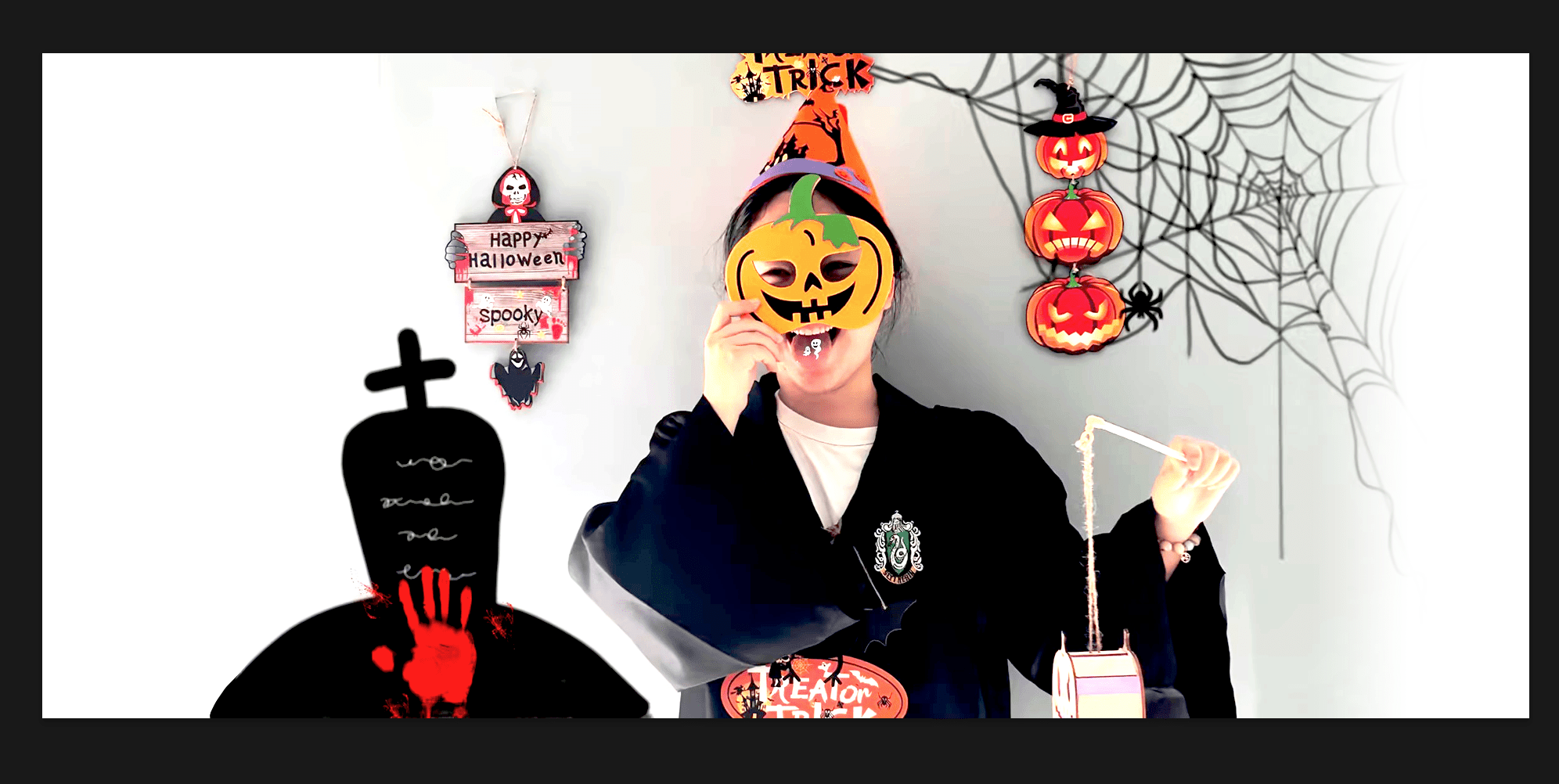
When you go to a party or invite others to your party, you must have an elegant mask. With a laser engraver, you can create a variety of laser-cut masks.

Handmade tutorial on how to make exquisite pumpkin masks using laser engraving machine

2. Wooden Signs
People love to stick Halloween wooden signs on doors, houses, and inside offices. It's a great gift for anyone. There are hundreds of ideas and designs to make unique and spooky Halloween wooden signs that will surprise the receiver. You can use wood or acrylic to create these.

Laser Engraving Machine to Make Halloween Signs
3. Vintage Skull Halloween Invitation
The vintage skull invitation is one of the best laser engraving ideas for Halloween. If you want to invite people to your Halloween party in a unique and thrilling way, you can make a skull Halloween invitation with spiders, spider webs, and other ghostly creatures. All you need is a piece of wood and then engrave the whole invitation on it. It will be unique, extraordinary. The recipients will be thrilled to join the party.
LONGER RAY5 Make Halloween Invitations

4. Spooky Halloween Jewelry
Jewelry is a woman's first love, even on Halloween. You can wear some ghostly jewelry, such as pumpkin, spooky bat, skull, witch hat, spider, raven shaped earrings. Rings and necklaces can also be made of wood. If your machine can engrave metal, you can engrave any spooky thing on a metal band.

LONGER laser engraving machine for making jewelry necklaces

5. Skull Rock Glass
Halloween wouldn’t be complete without a skull rock glass. Add a rotary attachment to your laser engraver, and you can engrave any design on any glass. We can use the skull rock glass to welcome guests - I believe that everyone will love this idea.

Beautifully handcrafted Halloween skull glasses

6.Halloween Party Banners
Banners can be used for decorating houses and party venues. They are usually made of cardstock or similar material. We can use a desktop laser engraver to engrave party banners with Halloween slogans and good-looking candies, which will make your Halloween party the most creative in town.

Halloween banner made with LONGER Laser B1 40W

7.Halloween Light Box
The light box is another good idea for Halloween. It looks very attractive and is one of the appealing decor ideas. Making a Halloween light box is not so difficult. All you need to do is make four pieces of engraved and cut wood and then connect them to form a rectangle. You can also provide a lamp with the box; it will be a complete set. People will love this surprising item and will be more willing to come to your party.

Halloween light boxes made by laser engraving machine to decorate the house

8. Halloween Cupcake Toppers/Decorations
People gift cupcakes on Halloween and decorate them with toppers. The cake decorations are made of acrylic, paper, or wood. With a laser machine, making cupcake toppers becomes easier. There are hundreds of designs for Halloween cupcake toppers. You can make different types of toppers and package them in dozens on this special day.

Make handmade Halloween cake trays that can be sold

9. Homemade Candles/Candle Holders
Halloween is incomplete without candles. People light candles at home to make the environment even scarier. Using candle holders can make candles more attractive. When you put a candle into the holder, the shadows from the spooky design look more appealing. You could use your laser machine to make various Halloween candle holders. It's a simple project, and people love to put them on candles. Holders can be made from wood, acrylic, or card stock.

Small Businessman Learns to Make Halloween Lanterns and Makes Lots of Money

10. Various Halloween decorations
Once you have a Halloween mask, don’t forget to make a few accessories for yourself. I suggest you carve acrylic into the shape of a skull and turn it into earrings, or carve weird patterns on stainless steel jewelry. So you have the perfect set of Halloween ornaments.

Exquisite Halloween wooden hang tags to decorate your party


With a laser engraving and cutting machine, anything is possible because you can make almost anything you like. You can seize the opportunity of Halloween to make some relevant items that families can use. To make it easy for you, we've shared some astonishing ideas. You can make these items and then share them on social media. I believe all viewers will love these crafts!
Happy Halloween!

By Academy | November 2, 2023
Lens Cleaning for Longer Ray5 10W

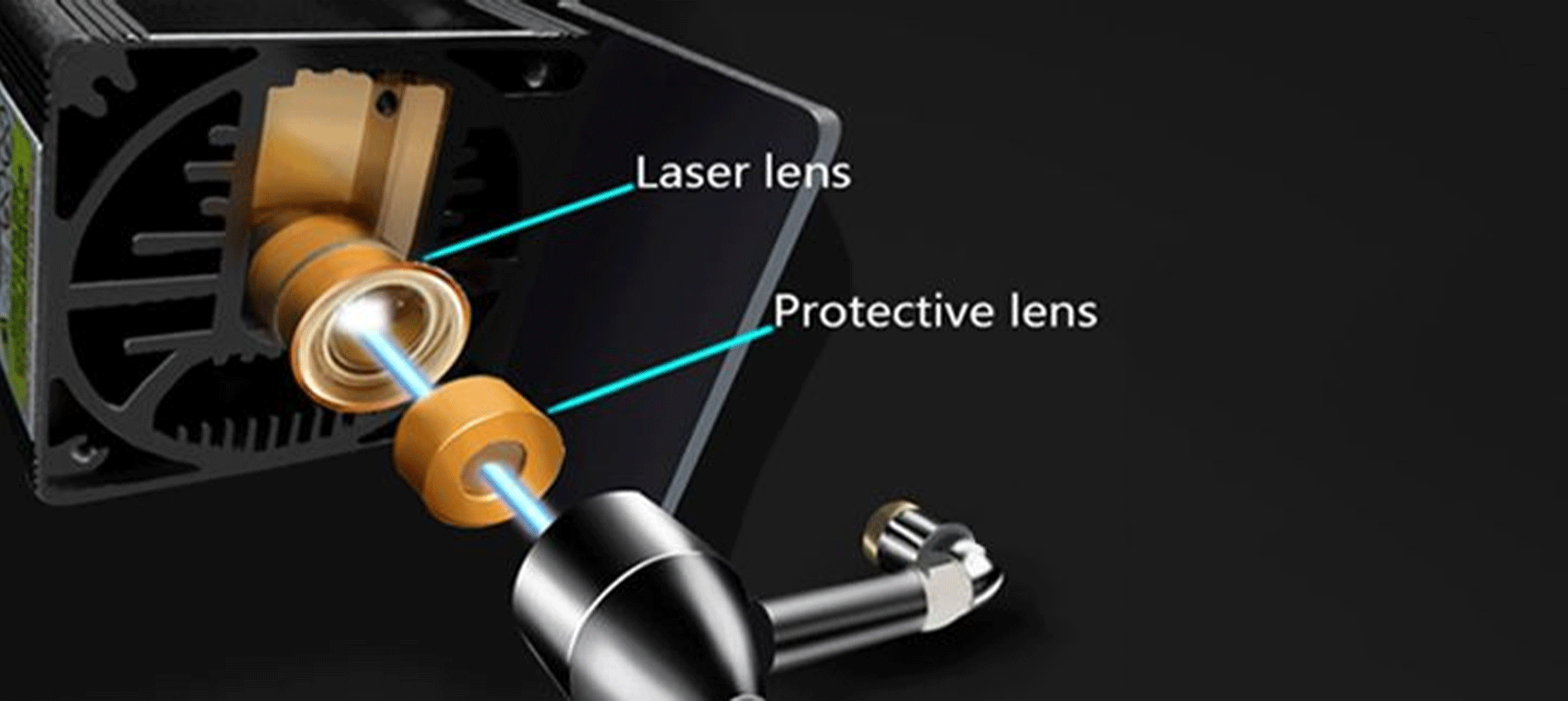
Longer Ray5 10W has a laser module capable of engraving and cutting multiple types of materials. However, depending on the type of work that is carried out, it is possible that a fair amount of smoke is produced, which can inevitably settle on the lens of the laser module and therefore blur it. Once the lens of the laser module is dirty or clouded, the laser beam can no longer pass through it, and therefore the emission of the laser module is drastically reduced. As a consequence, more and more power will be needed to engrave the same materials already engraved previously, until it will be practically impossible to engrave any type of material, even setting 100% power. This problem occurs most when an air assist system is not used; in fact, an air assist system allows you to create air pressure in the vicinity of the lens, thus preventing smoke and dust from settling easily on the lens.

Laser lens and Protective lens

In order to solve this problem, it is necessary to proceed to cleaning the lens of the laser module; once the lens is cleaned, the laser beam can pass through it without suffering losses, and therefore the materials will be engraved or cut again to perfection.

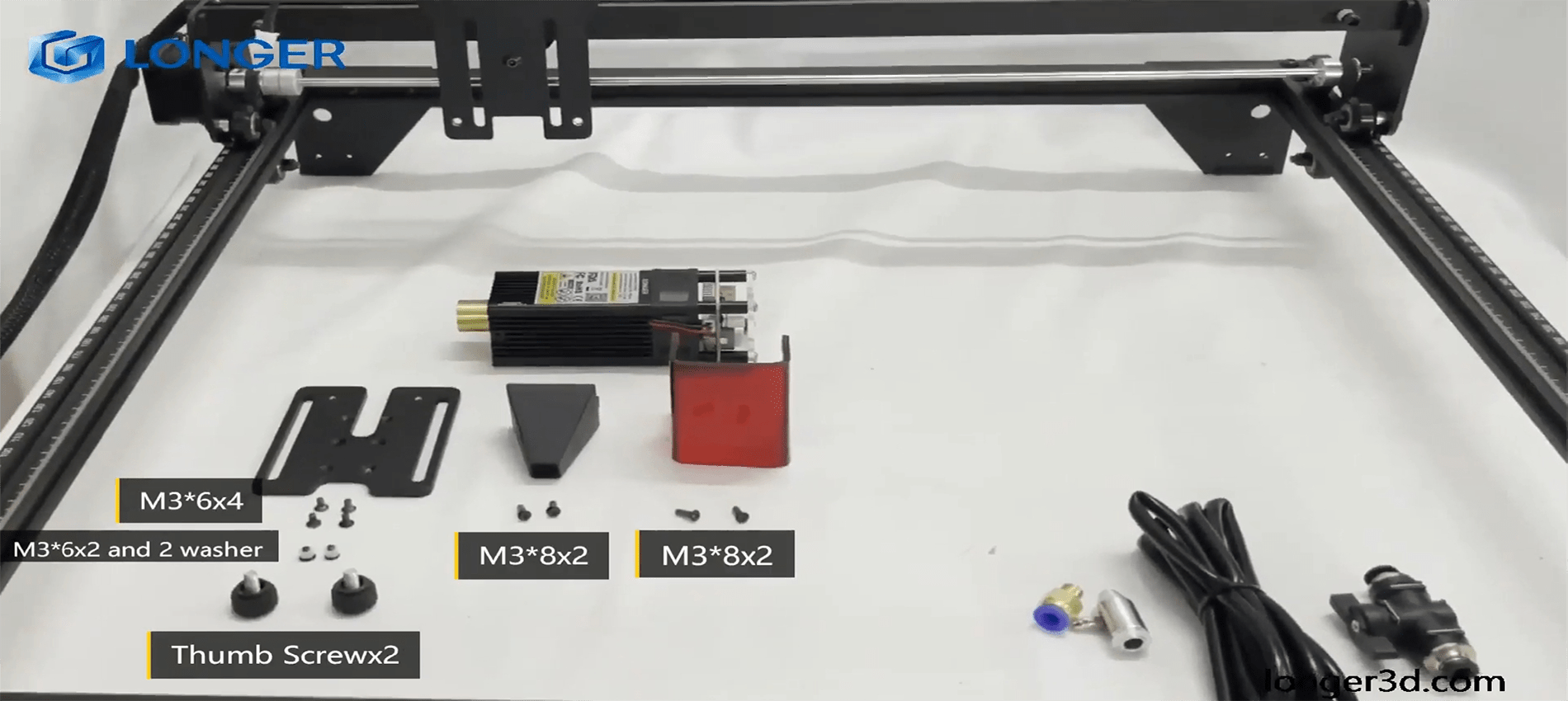
To proceed with the cleaning of the lens of the laser module of Longer Ray5 10W, it is necessary first to completely disassemble the laser module, as shown in the figure:

completely disassemble the laser module

The laser module of the Longer Ray5 10W has a factory-installed protective lens, which can be unscrewed and cleaned separately from the laser module. This lens is a simple protective glass and has no focusing function. After removing the protective lens, you can proceed to clean the lens with the use of a cotton swab soaked in alcohol. Be careful to prevent alcohol from entering the inside of the lens.

completely clean and free of dirt

Use one or more cotton swabs soaked in alcohol until the lens is completely clean and free of dirt; at this point, therefore, you can proceed to screw it to the laser module and reassemble the laser module of Longer Ray5 10W. At the end of the cleaning procedure, you can proceed to engrave a sample file contained in the microSD card of Longer Ray5 10W so you can evaluate the total restoration of the functionality of the laser module.

By Academy | July 25, 2023
Lens Cleaning for Longer Ray5 5W - LONGER
Lens Cleaning for Longer Ray5 5W

Longer Ray5 5W has a laser module capable of engraving and cutting multiple types of materials. However, depending on the type of work that is carried out, it is possible that a fair amount of smoke is produced, which can inevitably settle on the lens of the laser module and therefore blur it. Once the lens of the laser module is dirty or foggy, the laser beam can no longer pass through it, and therefore the emission of the laser module is drastically reduced. As a consequence, more and more power will be needed to engrave the same materials already engraved previously, until it will be practically impossible to engrave any type of material, even at 100% power.

In order to solve this problem, it is necessary to proceed to cleaning the lens of the laser module; once the lens is cleaned, the laser beam can pass through it without suffering losses, and therefore the materials will be engraved or cut again to perfection.

To proceed with the cleaning of the lens of the laser module of Longer Ray5 5W, it is necessary to first completely disassemble the laser module, as shown in the figure:

The laser module of the Longer Ray5 5W has a factory-calibrated lens, so be careful not to unscrew or screw on the lens. Otherwise, the focus will be lost irreparably. Once the lens is accessible, with one hand you have to hold the whole laser module upside down, while with the other you can proceed to clean the lens with the use of a cotton swab soaked in alcohol. Be careful to prevent alcohol from entering the laser module.

Use one or more cotton swabs soaked in alcohol until the lens is completely clean and free of dirt; at this point, therefore, you can proceed to reassemble the laser module of Longer Ray5 5W. At the end of the cleaning procedure, you can proceed to engrave a sample file contained in the microSD card of Longer Ray5 5W so you can evaluate the total restoration of the functionality of the laser module.

By Academy | July 25, 2023
Text Layout Cutting with Lightburn and Longer Ray5 - LONGER
Text Layout Cutting with Lightburn and Longer Ray5

Longer Ray5 allows you to engrave and cut multiple types of materials. In particular, many users of Longer Ray5 prefer to create a custom text and then engrave or cut it on wood panels or similar material. Engraving a text using the laser beam is not a big problem, as it is sufficient to set the right parameters for the type of material chosen, and the result will be excellent. However, if you want to cut (e.g., on wood or paper) your custom text, then setting the right parameters may not be enough.

In fact, depending on the type of text chosen, it may be necessary to make manual changes to the text so that the cut can take place correctly. Analyzing the issue in detail, assuming you want to laser cut the word "NICE," then there is no problem; however, if the word is "HELLO," then it should be noted that the letter "O" consists of a closed surface, which when cut will fall away from the material and thus change the layout of the letter "O."

Specifically, this problem occurs with all letters that contain a closed surface within them, such as the letters "A – B – D – O – P – Q – R."

Using LightBurn software, you can solve this problem really easily and quickly. In detail, first you proceed with the creation of your own personalized text within LightBurn. After entering the text, you will visually check for any letters that have problems when cutting.

In the example given here, there are some letters that cannot be cut correctly and therefore need to be corrected first. The solution to this problem lies in eliminating the closed surface inside the letter: to do this, just create a "bridge" that connects this closed surface with the rest of the letter.

In this way, after making the cut, this closed surface will remain attached to the cut panel, and therefore the layout of the letter will not be changed.

In particular, you must manually create a small rectangle, which must be pasted inside each problematic letter in order to create a bridge between the closed surface of the letter and the letter itself, as shown in the example below. After that, you have to make a Boolean subtraction between the letter and the rectangle.

We proceed to insert a rectangle for each letter that needs to be corrected, then we proceed with the subtraction (the procedure must be repeated for each letter, one letter at a time). Finally, the end result will look like this:

At this point, you can make a cutting preview or proceed with the export of the G-code on the microSD of Longer Ray5 and perform the cut (always remembering to set the correct parameters first to be able to cut the type of material chosen).

This technique can also be applied when using different text layouts, such as italic text or number format, so that you always eliminate any closed surfaces that prevent you from making a correct laser cut.

By Academy | July 6, 2023
Engraving & Cutting with Lightburn and Longer Ray5 - LONGER
Engraving & Cutting with Lightburn and Longer Ray5

Longer Ray5 allows you to engrave and cut multiple types of materials. In particular, many users of Longer Ray5 prefer to carry out engraving and cutting work at the same time, especially when it comes to working with wood panels; however, engraving and cutting do not necessarily have to be two distinct processes, as using Lightburn, you can perform both machining operations in one operation.

In particular, after opening an image in LightBurn, proceed to set the engraving parameters in the window on the right of the screen. I know that the engraving parameters are those of the model image.

After setting the engraving parameters, right-click with the mouse on the imported image, then select Trace Image.

In the screen that opens, define the quality of the cutting perimeter by increasing or decreasing the Threshold value, then confirm by pressing OK.

The image will be superimposed by a perimeter, as set in the previous screen, and at the same time in the window on the right of the screen will appear a new entry relating to the cut to be made, indicated with Model Line. For Model Line, set image cropping parameters, such as speed, power, and number of passes.

At the end, press Save Gcode to export the working file to the microSD of Longer Ray5, then proceed to start working on Longer Ray5. Alternatively, before exporting the GCode, you can check the simulation of the engraving and cutting process by pressing Preview.

In this way, Longer Ray5 will engrave the selected image, after which it will cut the image following the perimeter set above.


Above is the introduction of the first layer calibration; I hope it can help you. If you still have any questions during the operation, please visit our Support Page. Our knowledgeable staff is happy to assist you and your team with any questions.

Want to learn more about RAY5 Laser Engraver? Check out the video below.

https://www.youtube.com/playlist?list=PLLz1z_0pXsW0rjYbC2V_upO1YlU4HeuAg

Step into a world of precision craftsmanship with LONGER RAY5 Series. These high-accuracy laser engravers and cutters redefine what's possible, effortlessly mastering materials with unparalleled precision and ease. Whether you seek to infuse your home with personalized charm or elevate your professional projects, these versatile machines seamlessly adapt to your needs. Their compact design makes them an excellent choice for home laser engravers and cutters, adding a touch of sophistication to your creative space. Meanwhile, their precision engineering makes them equally at home in the professional arena, where they serve as the quintessential desktop laser cutter, providing industrial-grade precision right at your fingertips. Explore limitless possibilities and unlock your creativity with Longer RAY5 Series.


Read more

By Academy | June 19, 2023
Material Testing for Longer Ray5 10W & 5W - LONGER
Material Testing for Longer Ray5 10W & 5W

Longer Ray5 5W and Longer Ray5 10W allow you to engrave and cut different types of materials, quickly and easily. However, for each type of processing it is necessary to set different parameters regarding power and speed, precisely because each type of material reacts differently to the laser beam.

To have a reference about what power and speed to adopt for each type of material, there is a fairly complete table accurately reporting the best parameters to use.

about what power and speed to adopt for each type of material

However, the table can only be understood as a general reference; in fact, assuming you want to cut the basswood with Longer Ray5 10W, the recommended parameter is 100% power & 350 mm/min speed, but there are various types of basswood, and each one reacts differently during cutting, so it is not said that these parameters are perfect for each type of basswood, since some basswood could be burned instead of simply cut or not cut at all.

In order to obtain the correct parameters for the type of basswood you intend to cut, Lightburn has a powerful material test tool, which allows you to quickly determine the most specific and correct parameters. From the Lightburn home screen, select Laser Tools – Material Test; this screen will open:

select Laser Tools – Material Test

First, set the Count value to 5 for Vertical and Count to 4 for Horizontal; Also, set Height and Width to 5.00 mm.

Since the recommended parameters for cutting the basswood are 100% power & 350 mm/min speed, you can set a range between 100 and 500 mm/min for speed and a range between 50% and 80% for power (so as to avoid stressing the laser with 100% power).

Next, proceed with Edit Text Setting:

Edit Text Setting

This screen is used to engrave the labels of the test table. Since it is an engraving, set 3000 mm/min speed and 50% Power; Also, set Mode Fill.
Confirm by pressing OK.

At this point, proceed with Edit Material Settings:

Edit Material Settings

In this screen you can set the method of processing the material; since it is a matter of cutting, select Mode Line, and possibly set Number of Passes to 1 or more.
Confirm by pressing OK.

Once back on the main screen, press Save Gcode to export the test file, copy it to the microSD, and start testing on Longer Ray5.

When Ray5 has completed the job, reviewing the table will help you determine which parameters are best to set.


Similarly, if you want to proceed with an engraving test instead of cutting, open the Material Test screen. Since the recommended parameters for engraving the basswood are 35% Power & 3000 mm/min speed, set the testing range as shown in the image below:

set the testing range

On the Edit Material Settings screen, since this is an engraving, select Mode Fill:

the Edit Material Settings screen select Mode Fill

Once back on the main screen, press Save Gcode to export the test file, copy it to the microSD and start testing on Longer Ray5.

When Ray5 has completed the job, reviewing the table will help you determine which parameters are best to set.


Note that, before exporting the Gcode, both for a cut test and for an engraving test, you can always select Preview, which allows you to see in advance how the final result will look.


Lightburn Preview

Above is the introduction of parameter settings and material testing , hope it can help you. If you still have any questions during the operation, please visit our Support Page. Our knowledgeable staff is happy to assist you and your team with any questions.


The Longer Laser RAY5 Series is capable of engraving a wide range of materials, including plywood, basswood, hardwood, pinewood, acrylic, kraft paper, stainless steel, aluminum alloy, ceramics, and more. Additionally, the Longer RAY5 can cut materials such as basswood, acrylic, bamboo, kraft paper, and more.


With its powerful engraving and cutting capabilities, it transcends boundaries to become the best engraving machine and the best laser cutter for a variety of materials. Seamlessly transition from a wood laser cutter to a metal laser engraver, or even become a master jewelry engraver. Discover boundless, unlimited potential with the Longer Laser RAY5 Series.


Read more

By Academy | May 30, 2023
Air Assist Kit installation for Longer Ray5 10W & 5W - LONGER
Air Assist Kit installation for Longer Ray5 10W & 5W

Visible light and laser beam have in common the same nature, as both are composed of photons, however the difference between them is in the fact that visible light has an optically isotropic propagation (that is, it propagates identically in all directions) while in the laser all the energy is concentrated within a single beam of very small section. Therefore, when the laser hits matter, it is instantly able to radiate a great power in a very small area, causing a sudden and rapid increase in temperature that alters the state of matter.

Laser engraving machines, such as Longer Ray5, are able to emit a laser beam that instantly transforms the state of matter by combustion, and the contrast between the laser-subjected surface and the surrounding surface creates the visual effect commonly called Laser Engraving. However, the energy hitting a single point is not limited to that point, but the heat generated is also transmitted to the areas surrounding the point, causing the typical burning effect of laser processing.

In order to avoid or reduce this effect, an air assist mechanism can be used, which consists of a compressor capable of continuously blowing pressurized air directly onto the area subjected to the laser. In this way, the heat exchanged between the laser area and the surrounding area is mitigated by the fresh air of the Air Assist compressor, thus avoiding the burnt effect around the laser engraving. In addition, the air blown on the engraving zone cancels the heat exchange with the surrounding areas but does not damage the engraving ability of the laser beam. A simple example to understand this phenomenon can be this: if on a summer day with the sun high in the sky you go to the sea, if there is wind, then you feel cool, while if there is no wind, then you feel hot, but in both cases the sun causes burns to the skin in the same way.


Longer Ray5 10W Air Assist installation

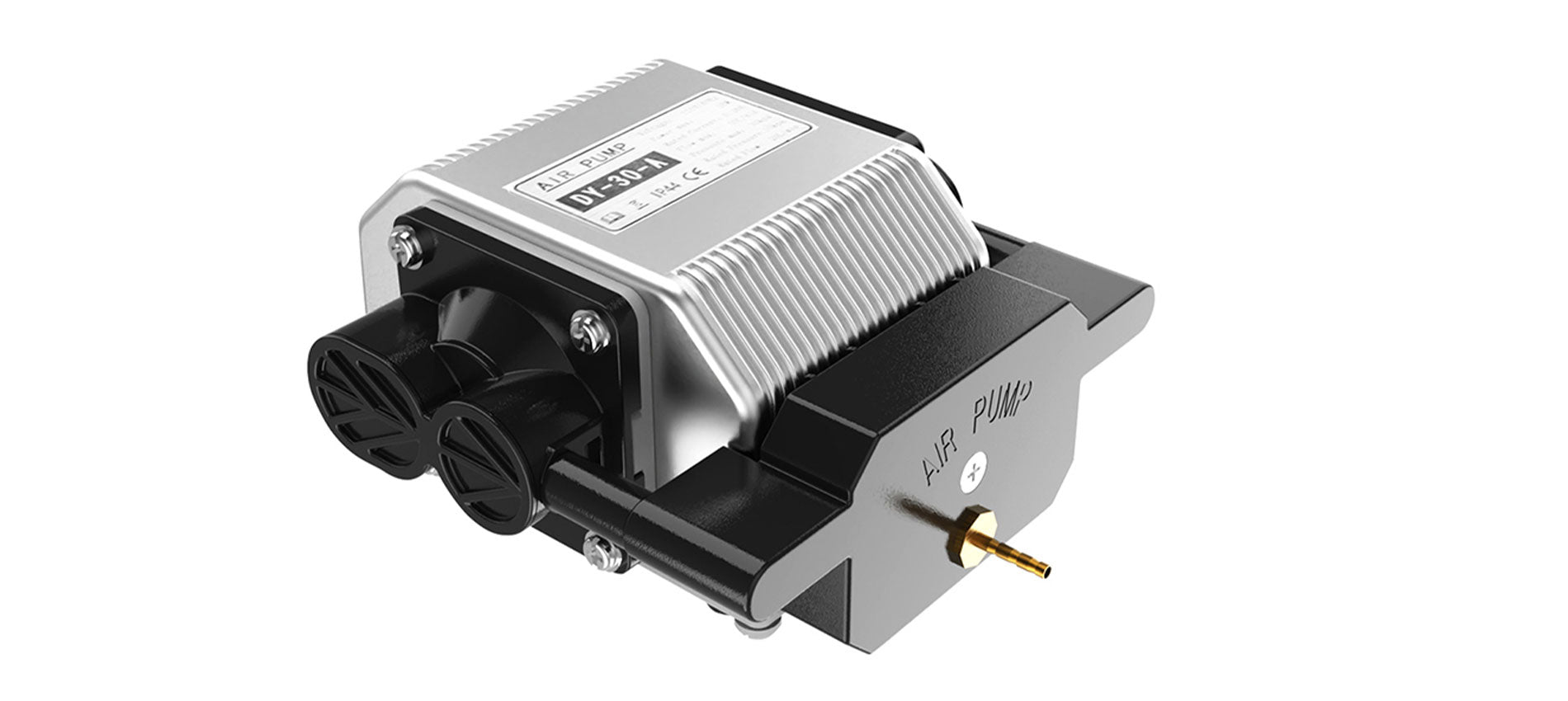
The longer Ray5 10W has an official Air Assist kit that consists of two parts, the nozzle kit and the air compressor, available at the following link: https://www.longer3d.com/products/air-assist-set .

Installing the Longer Air Assist on the 10W laser module is really easy; just follow the steps below:

  • First, proceed to disassemble the laser module from the rest of the machine


  • Install the metal nozzle on the laser module


  • Connect a rubber hose between the metal nozzle and the pressure regulator, and connect another part of the rubber hose to the regulator inlet


  • Connect the inlet pipe of the regulator to the outlet of the air compressor


    • Finally, install the laser module on the Ray5, activate the compressor switch and start an engraving from the Longer Ray5 display


Longer Ray5 5W Air Assist installation

To proceed with the installation of the Air Assist kit on the Longer Ray5 5W, it is necessary to purchase, as for the 10W version, the kit consisting of the nozzle kit and the air compressor, available at the following link: https://www.longer3d.com/products/air-assist-set . However, the metal nozzle included inside the kit is compatible with 10W module only; therefore, it is necessary to have a 3D printer to print with PLA or PETG the following nozzle:https://www.thingiverse.com/thing:5585296 .


Installing the Longer Air Assist on the 5W laser module is really easy; just follow the same steps as the installing method for the 10W laser module, but install the 3D-printed nozzle on the laser module instead of the metal nozzle. After that, as mentioned, just follow the same steps as shown for installation on the 10W module.


Conclusions

The use of air assist not only increases the engraving quality but can also increase the laser's cutting capacity thanks to the possibility of removing smoke and combustion debris thanks to the continuous breath of air; without air assist, these would end up settling on the laser lens, hindering the output laser beam of the module. Whether for hobbyist or professional use, Longer Air Assist is absolutely recommended if you want to achieve the maximum performance offered by Longer Ray5 10W and Longer Ray5 5W.

https://www.longer3d.com/collections/laser-engraver

By Academy | May 9, 2023
Longer Honeycomb Working Table - LONGER
Longer Honeycomb Working Table

A Honeycomb Working Table is a working base used in laser cutting machines that has a surface composed of a structure similar to that of a honeycomb, usually made of aluminum or steel. Thanks to the presence of regular holes, this surface allows the laser to pass through the processing and thus cut the material more easily, also leaving gaps to escape the gases and particles produced during the cutting process.

Using an aluminum worktop such as the Longer Honeycomb Working Table has numerous advantages over using a flat worktop or other types of work surfaces. First of all, the honeycomb allows to minimize the contact between the material to be cut and the work surface, reducing the risk of damage to the material itself; In addition, the honeycomb structure provides solid support to the material being processed, preventing the surface of the material from bending or deforming during laser cutting.

Another important feature of Longer Honeycomb Working Table is that it helps to maintain a good circulation of gases that can collect in the work area during the cutting process, preventing burnt particles and combustion slag from sticking to the surface of the wood, improving the quality of the cut and reducing the risk of damage to the wood itself. In addition, the honeycomb structure can also reduce the thermal effect during laser cutting: in fact, when the laser hits the material, the heat produced can cause deformation, ripples or burns of the material, however the honeycomb can reduce the thermal effect because it allows heat to be dissipated evenly around the material, cooling it much faster than a closed base. However, it requires regular cleaning to ensure that the holes do not become clogged and that gas circulation is optimal. Finally, being totally open, Longer Honeycomb Working Table can be equipped with a suction system under it, in order to remove the combustion gases created by the laser during cutting, preventing smoke and particles from being dispersed into the environment and thus maintaining a clean and safe work area for the operator.

The Longer Honeycomb Working Table can be used when engraving or cutting a wide range of materials, including glass, wood, paper, textiles and metals, as its aluminum structure does not react with these materials. Moreover, thanks to its perfectly leveled and flat surface, the engravings are also improved because the laser beam manages to maintain an equidistance at all points of the material to be engraved.

If you do not use the Longer Honeycomb Working Table, several negative effects can occur in the laser cutting process. First, direct contact between the material to be cut and the surface of the worktable can increase the risk of damage to the material in the part in contact with the worktop due to the lack of heat dissipation. Secondly, burnt particles and slag produced during the cutting process can accumulate on the work surface, damaging it and causing permanent stains. For these reasons it is always recommended to use Longer Honeycomb Working Table which acts as a support for the workpiece and as a work surface, avoiding that the laser beam comes into contact with your table. In addition, Longer Honeycomb can be replaced relatively easily when it becomes too ruined by the many processes: this is undoubtedly much more convenient than having to change tables.

For these reasons, Longer Honeycomb Working Table is one of the best accessories for those who use a laser engraving and cutting machine, as it improves the quality of laser cutting, reduces damage to the cut material and increases the overall efficiency of the machining process.

https://www.longer3d.com/collections/laser-engraver-accessories

By Academy | April 19, 2023
Longer Laser Rotary Roller - LONGER
Longer Laser Rotary Roller

Longer Laser Rotary Roller is a fundamental accessory for all those who carry out laser engraving work, as it is possible to make engravings on curved surfaces with ease, which would be impossible to perform without this accessory.

Everyone who uses a laser engraving machine knows well that in order for the laser to engrave a surface it is necessary that the laser beam is focused. Assuming that, in order for the laser beam to be in focus it is necessary that the distance between the laser module and the surface to be engraved is 50mm, once the right distance has been established it is possible to engrave any point of the surface as the equidistance is respected at every point. However, if the surface to be engraved is not flat but curved, then the equidistance is not respected; in fact, as you can see from the image below, the focus (fixed in point A) is lost as soon as the laser module moves with respect to the focus point.

To solverand this problem it is necessary to use the Longer Laser Rotary Roller, which causes the surface to be engraved (through a rotation) to move instead of the laser module. In this way, each point of the curved surface to be engraved is brought to the focus point of the laser, i.e. the surface to be engraved makes a "rotation". For this technique to work correctly it is necessary that the surface to be engraved is cylindrical in shape, otherwise the problem of focusing would be solved with respect to the Y axis with the Rotary Roller, but it would occur with respect to the X axis.

The installation of Longer Rotary Roller is really easy: just connect it to the Y-axis connector of your Longer Ray5, and in this way the laser module will move to the X axis, but the movement with respect to the Y axis will be applied to the Rotary Roller instead of the Y axis of the laser module. As for the settings, they are almost the same settings used for engraving on a flat surface. In fact, if you want to engrave a 10x10cm image, instead of getting a 10x10cm image on a flat surface you will get a 10x10cm engraving on a curved surface, so the result in terms of size does not change. To better understand this concept, it is similar to when you remove the label from a jar: the label on the jar is curved, when you remove it and place it on a plane it becomes flat, but in both cases the label is always the same and the dimensions do not change.  

In order for the movement steps to be respected, the Rotary Roller must be set differently according to the size of the object on which you intend to make the laser engraving. In detail, about the gear of the roller, you can refer to these dimensions in order to keep the correct steps:

1: Distance between two axes is 5mm, suitable for engraving 6-38mm diameter objects

2: Distance between two axes is 23mm, suitable for engraving 38-70mm diameter objects

3: Distance between two axes is 41mm, suitable for engraving 70-102mm diameter objects

4: Distance between two axes is 59mm, suitable for engraving 102-134mm diameter objects

5: Distance between two axes is 77mm, suitable for engraving 134-166mm diameter objects

6: Distance between two axes is 95mm, suitable for engraving 166-200mm diameter objects


Using the Longer Laser Rotary Roller allows you to expand the functionality of your Longer Ray5, as you can easily engrave many everyday objects, such as pens, jars, cylindrical objects and much more.

https://www.longer3d.com/collections/laser-engraver-accessories

By Academy | April 7, 2023