Academy

The Truth about FDM 3D Printer in Real-World Business - LONGER
The Truth about FDM 3D Printer in Real-World Business

When we talk about FDM 3D Printing as a whole, the question that troubles most people is whether these printers are practical enough to be used for real-world operations. To tackle these concerns, we'll be looking at what FDM 3D printing is and whether or not it's suitable for your business, in particular.

What is FDM 3D Printing?

Fused Deposition Modeling is a process that involves heating up the filament and depositing it in layers on a build platform. This process allows for the creation of complex shapes and structures with high accuracy and detail. FDM 3D printing can be used for a variety of applications ranging from prototyping to product manufacturing.

FDM 3D printing can be used to create parts for prototypes, end-use products, or even customized items such as jewelry or toys. With the help of this technology, businesses are able to reduce their production costs while creating high-quality products with greater efficiency.

What are the Differences between FDM Printing and SLA Printing?

3D printing technology has revolutionized the way products are designed and manufactured. Two of the most popular 3D printing technologies used today are FDM printing and SLA printing. While both technologies have their advantages and disadvantages, it is not easy to determine which one is better for a particular application.

Fused Deposition Modeling (FDM 3D Printing) involves melting a plastic filament material through a heated nozzle and then depositing it in layers to build up an object. This type of 3D printing is fast, cost-effective, and can be used to produce complex shapes with high accuracy.

It is being used in a wide range of industries, such as automotive, aerospace, medical, consumer goods, and many more. With its increasing popularity, FDM 3D printing is becoming one of the most popular ways to create customized parts or objects quickly and efficiently.

On the contrary, SLA 3D printing is a revolutionary technology that has changed the way we produce products. It is a type of 3D printing process that uses a laser to cure liquid resin layer by layer, creating complex and detailed objects with high accuracy and surface finish.

Although both printing technologies are efficient in working, deciding which one will work best for you depends entirely on what outcome you are expecting.

Is FDM Printing Practical for Real-World Operations?

3D printing technology has completely changed the way we create and manufacture products. It has allowed us to print complex shapes and structures with precision and accuracy, making it a perfect choice for a variety of applications. FDM printing, in particular, is being used more and more in real-world operations due to its cost-effectiveness, speed, and scalability.

This technology has a lot of advantages over other 3D printing methods, such as its low cost and ease of use. However, there are some drawbacks to consider when deciding if FDM printing is right for your operations. The upsides and downsides have been discussed ahead.

The Perks of Utilizing FDM 3D Printing

FDM 3D printing offers a range of benefits for businesses of all sizes, from medium-scale startups to large corporations. The most significant perks of utilizing FDM 3D printing include faster production times, improved product quality, and cost savings. With FDM 3D printing, businesses can quickly create complex designs with intricate detail and accuracy while still keeping costs low.

Additionally, the technology can be used to produce highly customized products that meet specific customer requirements. By leveraging FDM 3D printing, businesses can take advantage of its many benefits and gain a competitive edge in their respective markets.

From cost savings to faster production times, FDM 3D printing can help you streamline your manufacturing process and produce quality products in less time.

The Downsides of Utilizing FDM 3D Printing

FDM 3D printing has become an increasingly popular technology for a variety of uses, from prototyping to end-use parts. While it offers many advantages, there are some downsides that should be taken into consideration when utilizing this technology. These include the high cost of materials, the slow printing speed, and the limited accuracy of parts produced.

But, all these drawbacks are concerned with the expertise of practitioners. If you are a pro in handling the printer, you can do wonders with it. Even beginners can also come up with excellent results, if they go through the detailed how-to guide for using it. Another factor contributing to these drawbacks is the quality of your FDM 3D printer. If you are using one sourced from inexpensive and unreliable manufacturer, you should expect to face these cons.

The Truth about Getting an FDM 3D Printer: Is it Worth It?

With the rise of 3D printing technology, more and more people are turning to FDM 3D printers to create custom objects. But is it actually worth getting one? FDM 3D printers offer a lot of advantages over traditional manufacturing methods, including cost savings, speed, and convenience. FDM 3D printers are now more accessible than ever.

Getting an FDM 3D printer also depends on your individual needs and goals. For example, if you need to make small-scale prototypes or models for your business, then an FDM 3D printer can be a great investment.

Worried About Getting an Effective 3D Printer: Longer May Have Just What You Need

If you're looking for an effective 3D printer that can do the job right, then you need not worry anymore. Longer has just what you need to get your 3D printing projects done quickly and efficiently.

From powerful desktop models to large-scale industrial machines, including FDM 3D Printers and Resin Printers, Longer offers a variety of options that will help bring your ideas to life. Therefore, if you're on the lookout for a dependable FDM 3D printer that won't break the bank, then Longer is the perfect choice for you.

Some of our top picks from their top-notch collection include the FDM 3D Printers, LK5 PRO, LK4 PRO, LK1, etc., and Resin Printers, Orange 4K, Orange 30, and Orange 10.

Conclusion

Ultimately, the decision of whether or not it's worth getting an FDM 3D printer will depend on what kind of projects you plan on using it for. FDM 3D printers offer many advantages over other types of 3D printing technology.

They are affordable, easy to use, and can produce high-quality prints with a variety of materials. They also have a wide range of uses, from prototyping to production parts and even home decor items.

https://www.longer3d.com/products/lk5-pro-fdm-3d-printer

By Academy | February 10, 2023
Is FDM 3D Printer the Best Gadget for Beginners? - LONGER
Is FDM 3D Printer the Best Gadget for Beginners?

Technology is constantly evolving and thus is reflected in the improvement of printing. As of now, 3D printing has been the talk of the town. The majority of individuals today rely on the advanced technology of this 3D Printing approach.

3D printers have ushered in a new era in the industrial business. They have practically limitless options for the goods they generate. Out of several 3D printing techniques, FDM has taken over the 3D printing industry by storm. What better time to start learning more about FDM than now?

This article will take you through why and how novice users can efficiently operate FDM, put it to use, and enhance their marketing tactics.

What is FDM 3D Printer?

In 1980, FDM (Fused Deposition Modelling) was introduced. As you are aware, a typical printer creates images one line at a time. FDM printers are identical, except that they generate images in three dimensions rather than simply two. One layer of your substance is laid on top of another until you have achieved the masterpiece.

The sector, primarily mass media, portrays 3D printing as a pristine and modern tech capable of replicating complicated products. However, because of this, defining 3D printing is incredibly difficult. In truth, there are different 3D printing technologies, but FDM (fused deposition modeling), the subject of this article, is the most popular.

FDM is a method of additive manufacturing that heats and melts a plastic filament coiled over a spindle roll into liquid. This liquid is then stretched across a surface known as the build platform.

You may have encountered the term FFF (Fused Filament Fabrication). FDM and FFF employ the same technique but depict it in two different ways, often confusing those new to the 3D printing sector. The proprietor of FFF later trademarked the name FDM.

What to Know about the Working of FDM 3D Printers?

What material is utilized to execute FDM? All you need is thermoplastic, renowned for being pliable when heated. This feature allows each layer to adhere to the others during the creation process. With so many different types of thermoplastic available, you may choose one that meets your preferences.

To keep the material from spilling over, you must add stability, which is entirely dependent upon the size and shape of the piece. The fascinating part is that FDM can also generate these supports. You may also lift your game by adding water-soluble support materials to hold your design intact.

Reasons FDM 3D Printer Is the Best for Beginners

Although FDM is the most prevalent type of 3D printing, you should grasp why it is the ultimate for newbie users or whether it is the perfect method for your purposes. Here's everything you need to know!

1. Accessibility

Overall, what is the most well-known feature of each item for the industry depart? It's all about accessibility! Today, there is a 3D printer for all, and FDM printers are marketed in all sectors.

Having all of this stated, it is evident that accessibility has been a critical component in the evolution of 3D printing, as well as one of its primary benefits generally. It gives the upper hand to beginners to easily purchase the equipment and set up their business.

2. Easy to Use

They are simple to use whether you buy or create your own desktop 3D printer FDM setup. Compared to other digital fabrication platforms, the workflow necessitates a relatively simple way to process and print an object. You can easily set up your FDM 3D printing setup and utilize it without causing any damage to your goods.

3. Give Your Creation a Geometric Freedom

When creating your masterpiece, think outside the box. One of the most significant benefits of FDM 3D printing is the capacity to create unique 3D shapes that would be challenging to produce with standard printing technologies.

The precise layering of the manufacturing stage allows a geometric shape to encompass all three axes. The previous approach to designing goods was guided by limited ways such as sculpting and forging. To harness this exceptional range of innovation, industry rookies should consider getting FDM 3D printer.

4. Personalization and Customization

One of the most obvious benefits of 3D printing is the ability to customize products. This versatility also enables large-scale manufacturing, in which customized items may be created while keeping the minimal costs related to mass creation.

This can be a crucial differentiator for many sectors and deliver good items for clients to enter the trade.

5. Financial Feasibility

3D printing is broadening the spectrum of systems and applications. The cost of production with 3D FDM printing gives you financial flexibility and allows you to spend less on generating a quality product. You can easily rank in business if you spend on this approach.

6. Endless Possibilities

The possibilities and applications of an FDM 3D Printer are limitless. This printing is popular among amateurs and may be used in various fields, such as dentistry and aeronautics.

Where Can I Get this High-Quality FDM 3D Printer?

As FDM 3D printers become a more innovative technology in the printing industry, you may be asking where you should get yours. Let us reveal the top-tier company group that operates in the 3D printing market, LONGER 3D. It is a well-known brand with years of experience in the filed. The Longer 3D team is dedicated to providing its customers with high-quality items and the most outstanding service in town.

LONGER LK5

For beginner, their LK5 PRO, LK4 X, and LK4 PRO are the best choices. These come with easy-to-handle controls and are much convenient to use. Read the manual once and you are all set to make your own 3D models.

Final Thoughts

These 3D printing novel ways exist in a fast-paced world where new technology, equipment, and systems are being developed daily. The FDM 3D printer's efficiency, limitless applicability, accessibility, and geometric flexibility are the key features that make it ideal for beginners. Because of these characteristics, FDM 3D printing technology is widely used in industries ranging from medicine to aircraft manufacturing.

If you want to get yours right away, the ideal brand is Longer 3D, which will meet all your requirements. Check out their website to know more about it!

https://www.longer3d.com/products/lk5-pro-fdm-3d-printer

By Academy | February 10, 2023
How to Make Perfect 3D Objects Using FDM 3D Printer - LONGER
How to Make Perfect 3D Objects Using FDM 3D Printer

3D printing has become quite popular in the last few years to make complex shapes allowing new possibilities in many industries. Significant impacts are seen in industry, medicine, agriculture, and many other fields. According to results from research, up to 98.81% accuracy is achieved with commercial FDM printers. Is it easy to achieve an outstanding quality such as this?

Many factors can help you achieve high quality and an accuracy of almost 99% through the tips and tricks mentioned in this article. Without further delays, let’s hope on!

Choosing the Right Material

The suitable material is a defining quality and expense for the model you need. You can choose any material, but assessing the design’s purpose will save you time and money. Explore all possible options and experiment a little to enhance your capability.

PLA – Polylactic Acid is one of the most common materials for FDM 3D printing because of its rigidity and brittleness. Use it for ornamental models or if you want to learn more about 3D printing as a starter, as it is easier to build.

ABS – Acrylonitrile Butadiene Styrene, stronger but challenging to build, ideal for functional parts. So, choose it as such because it is inflexible.

PETG – Polyethylene Terephthalate is stronger than PLA and more flexible than ABS. Perfect for outdoor models as it has good chemical resistance.

Nylon – Strongest and most flexible, suitable for tools and functional parts because it is durable.

Take Care of Filaments

Store your filament spools properly and keep them wound at all times. Any careless knots or breaks can cause clogging in the extruder and damage in printing.

Consider storage space if you keep a few spools for backup and free of humidity. You don’t want your feed to go stale so keep absorbents or air jar containers. We also recommend using Filament Filters to keep your spools clean and oiled.

Split Your Models

The best complexity is the simplest. You can save tons of time and cost if you work on that. Splitting your model into two or more parts can save much material on supports and be made individually. After you are done with parts, you can join them together quickly afterward.

 How to Make Perfect 3D Objects Using LONGER FDM 3D Printer - LONGER 3D

Paying Attention to Detailing is Paramount

Depending on the size of your FDM printer and the material used, your design will always have limitations. You should not reduce the thickness of the model’s walls to less than 1mm, making it safer for FDM printed designs. The more complex the shape, the more safety cushion you require. Furthermore, you need more space between interlocking parts. Anything higher than 0.4mm is considered safe.

Strong Models Require Stress Distribution and Analysis

Take a look at the image below. The one on the left is more prone to failure if force is applied to either end. The model on the right has a brace to support both legs of the angle, supporting it. Most slicer and 3D designers in the market allow you to analyze your model based on different preferences. Learn to use them and fix errors in your 3D models as they come along.

 How to Make Perfect 3D Objects Using FDM 3D Printer - LONGER 3D 2

Orientations of Holes in Your Models

As we discussed above regarding splitting the model and allowing bracing, managing holes orientation is also essential. The model on the left requires support as the top arm can bend under the weight. Your printer can easily print the hole on the right with a vertical axis orientation. A simple rotation does the trick.

 How to Make Perfect 3D Objects Using FDM 3D Printer - LONGER 3D 3

Now, if you have multiple holes in different directions and orientations, here is what you should do. Prioritize the blind holes first. When they are covered, you can prioritize smaller holes, so they don't get smothered under the wait. Lastly, you must consider which hole is more critical to the model design and work from there.

Managing The File’s Polycount

Make it easier for your printer when it comes to the polycount of your design. You don’t want a processing nightmare for an intricately designed model. Keep the polycount as low as possible, or split the model to keep the polycount in check.

Following Guidelines for Working Temperature

Each filament type and manufacturers have different recommendations for extrusion temperatures. Please follow those suggested temperatures with a buffer of 10 degrees higher or lower. Significant changes can cause lower-quality FDM outputs. You don’t want your model to have wrinkles, spilling, or sticking where not needed.

 How to Make Perfect 3D Objects Using FDM 3D Printer - LONGER 3D 4

The platform should be heated adequately to allow the print to stick with it and give the printing parts above sturdiness.

Choosing the Best Printer and Manufacturer

This is the most critical part. Your tools are what makes or break your design. You should not spend on an expensive machine which isn’t up to the mark. If you are new to 3D printing, why not consider optimal-priced 3D FDM printers?  

The LK5 Pro FDM printer from Longer has sufficient spacing to allow for larger designs, as it also has an upgraded dual blower kit. You can also choose the LK4 X FDM printer with a direct dual-gear extruder.

LONGER LK5 Pro

Talking to the manufacturers or getting recommendations from your friends and others in the field is always the best choice.

Epoxy Resin Coating for Strength

The strength of your 3D print is crucial, especially for functional tools. Epoxy resin coating after you are done printing can enhance the strength of your product. The coating adds a hard layer outside your print. It will also help hide all the layers and extrusions left on your surface due to supports and joints.

Best Practices for FDM 3D Printing

  • Don't let the bridge exceed 5mm as sagging may occur, or your supports can leave a mark in the end
  • You can drill into your vertical hole diameters if you want greater accuracy
  • Add supports if you consider making models with an angle higher than 45 degrees.
  • Include chamfers that are at 45 degrees angle for all the edges of your model that are touching the base/build plate of your FDM printer
  • Considering practices such as splitting model, the orientation of holes, and build direction can significantly influence the final build time and costs
  • https://www.longer3d.com/products/lk5-pro-fdm-3d-printer
By Academy | February 10, 2023
LONGER LK4 X vs. LK5 Pro vs. LK4 Pro vs. Orange 4K, Which 3D Printer is Best for You? - LONGER
LONGER LK4 X vs. LK5 Pro vs. LK4 Pro vs. Orange 4K, Which 3D Printer is Best for You?

3D modeling significantly impacts vital industries such as medicine, sports, aeronautics, etc. But is also beloved by enthusiasts and hobbyists. Printing them has been made relatively easy if you already have a working digital 3D design of any model. This ease of operation has made consumer flock to buy 3D printers. Are you considering buying a 3D printer yourself but are worried about the high costs and complexity of designing?

Well, now you don’t have to worry as today we have chosen an affordable but professional brand, LONGER, explained in this article. Let’s start!

Defining Features of LONGER 3D Printers

This section will discuss some of the defining features of each 3D printer in this list. It will be followed by the significant differences between each and which is best for you. All these printers are open-source coded, allowing consumers to share their best designs with the community while taking inspiration from others for the best results.

1. LK4 X FDM 3D Printer

LK4 X comes with a 4.3” colored touchscreen helping you choose the best designs and make efficient adjustments. Make your ideas come true with its big bed design and several applications, especially for teaching kids in STEM and other art and design projects.

 LONGER LK4 X 3D Printer

The LK4 X has intelligent 16-point auto leveling supporting your intricate projects, compensating for any unevenness. You get stronger and more accurate filament control with a double-gear extrusion mechanism and direct drive chip. This feature is further enhanced by the premium spring-flexible steel that allows staying power for the adhesion with the printed model.

  • Uses innovative auto-leveling technology to compensate for the unevenness of the hotbed
  • Has building size of 8.66"*8.66"*9.84" (220*220*250mm)
  • Comes with a 32-bit open-source motherboard, a 4.3-inch touchscreen, and a flexible PEI film
  • It comes pre-assembled with 95%
  • Fast shipping available
  • Order today for only $299.99

Consumer Comments

GWS 1205 – At first, I rated it below 3, but eventually discovered that the problem was the misalignment of the z-axes after doing a vast amount of research and watching YouTube videos. After I tuned it in, the machine is now operating perfectly.

2. LK5 PRO FDM 3D Printer

LK5 Pro has the upgraded Dual Blower kit that cools the filament as the material is being extruded, saving you the trouble of any deformation. The triangle design-build allows you to make stable and perfect projects as it has minimal vibration while working.


LONGER LK5 PRO 3D Printer

This model is for you when it comes to quieter and more enhanced printing due to High Temp resistance tubing.

  • Has exceptional building size of 300x300x400mm (11.8"x11.8"x15.7")
  • Best for high-precision 3D printing
  • Comes with pre-installed 3 TMC2208 ultra-silent chipsets, which are based on open-source coding, making them ultra-quiet
  • Has a Carborundum glass platform for easier mold taking
  • Comes with run protection
  • Excellent price of only $299.99

Consumer Comments

  1. Vantlin –I've just started using 3D printing. I searched for a high-quality printer at a fair price because this was my first foray into 3D printing. I made the right choice by purchasing the LONGER LK 5 Pro!

3. LK4 PRO FDM 3D Printer

The LK4 Pro FDM 3D printing machine has a modest build, a cute form, a new metal frame, a trendy, modern look, a self-developed intelligent system software, a fresh user interface, and standalone manufacturing. It is a popular and inexpensive 3D printer type.

 LONGER LK4 PRO 3D PRINTER

The LK4 printer makes a beautiful present for the creative person in your family, the aspiring designer, or the young person getting ready to enroll in their first technology course.

  • Open-source codes
  • Ultra-quiet and no noise enhances the functionality if you are printing at home.
  • Equipped with a 4.3” touch screen for convenient controlling
  • Enhanced structural rigidity with new Aluminum frame design
  • Built-in Safe Power Supply for efficient power usage
  • Fast shipping available for the purchase of only $179.99

Consumer Comments

  1. Benckert –After the wait for the new touchscreen and the software update, the printer appears to be operating as intended. I have no experience with 3D printing, but after viewing a few Youtube clips about the technology in general and Cura in particular, I am off to a good, trouble-free start. The printer is finally functioning as described, though I intend to add Octopi for further monitoring and control features.

4. Orange 4K Resin 3D Printer

LONGER Orange 4K is the leader in Subpixel technology that can make precision models for up to 4K resolution providing more detail in miniature designs. The in-house slicing software is top of the line that is not just easy to operate, but the slicing feature is three times faster. What more can you want with a 3D printer having minute-level details in a small design?

 LONGER ORANGE 4K Resin 3D Printer

There are tons of 3D printing applications, such as making toys for kids, allowing designs for manufacturing concerns, perfect dental models, and even ultra-detailed architecture designs.

  • Subpixel technology with a fantastic resolution of X 31.5µm Y 10.5µm will give you the best results if you love printing miniatures.
  • Comes with 6480*3840 Resolution, Parallel UV Lighting Sources, and Fast Printing Mono LCD Screen
  • Its four crews make leveling much easier.
  • Features temperature detecting tool for LONGER life span
  • Fastest printing with less exposure time
  • You can purchase the 3D printer today for only $319.99

Consumer Comments

Heath2015 – I've only recently started using this incredible equipment for 3D printing, but I have to admit it does a good job. Even though I had rarely printed anything before, I quickly and easily had the LONGER Orange 30 running in no time.

What are the Biggest Differences among LONGER 3D Printer Models?

The LK4 X model offers sophisticated 16-point accurate levelling for stable working settings when the base plate needs to move, and it is priced the same as the LK5 Pro model. The inclusion of double-gear extrusion for larger and more complex structures distinguishes the LK4 X from competing versions. Finally, even though all 4 versions can have their essential components upgraded, the LK4 X has the most possibilities, making it an excellent modular machine.

Contrastingly, LK5 PRO comes with a triangular design and dual inclined road, which assists in producing optimal printing results. It also comes in handy in eliminating the turbulence and retention of the Z-axis. Its 3Kits TMC2208 for XYZ Axis and larger bed size add to its value.

Coming to LK4 Pro, although this model is similar to the LK4 X and LK5 Pro, its ultra-durable aluminum manufacturing sets it apart from others. Moreover, it has a built-in Safe Power Supply that keeps your machine and investment safe. In our opinion, LK4 Pro is the second largest of the 4 right after LK5 Pro, a great comprise between LK4 X and LK5 Pro.

Orange 4k is your best bet if you want to make small yet intricate designs. It comes equipped with Subpixel technology that distinguishes it from other competitors. No matter if it’s the smallest, it costs the most.

Comparison Chart of LK4 X vs. LK5 Pro vs. LK4 Pro vs. Orange 4k

Please see the following table to understand what each of these printers has for you.

Model Number

LK4 X

LK5 Pro

LK4 Pro

Orange 4k

Printing Technology

FDM 3D Printing Technology

FDM 3D Printing Technology

FDM 3D Printing Technology

LCD Stereo lithography

Working Area

220*220*250mm(8.66"x8.66"x9.84")

300*300*400mm (11.81"*11.81"*15.75")

220*220*250mm  (8.7"*8.7"*9.8")

120*68*190mm  (4.7"*2.7"*7.48")

Printing speed

≤180mm/s

≤180mm/s

≦180mm/s (Suggest 60-80mm/s)

Up to 80mm/h on Mono Version

Printing accuracy

±0.1mm

±0.1mm

-

10 micrometer

Layer thickness

0.1-0.4mm

0.1-0.4mm

0.1-0.4mm

0.01-0.1mm

Support filaments

PLA/TPU/ABS/ PETG/Wood

PLA/ABS/ PETG

1.75mm PLA/ABS/PETG


Direct drive extruder

Direct drive extruder

Bowden Extruder

-

-

Auto leveling

Yes

Optional


-

Filament Detector

Yes

Yes

Yes

-

Resume Printing

Yes

Yes

Yes

-

Hotbed

PEI Flexible Steel

Ceramic Coated Glass


-

Motherboard

32-Bit Open Source & Silent Motherboard

8-Bit Open Source & Silent Motherboard


Connection method

TF card or USB

TF card or USB

TF card or USB

USB

Hot bed Temperature

≤100°C

≤100°C


Nozzle Temperature

≤250°C

≤250°C

190-250℃

-

Rated power

320W

350W


-

Gross Weight

9.78KG

13.5KGS

8.5KGS

11.5KGS

Printer Dimension

485*465*615mm

580*540*663mm

425*402*505mm

230*230*437mm (9.16"*9.06"*17.02")

Package Dimension

540*525*265mm

662*588*193mm

467*412*187mm

310*310*580mm (12.2"*12.2"*22.83")

Nozzle Diameter


0.4mm

0.4mm


Slice Software

-

Cura, Reptier-Host

Cura, Reptier-Host

Longerware / Chitubox / Lychee

File Format

-

STL, G-Code. OBJ

G-code, STL

-

LCD Screen Size

-

4.3 Inch

-

5.5 Inch

Salient Features

· More Height

· Intelligent Auto Levelling

· 5:1 reduction ratio

· Ultra silent motherboard

· Fast and quiet printing

· Affordable printer

· Triangle design

· Silent printing

· Glass upgrade for easy removal

· High Temp resistant tubing

· Amazing tempered glass design

· The printing recovery function is available

· Ultra quiet mode

· Durable aluminum frame design

· Safety in power supply

· Subpixel technology

· Ultrafine precision

· Quick printing with mono screen

· Parallel UV Lighting Sources

· Dual Z-Axis Design

Price

$299.99

$299.99

$179.99

$319.99

Conclusion

That was all about the four amazing printers from the renowned printer manufacturing brand, i.e., LONGER. Hope you find it helpful in making an informed decision about which one you should get.

https://www.longer3d.com/products/lk5-pro-fdm-3d-printer

By Academy | February 3, 2023
An Ultimate Guide to FDM 3D Printer and Its Applications - LONGER
An Ultimate Guide to FDM 3D Printer and Its Applications

There's been a vast technological development, especially if we talk about 3D printing. We use 3D printing almost everywhere. Whether it is for creating engaging business models or construction models, a 3D printer is always the best choice.

Among the leading 3D printer technologies, FDM is very popular. The reason behind the popularity of the FDM printer is that it is not only highly efficient but also ideal for beginners.

Want to know more about FDM printers? You’ve landed in the right place! In this article, we'll provide you with the ultimate guideline for FDM 3D printers and their applications.

By Academy | January 18, 2023
Longer Drawing Machine - LONGER
Longer Drawing Machine

 A Pen Plotter is a Drawing Machine that is positioned between a 3D printer and a Laser Engraver, since it has characteristics of both of them. In fact, it uses a three-axis Cartesian XYZ system (like a 3D printer) to make 2D images (like a Laser Engraver) using a pen. In simple words, this machine allows you to draw as you do by hand, but with the precision and handwriting of a computer.

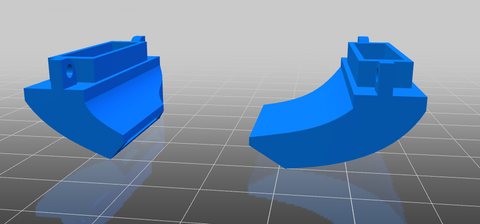
This guide allows you to make a Pen Plotter using any Longer FDM 3D printer as a base. The change does not alter printing capabilities but is an added feature. Note that this guide is not compatible with printers equipped with BL-TOUCH leveling sensors.


Preparation of the machine

  1. Download and print this pen holder:

https://drive.google.com/file/d/1gwQJZo7U1t-0NzUbUzdNdexHfIp1fW4g/view?usp=sharing 

  1. Screwdown the two screws placed to the left of the head module and the pen support (the dual blower module already provides two holes where to install the pen support)


  1. Proceed to normal leveling of the printer, using the sheet of paper to level the nozzle and the glass of the hotbed
  2. After leveling the print bed, remove the glass and replace it with a sheet of paper; Since the sheet of paper is thinner than the glass, the nozzle will be very far from the sheet of paper, but this is normal
  3. Insert a pen inside the pen holder; the pen must be in contact with the sheet of paper, the tip of the pen must touch the paper to be able to write, then secure the pen using a screw through the support


  1. Using a test sheet, test whether moving the x-axis can write to all points on the sheet
  2. To prevent the filament sensor from reporting an error, insert a piece of filament through the filament sensor; also, disconnect the extruder motor E cable


Preparation of the Cura software

  1. From the Cura menu, add a new printer that matches your printer model (if LK4PRO add LK4PRO, if LK5PRO add LK5PRO, etc.), and rename the new printer as "Drawing Machine"


  1. Replace the Start G-code with this new Start G-code:

; LONGER Start G-code

G21 ; metric values

G90 ; absolute positioning

M82 ; Set Extruder to Absolute Mode

M107 ; start with the fan off

G92 E0 ; Reset Extruder

G28 ; Home all axes

G1 Z2.0 F3000 ; Move Z Axis up little to prevent scratching of Heat Bed


  1. Download and import into Cura this print profile "plotter.curaprofile" for "Drawing Machine". The imported profile allows the printer to work without heating hotend/hotbed and without extruding filament:

https://drive.google.com/file/d/1cxeTZ1QrjHt8bsGC8TLVEHthtU_jNLkI/view?usp=sharing


Preparation of the Drawing File

  1. After choosing a 2D image without background (like this one above in the figure), open the "3D Builder" software preinstalled in Windows 10 (if it was not present, download it from the Windows Store). Then select "Open – Load image" to import the selected image.


  1. Once the image has been imported into 3D Builder, you can change some settings such as Levels, Smooth, and so on; using these settings, edit the file according to your preferences. Once the editing is complete, select Import Image to get the image converted to 3D file.


  1. At this point, assign to the 3D model aheight "Z" of 0.1 mm; in fact, a drawing can be considered as a 3D model composed of a single layer, therefore assigning a thickness of 0.1 mm then the printer finishes the work after the first layer
  2. When the 3D model is ready, proceed to export, selecting "Save as - . STL".


Drawing printing procedure

  1. Import the previously created "3D" drawing into Cura
  2. At this point, the design can be made either full or with only the outline   a.To make a full drawing, make sure "Top/Bottom Thickness" is set to "1"


          b.To create a blank drawing, with edges only, make sure "Top/Bottom        Thickness" is set to "0"


  1. Export the Gcode, proceed to print, and here is the final result

  1. Download here some sample model, enjoy your new Longer Drawing Machine!

https://drive.google.com/file/d/1K4Adp4pt1v9ypqZ2ytmCrK679k0XrAsy/view?usp=sharing 

https://www.longer3d.com/products/lk5-pro-fdm-3d-printer


By Academy | December 12, 2022
Longer Fanducts for FDM 3D printers - LONGER
Longer Fanducts for FDM 3D printers

All FDM 3D printers are equipped with some fans, each of which performs a different function. For example, one fan cools the mainboard, another fan cools the hotend, and so on.

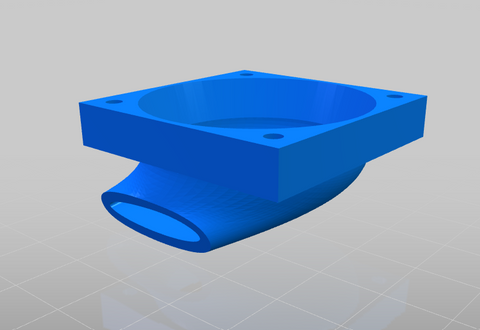
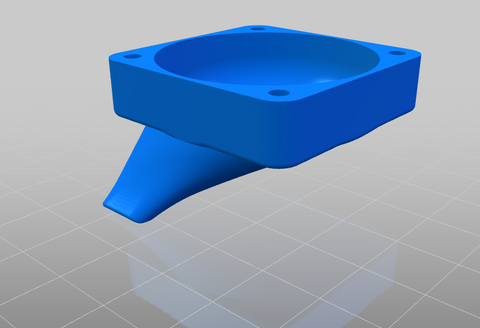
A fan with relevant functionality is the cooling fan of the printed filament, which is a fan that cools the print, so as to allow the filament to solidify quickly, avoiding deformation in the print due to heat. This fan can not do anything on its own, and in fact it is always associated with a "fanduct", or a duct through which the air emitted by the fan passes, which is concentrated and directed correctly on the print.

Fanducts come in various shapes and sizes, while all maintaining the same function; depending on its design, the fanduct can concentrate more or less air, in one or more directions. Here's a list of official Longer 3D fanducts, each with different features for different purposes:


  • Classic Fanduct


This fanduct is the default model of Longer 3D printers, it allows you to concentrate a large amount of air and cool a large portion of the print at the same time thanks to its round output. It is perfect for prints with large surfaces, prints that are printed at high speed and for prints made with very large nozzles.

Download link:   https://www.thingiverse.com/thing:5585284


  • Squared fanduct


This Longer 3D fanduct is equipped with two rectangular outputs, thus being able to divide the air flow equally in two directions. Depending on the printing direction, this fanduct usually takes care of cooling both the part already printed and the part that is about to be printed; In addition, all the air is concentrated in these two zones, so the cooling inflow is considerable. The disadvantage is that for high-speed prints, the fanduct may not have enough time to cool the print because its airflow is very direct.

Download link:   https://drive.google.com/file/d/1T-tPjxG2hIX5XB63BakLJlfQkH_xQGby/view?usp=sharing


  • Precision fanduct


This Longer 3D fanduct is the one that concentrates the air the most, and then directs it at high pressure and speed at a single point. In fact, due to the great difference in section between inlet and outlet, the air accumulates a great speed at the outlet, thus being able to cool the affected printing part in a few moments. Its main use is for prints with many detailed parts and very thin parts that extend upwards; For example, trying to print a tip, usually the heat causes a deformation due to the collapse of the structure, instead with this fanduct it is possible to dissipate heat quickly, largely solving the problem.

Download link:   https://www.thingiverse.com/thing:4860509


  • Longer Dual Blower Kit


The new Longer Dual Blower has been specially designed to allow a faster and more uniform emission of cooling air, thanks to two bilateral turbo fans and a double ventilation duct; in this way the prints are much more detailed and the bridging printing greatly improved.

  • The installation is very simple, and can be done by consulting this video guide:

https://youtu.be/zEA-eM5sfho

  • The purchase is available on the Official Longer Store:

https://www.longer3d.com/collections/accessories/products/longer-new-dual-blower-fan-kit

The fanducts of the Dual Blower are totally 3D printable, stl files are available if necessary.
Download link:   https://www.thingiverse.com/thing:5585281

https://www.longer3d.com/products/lk5-pro-fdm-3d-printer

By Academy | December 12, 2022
Diode Laser Engraver (450 nm) vs CO2 Laser Engraver (1024 nm) - LONGER
Diode Laser Engraver (450 nm) vs CO2 Laser Engraver (1024 nm)

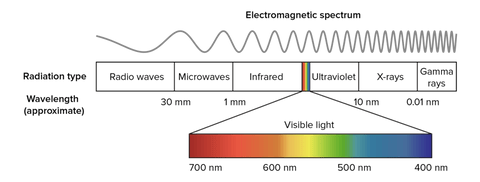
In physics, the propagation in space of electromagnetic field energy is called electromagnetic radiation. Depending on the wavelength, the radiation takes on a different nomenclature; in particular, electromagnetic radiation with a wavelength between about 400 nm and 700 nm is called visible radiation and is perceptible by the human eye and transformed by the brain into visual sensations; this radiation is what is commonly called light.


electromagnetic spectrum

Frequency and wavelength are inversely proportional quantities, i.e., when the wavelength decreases, then the frequency increases. Radio waves, also used for FM and TV broadcasts, are in the MHz range; instead, microwaves are on the order of GHz. Instead, visible light is already in the order of THz and then increases more and more in the rays due to nuclear decay, which, however, have a minuscule wavelength. Note that with the same power, electromagnetic radiation is able to pass through matter more easily when it has a longer wavelength (i.e., lower frequency); a trivial example is the ability of radio waves to pass through the walls of a house, while sunlight is shielded.

By analyzing the laser beams, they therefore take on a different color according to the wavelength; a blue beam (like the Longer Ray5 laser) has a wavelength of 450 nm, while green or red laser beams have different lengths. However, a laser beam does not necessarily belong to the visible spectrum, as it can also be generated as a different radiation. For example, there are some lasers belonging to the infrared, which are invisible but retain their abilities.

An example of an infrared laser is the CO₂ laser, which is a laser characterized by a wavelength between 940 nm and 1060 nm, which is generated within an active laser medium contained in an air- or water-cooled gas discharge tube. The gas contained within the laser tube consists mainly of carbon dioxide (CO2) and other gases, where an initial gas is excited by electric current but is not able to release a photon because of its chemical structure and then transfers its energy to a CO2 molecule that triggers the first photon. The operation is similar to a neon/fluorescent bulb, although in this case the photons generate a laser beam instead of optically isotropic light.

Given the high power obtainable (as the ratio between input and output power is very high), CO₂ lasers are widely used for metal engraving, for cutting materials, and for industrial welding. They are also very useful in surgery because the main constituent, water, of the cells absorbs very well the emitted infrared frequency. In addition, CO₂ lasers are also used for telemetry, as infrared can pass through the Earth's atmosphere easily, being almost completely transparent to infrared.

https://www.longer3d.com/collections/laser-engraver

By Academy | November 8, 2022
Step-Down Converters & Voltage Regulators - LONGER
Step-Down Converters & Voltage Regulators

Many owners of Longer 3D printers love to customize the machine with additional accessories, LED lighting, and so on. However, each accessory works at a specific electrical voltage and requires a certain current, so attention should be paid to the technical specifications of each of them; in fact, Longer printers generally work at 24V, so it is not enough to simply connect the accessories to the mainboard of the printer or to its power supply, since this could compromise the operation of both the printer and the accessories.

NOTE: This guide is only for an electronically savvy audience! Misinterpretations could cause accidents and damage to equipment. If you don't feel confident, don't try the changes but talk to an expert.


In order to lower the voltage from 24V to a lower one it is necessary to cause a "Potential Difference Drop". The most basic method in physics to achieve this is the use of a resistor, however it dissipates all the current absorbed in the form of heat, so it is an inefficient and unstable method, since it depends on many factors. Nowadays there are various electronic components that can perform this function in an excellent way, and given their really low cost it is really worth considering to be able to operate safely. Here is a description of the best components on the market.


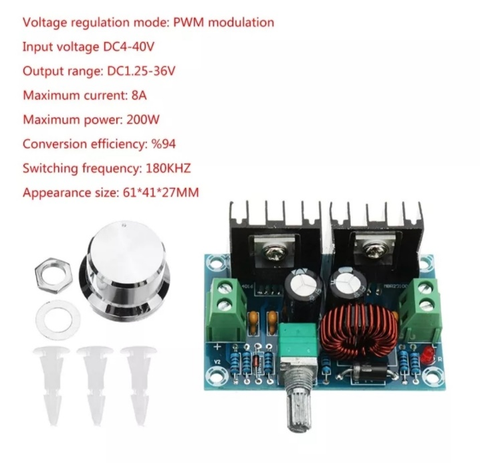
XH-M401

This voltage converter allows you to adjust the potential difference downwards efficiently and supports a high current passage thanks to the presence of two power mosfets. Connected to one of the outputs of the printer's power supply, it allows you to adjust the voltage between 24V ~1V, so it is ideal for connecting 12V & 5V LED lamps that require high current absorption, to connect 12V & 5V fans, to connect camcorders that require a specific voltage, or any other type of accessory.


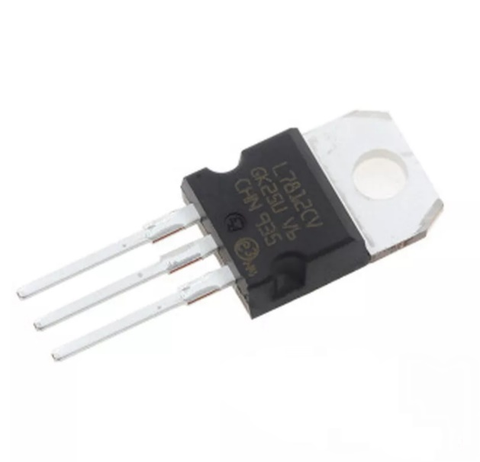
L7812

This linear voltage regulator allows you to adjust a voltage of 35V max in a voltage of 12V output, however the output current is 1A max and also dissipates in the form of heat; for this reason, the voltage regulator has a hole, as it must be fixed with a screw on top of an aluminum bracket in order to reduce its temperature. Using this regulator, it is possible to reduce the voltage from 24V to 12V, however its use is limited to accessories that require a very low current (for example, a 12V fan), and in any case the regulator must be dissipated by fixing it to the printer frame taking care not to cause short circuits.


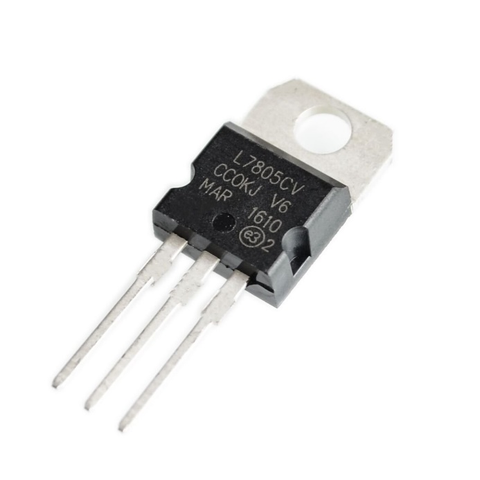
L7805

This linear voltage regulator, similar to the L7812 regulator, allows you to reduce the voltage by having a 5V output. It is often used to reduce voltages of 12V towards 5V, however it can also be used to reduce the 24V of the machine in 5V even if the dissipation in the form of heat will be really excessive. It is strongly discouraged to use this voltage regulator allows, preferring in its place the XH-M401 regulator.


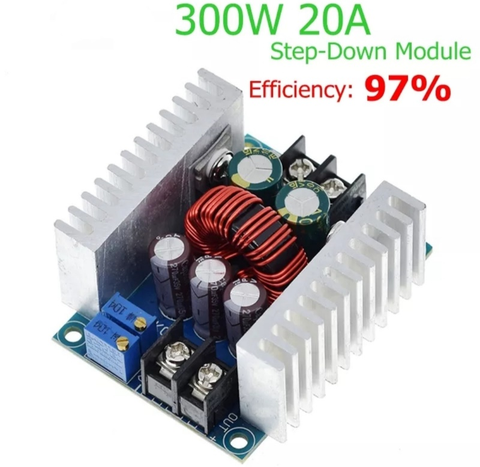
SZBK07 300W/20A (for special applications)

This voltage converter can be too elaborate, as it allows both to adjust the output voltage and to limit the max current absorbed by the connected component in output. This turns out to be the best compromise to power driver-free LEDs, battery charging and other applications that require special attention. It is exposed here only for information, as accessories for 3D printers do not require such precautions.

https://www.longer3d.com/collections/3d-printers-1

By Academy | September 30, 2022
3D RESIN PRINTER REVIEW | DON'T UNDERESTIMATE THE MIGHTY ORANGE 30 - LONGER
3D RESIN PRINTER REVIEW | DON'T UNDERESTIMATE THE MIGHTY ORANGE 30
Longer 3D as a company has FDM and Resin printers but also sells laser engraver machines.

Here are some of the specs about the Orange 30.

  • High precision & Uniform Matrix UV lighting
  • 2.8 inch Touch screen & faster printing speed
  • Fast Cooling & high-Temperature warning system
  • Affordable price: $149.99 or £130

This Printer started out on Kickstarter in 2019 and was successfully funded there. The vat has been updated by Longer since it was released and is a plastic one compared to the metal one originally.

So its a 2K LCD screen at 2560 X 1440 resolutions and 47.25µm pixel size, the build plate is 120mm(L)*68mm(W)*170mm(H); With a solid linear guide and special slider design, it will ensure the accuracy and stable of Z-axis.

So I set about unboxing the printer live over at my Twitch channel, it comes well packed in a box with lots of protection for it, one of the first things I noticed about this resin printer is that you need to assemble the UV cover as it is flat picked and has a paper covering both sides of it to protect from scratches.

Assembling the UV cover took the longest to do as the paper that needed taking off was stuck well to the plastic. Once this was done it was a little tricky getting the elastic bands on it to hold it together, but if you don’t wish to use the elastic bands that come with the printer you can find STL files for a system to hold it together a bit better, as I always feel it's going to fall apart in my hands when moving the lid about.

Putting the vat on is straightforward as always and it was a quick process to level the build plate.

Once I've done everything I put the USB drive into the printer and see that there were 4 test files, so I set about printing them all, they all came out fantastic as I would expect from a resin printer, the touch screen is responsive and nicely laid out and easy to navigate it.


I set about slicing some of my own files I wanted to print on it and if you want you can use Longer 3D own slicer for it, but I use Lychee Slicer as my go-to slicer these days. It was easy to add the printer to the slicer, you just need to make sure you save the file to the USB drive as a .lgs30 file for the printer to read it.

Ok so it’s not the biggest of build plates for a resin printer, but don’t let that fool you. I found this printer was able to print everything I was slicing for it, I had one failure out of about 30 prints and that was down to human error as I didn’t add supports correctly. The print quality is good especially for a 2k resin printer, it wasn’t overly loud when it was printing and I didn’t notice any bad smells of resin coming from it, which I do use an air purifier next to all my resin printers just for some added protection.

So who is this resin printer aimed at? That’s a good question, I think that this might just be one of the best entry-level resin printers that you can buy at the moment, resin printing can be expensive if you are starting out in it, printer, wash and cure station, IPA for the wash and gloves, etc, it starts adding up. So if you purchased this as your first resin printer and you found out that resin printing wasn’t for you, it's not a big amount of money spent on the Orange 30 and I’m sure you will find a buyer for it if you put it up for sale.

If you are an experienced resin user already you might possibly have bigger resin printers that you use, like myself, recently I was printing a Wicked3D STL which was a decent size, and I used 3 resin printers to print all the parts for it and the Orange 30 fitted perfectly for printing the small parts for it, in-between my bigger resin printers, some people use resin printers for small tabletop figures and I’m sure you would be able to get a good amount of them on the build plate of the Orange 30.

So in conclusion I think that this resin printer is ideal for all users, especially for the price. I have been printing litho on this printer too and the photo quality is good. if you were to invest in this I think most people would be pleased with the results of the prints.


https://www.longer3d.com/products/orange-4k-resin-3d-printer
By Academy | September 21, 2022